Webex Webinar Certificate: How to Issue Them Automatically for Free

What Is Webex by Cisco, and What Does It Actually Do?
You ran the webinar. Attendees showed up: nurses logging CPD hours, compliance officers needing proof for their regulator, IT professionals counting this toward professional development. Webex by Cisco gave them a great session.
Then it gave them nothing else.
Webex Webinars is one of the most capable enterprise webinar platforms available, supporting up to 100,000 attendees, real-time translation in 100+ languages, full registration flows, branded event pages, polls, and Q&A. The attendance report is there. The certificate layer is not.
| Feature | Available in Webex Webinar |
|---|---|
| Custom registration form | Yes |
| Attendance report (CSV download) | Yes |
| Polls, Q&A, reactions | Yes |
| Certificate of attendance | No |
| Verifiable digital credentials | No |
| CEU / CPD certificate issuance | No |
| Post-issuance engagement tracking | No |
Cisco Certifications vs. Webex Webinar Certificates: Two Different Things
Cisco runs a world-class professional certification program. CCNP Collaboration, CCIE Collaboration, CCNA, and specialist tracks in cybersecurity, AI, and data center are managed through Cisco's CertMetrics system, entirely separate from the Webex platform. None of that extends to individual webinar sessions.
For the training manager who just ran a Webex compliance session, Cisco's certification ecosystem is irrelevant. They need a certificate of attendance, right now, for every person who showed up.
The Real Cost of Doing It Manually
Without a built-in solution, most teams fall back on one of these:
- Exporting the CSV and copying names into a Word or PowerPoint template one by one
- Designing a PDF and emailing it to each participant individually
- Skipping certificates entirely, and losing CPD-eligible attendees in the process
According to Wauld's own time analysis, the manual process takes approximately 2 minutes per certificate once you factor in checking names, adding details to a template, and sending. For 1,000 attendees, that is over 33 hours of admin work, nearly a full working week lost after a single webinar. And if you want to understand why course certificates matter beyond just compliance, it is worth reading before your next program.
Where Wauld Steps In
Wauld is a digital credential platform built for workforce training programs, online courses, webinars, and professional associations. It manages the complete lifecycle of certificates and badges: design, issue, track, verify, and manage. It does not replace Webex. It is the certificate layer Webex was never built with.
Every Wauld credential is a verifiable digital certificate, not a static PDF. It carries:
- A unique UUID for tamperproof identification
- A QR code for instant offline verification
- A shareable hosted recipient page
- A one-click LinkedIn "Add to Profile" button
- A personal credential wallet accessible from any device, including Apple Wallet
Anyone can verify it in seconds. You can edit, void, or reissue it from one dashboard. To understand how this compares to what a standard LMS or webinar platform provides, see LMS Certificates vs Digital Credentialing Platform.
Everything Wauld Adds That Webex Cannot
Design and Templates
Wauld includes a full Design Studio with 1,000+ professionally designed certificate and badge templates. For webinar organizers specifically, there are 15 fully customizable webinar certificate templates ready to use as a starting point. You add your logo, brand colors, authorized signatures, and custom QR codes, with no design experience required.
Templates cover every use case:
- Webinar attendance certificates
- CPD and CEU completion certificates
- Digital badges for session-level recognition and micro-credentials
- Compliance training certificates
- Professional development program certificates
Every template is fully editable in the Design Studio, with custom attribute fields for dynamic data like recipient name, webinar title, date, duration, and session-specific information.
Verified Credentials and Trust
Every Wauld certificate passes a three-step validation protocol verifying the recipient's identity, the issuing organization's legitimacy, and the certificate's authenticity. Organizations can also earn a Verified Organization badge through Wauld's KYC process, which appears on every credential you issue and builds trust with recipients, employers, and licensing boards.
LinkedIn Sharing and the Credential Flywheel
One-click LinkedIn sharing is built into every Wauld credential. When a recipient adds their Webex webinar certificate to their LinkedIn profile, your organization appears as the verified issuer. Every share puts your brand in front of a new professional audience without any additional marketing spend. Wauld calls this the credential flywheel. For a practical guide to how recipients can use this, see Guide to Leverage Your Digital Certificate or Badge on LinkedIn.
Engagement Analytics
Once a certificate is issued, Wauld tracks what happens next. Your issuer dashboard shows:
- Who opened their certificate and when
- How many times it was viewed or downloaded
- How many recipients added it to their LinkedIn profile
- How many third-party verifications it received
- Website traffic driven back to your organization from shared credential links
This turns your webinar program into a measurable brand-building activity, not just a compliance checkbox.
Post-Issuance Control
Unlike a PDF sent by email, every Wauld credential stays under your control after issuance. You can:
- Edit and reissue credentials when details need correcting
- Void credentials to mark them invalid
- Process recipient change requests through a structured approval workflow
- Set expiry dates and let Wauld send automated renewal reminders
This is particularly valuable for CPD programs where annual recertification is required. For organizers who want to tie certificates to post-webinar engagement, Wauld also supports awarding instant certificates to only those who complete a post-webinar survey, which is a powerful way to filter genuine attendees.
Webex Native vs. Wauld
| Webex Attendance CSV | Wauld Digital Certificate | |
|---|---|---|
| Verifiable by employers | No | Yes: unique UUID + QR |
| LinkedIn shareable | No | Yes: one click |
| Expiry and renewal | No | Yes: automated reminders |
| Post-issuance analytics | No | Yes: opens, shares, verifications |
| Edit or reissue | No | Yes: from one dashboard |
| CEU / CPD documentation | No | Yes: hosted credential page |
| Template library | No | Yes: 1,000+ designs |
| Digital badges | No | Yes: session-level recognition |
| Verified organization badge | No | Yes: KYC verified |
| Free to start | No | Yes: up to 300 credentials |
3 Methods to Issue Certificates for Webex Webinars
Method 1: Bulk CSV Upload
No code. No setup. Recommended for most teams.
The Webex admin panel exports a full attendance report as a CSV after every session. That file is everything Wauld needs to issue certificates to every participant at once.
Step-by-step:
- After your webinar ends, open the session in your Webex admin panel and download the Attendance Report CSV
- Clean the file. Remove panelists, co-hosts, and anyone who joined for a pre-event tech check. Webex exports all session participants, not just attendees
- Log in to Wauld and choose a webinar certificate template from the 1,000+ gallery, or design your own in the Design Studio
- Upload the CSV. Map the name and email columns, plus any custom fields like webinar title, CPD hours, or session date
- Preview a sample certificate to confirm all fields are populating correctly
- Click Issue. Wauld emails a personalized, verifiable certificate to every participant simultaneously
Pro Tip: Wauld's preview step shows you exactly what will go out before anything sends. If a name field has merged incorrectly or a date is blank, you catch it here before a single certificate leaves your account.
Total time for 1,000 attendees: approximately 25 minutes.
Cost:
- Webex attendance CSV export: free, included in all Webex Webinar plans
- Wauld: free for up to 300 credentials at $0. Beyond 300, the Growth plan scales by credential volume. Non-profits receive 50% off permanently
- Total for most webinars: $0
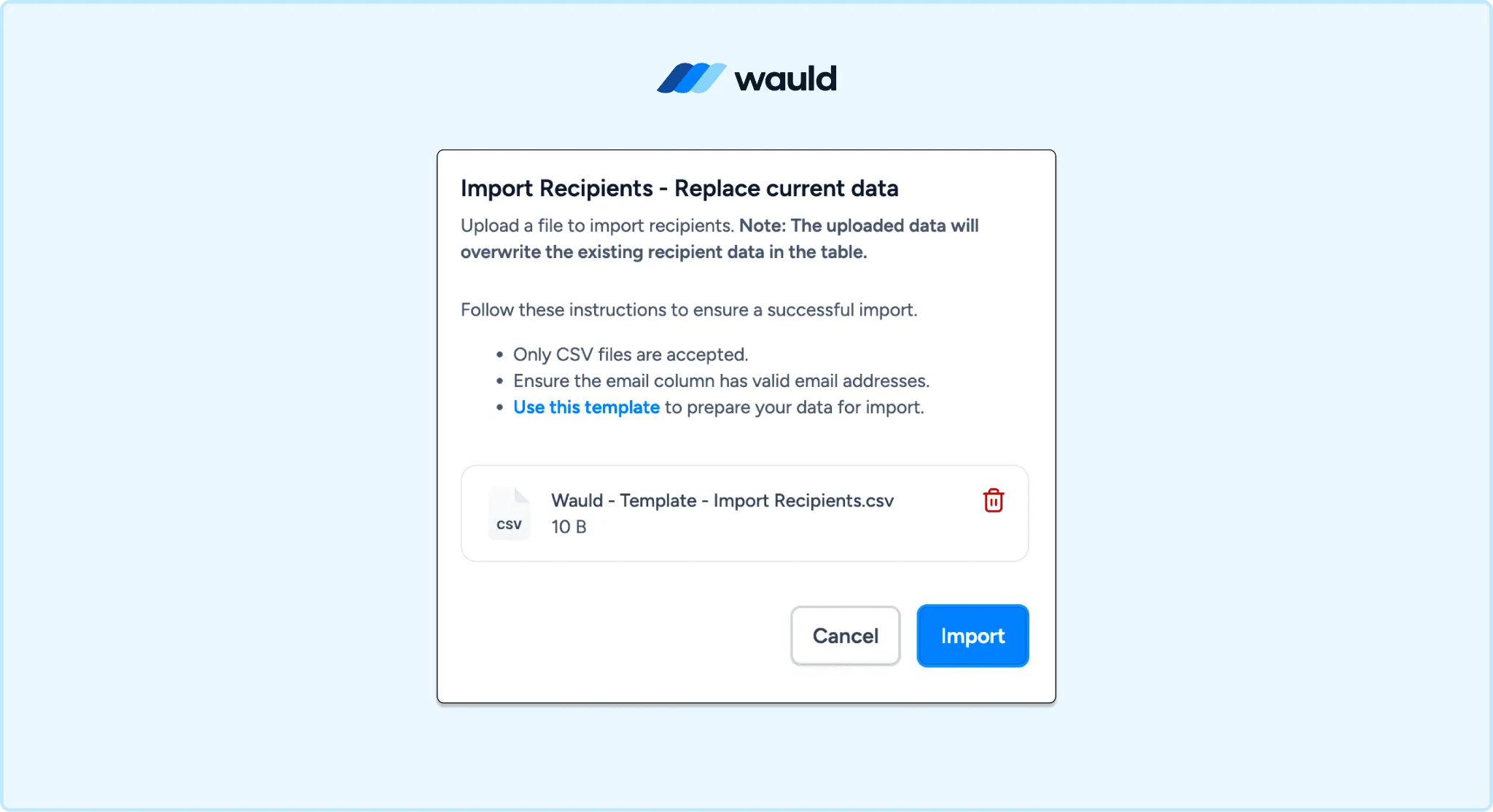
Bulk CSV Upload to issue credentials in less than a minute on Wauld
Method 2: Zapier Automation
Low-code. Best for recurring weekly or monthly webinar series.
The Cisco Webex Meetings app on Zapier supports only one trigger: New Meeting, which fires when a meeting is scheduled, not when it ends. There is no native session-completion or attendee trigger.
The practical solution is to use Webhooks by Zapier as the trigger, with Google Sheets as a lightweight middleware layer. As of May 2026, Wauld connects to 9,000+ apps through Zapier and supports two events: Issue Credential (action) and Credential Issued (trigger).
How the flow works:
| Step | Tool | What happens |
|---|---|---|
| 1 | You | Upload cleaned Webex CSV to a Google Sheet after each session |
| 2 | Zapier | New Row in Google Sheets fires as the trigger |
| 3 | Filter by Zapier (optional) | Check attendance duration meets minimum threshold |
| 4 | Wauld | Issue Credential action fires, certificate delivered automatically |
Build this once. Every future session only requires uploading the cleaned CSV to the Sheet. For the complete step-by-step Zapier setup, see How to Automate Certificate Issuance With Zapier and Wauld.
Pro Tip: This same Google Sheets middleware approach works across platforms. If your team also runs webinars on other tools, you can route multiple attendance sources through the same Sheet and the same Wauld Zap.
Cost:
- Webex: no additional cost
- Zapier: Webhooks by Zapier requires the Professional plan, starting from $19.99/month billed annually (or $29.99/month monthly) for 750 tasks. The Free plan excludes webhooks entirely. Each certificate issued counts as one task
- Wauld: free plan for under 300 credentials; Growth plan for higher volumes
- Total: from $19.99/month for Zapier + Wauld (free or paid by volume)
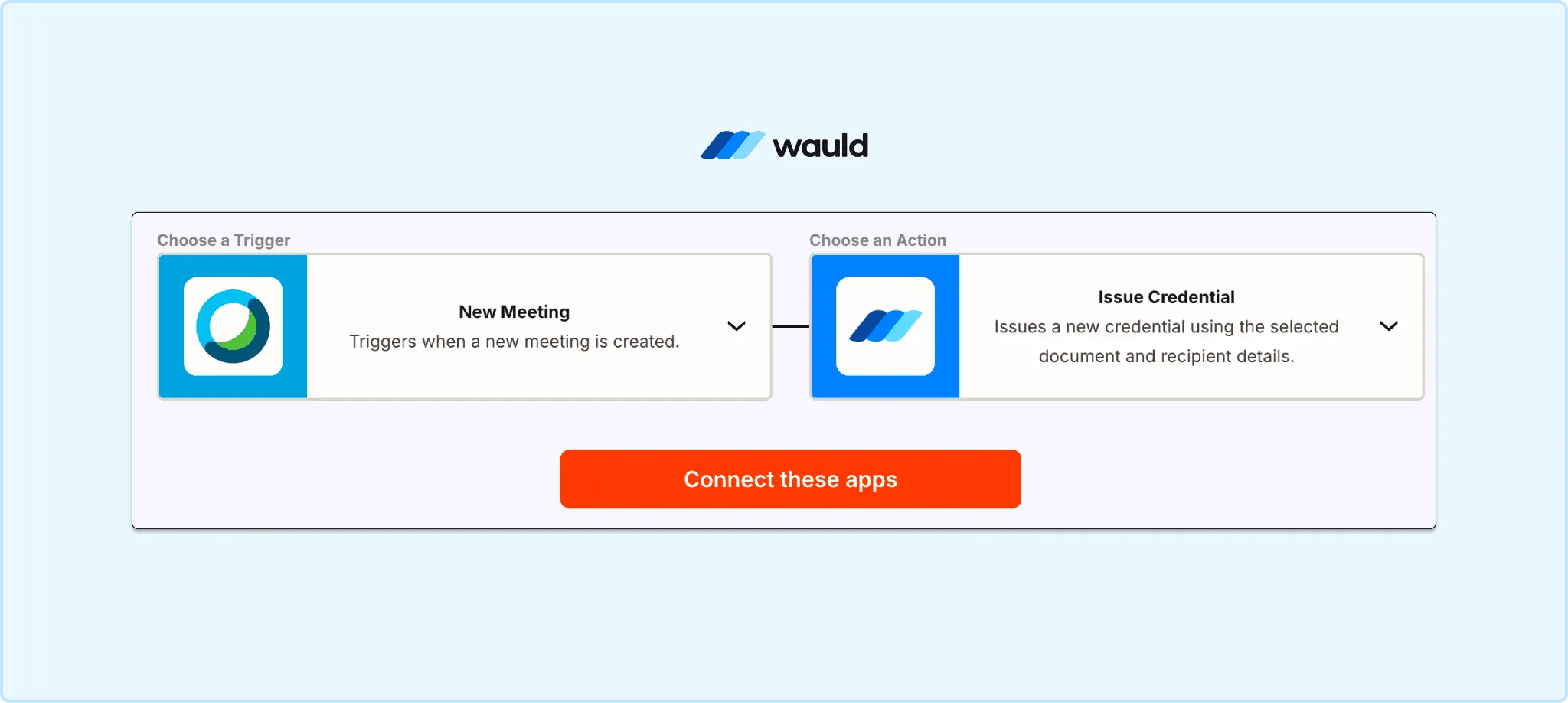
Zapier Integration of Wauld and Webex by Cisco
Method 3: Webex API Webhook + Wauld Custom Trigger
Developer method. Fully real-time. Zero manual steps after setup.
Both sides of this integration are real and documented. Here is exactly how they connect.
What Webex supports: The Webex developer API supports outgoing webhooks including resource: meetings + event: ended, which fires in near real-time when a session ends. A follow-up call to /v1/meetingParticipants retrieves the full attendee list with join time, leave time, and session duration.
What Wauld supports: As of May 2026, Wauld supports inbound webhooks via Custom Triggers. When your server POSTs a recipient's name and email to Wauld's custom trigger endpoint, Wauld issues and delivers the certificate automatically.
The real-time pipeline:
| Step | Where | What happens |
|---|---|---|
| 1 | Webex API | meetings + ended webhook fires when session ends |
| 2 | Your server | Receives meeting ID, calls /v1/meetingParticipants for attendee list |
| 3 | Your server | Filters by minimum attendance duration (optional), then POSTs each attendee to Wauld |
| 4 | Wauld | Issues and emails a verifiable certificate to each confirmed attendee within minutes |
Certificates land in inboxes within minutes of the session ending, with zero manual steps after the initial build.
One important note: For Webex for Government (FedRAMP) deployments, the meetings and meetingParticipants webhook resources are not available. Teams in that environment should use Method 1 or Method 2.
Cost:
- Webex API: free with any existing Webex account, no additional cost to use the developer API
- Wauld Custom Triggers: available on Growth and Enterprise plans only, not included in the Free plan. See Wauld pricing
- Developer time: a few hours to build and host the server middleware. A lightweight serverless function (AWS Lambda, Google Cloud Functions) is sufficient and low cost
- Total: $0 extra on Webex + Wauld Growth plan + one-time developer build
Which Method Is Right for You?
| Bulk CSV | Zapier | Webex API + Wauld | |
|---|---|---|---|
| Technical skill | None | Low | Developer required |
| Setup time | 30 min | 1 to 2 hours | Several hours |
| Issuance timing | Manual, per session | Semi-automated | Fully real-time |
| Best for | One-off webinars | Recurring series | Enterprise, high volume |
| Zapier cost | $0 | From $19.99/month | $0 |
| Wauld plan | Free | Free or Growth | Growth or Enterprise |
For most Webex webinar organizers, Method 1 is where to start. Zero cost on Wauld's free plan for up to 300 attendees, no setup, under 25 minutes per session.
Why Regulated Industries Cannot Skip This
Webex's security and compliance certifications, including ISO/IEC 27001, HIPAA, GDPR, SOC 2 Type II, and FedRAMP, signal a customer base heavily concentrated in regulated industries. Those are exactly the industries where a CSV export is not proof of attendance.
- Healthcare professionals need documented CPD hours for license renewal
- Legal and finance professionals need CEU records for professional standing
- HR and compliance teams need evidenced training completion for audits. See HR Training Certification: Build Skills That Move You Forward
- Professional associations use member-facing credentials to drive renewal and retention. See Digital Credentials for Associations: Retain More Members
A Wauld certificate is not just proof of attendance. It is a hosted, shareable, verifiable credential that recipients submit to licensing boards, add to LinkedIn, and carry with them long after the session ends. Certificates also strengthen your post-event marketing. See How Certificates Help Strengthen Event Marketing and Post-Event Engagement for the full picture.
More Webinar Certificate Guides from Wauld
Running sessions across multiple platforms? Wauld covers the same certificate gap on every major webinar tool:
- Microsoft Teams Webinar Certificate: How to Issue Them Automatically
- Sending Certificates for Zoom Webinars: The Why and the How
- ON24: Professional Certification for Webinar and Training
- LiveWebinar: How to Issue Post-Webinar Certificates
Need a design before you start? Browse 15 fully customizable webinar certificate templates or explore 25 free digital badge templates for session-level recognition.
Ready to Issue Verifiable Webex Certificates?
Your Webex webinar already delivered the training. Wauld handles everything that comes after: the verifiable proof that the learning occurred, that travels with the recipient, satisfies the compliance requirement, and builds your brand every time someone shares it on LinkedIn.
The free plan covers up to 300 verifiable credentials with no credit card required. Non-profit organizations running member webinars or compliance sessions receive 50% off Growth and Enterprise plans permanently.