SHRM Recertification Providers: How to Automatically Issue PDC Certificates

After a SHRM-approved program, attendees need proof of their PDCs right away. Issuing certificates by hand is slow, error-prone, and hard to track.
This guide shows exactly what to include in a SHRM PDC certificate and how to automate the entire process so your attendees get verifiable credentials instantly while you focus on delivering excellent programs.
What is a SHRM Recertification Provider?
A SHRM Recertification Provider is an organization approved by the Society for Human Resource Management to offer Professional Development Credits (PDCs) to SHRM-CP and SHRM-SCP certification holders. These credits are required for professionals to maintain their active certifications.
SHRM Recertification Providers include:
- Training companies and consultancies offering HR development programs
- Universities and colleges with HR-focused curricula
- Conferences and industry events covering HR topics
- Professional associations hosting continuing education
- In-house HR departments offering internal training programs
How to Become a SHRM Recertification Provider
Becoming a SHRM Recertification Provider involves three main steps:
- 1
Check Eligibility
- Your organization must offer programs that align with HR competency areas and professional development standards
- The program must be educational in nature, not sales-focused
- 2
Complete the Application Submit an application through the SHRM Provider Portal, including:
- Details about your organization
- Program descriptions and content outlines
- Learning objectives aligned to HR competencies
- Evidence of instructional quality
- 3
Access Your Provider Portal Once approved, you'll receive:
- Official SHRM Recertification Provider logo (with usage guidelines)
- Access to the provider portal for activity registration
- Ability to generate Activity IDs for your programs
- Verification tools for attendee claims
How to Offer SHRM Credits (PDCs) for Your Program
Once approved as a provider, you need to register each individual program to offer PDCs:
Step 1: Register Your Activity Log into your SHRM Provider Portal and register each program, course, or event. You'll provide:
- Program title and description
- Learning outcomes and objectives
- Instructional methods used
- Program duration and format (in-person, virtual, hybrid, self-paced)
Step 2: Receive Your Activity ID SHRM assigns a unique Activity ID to each registered program (for example: ACT-12345). This ID is used to verify that attendees completed your approved program.
Step 3: Determine PDC Credits The number of PDCs awarded is based on:
- Contact hours: Generally, 1 hour of instruction = 1 PDC
- Program type: Workshops, conferences, and courses are calculated based on active learning time
- Dual-approval programs: Programs approved for both SHRM and HRCI credits may award different credit amounts to each body
Once you register your activity and receive approval, you're ready to issue certificates.
What a SHRM PDC Certificate Must Include
SHRM has specific requirements for PDC certificates to ensure they're legitimate and verifiable. Here's what your certificate must contain:
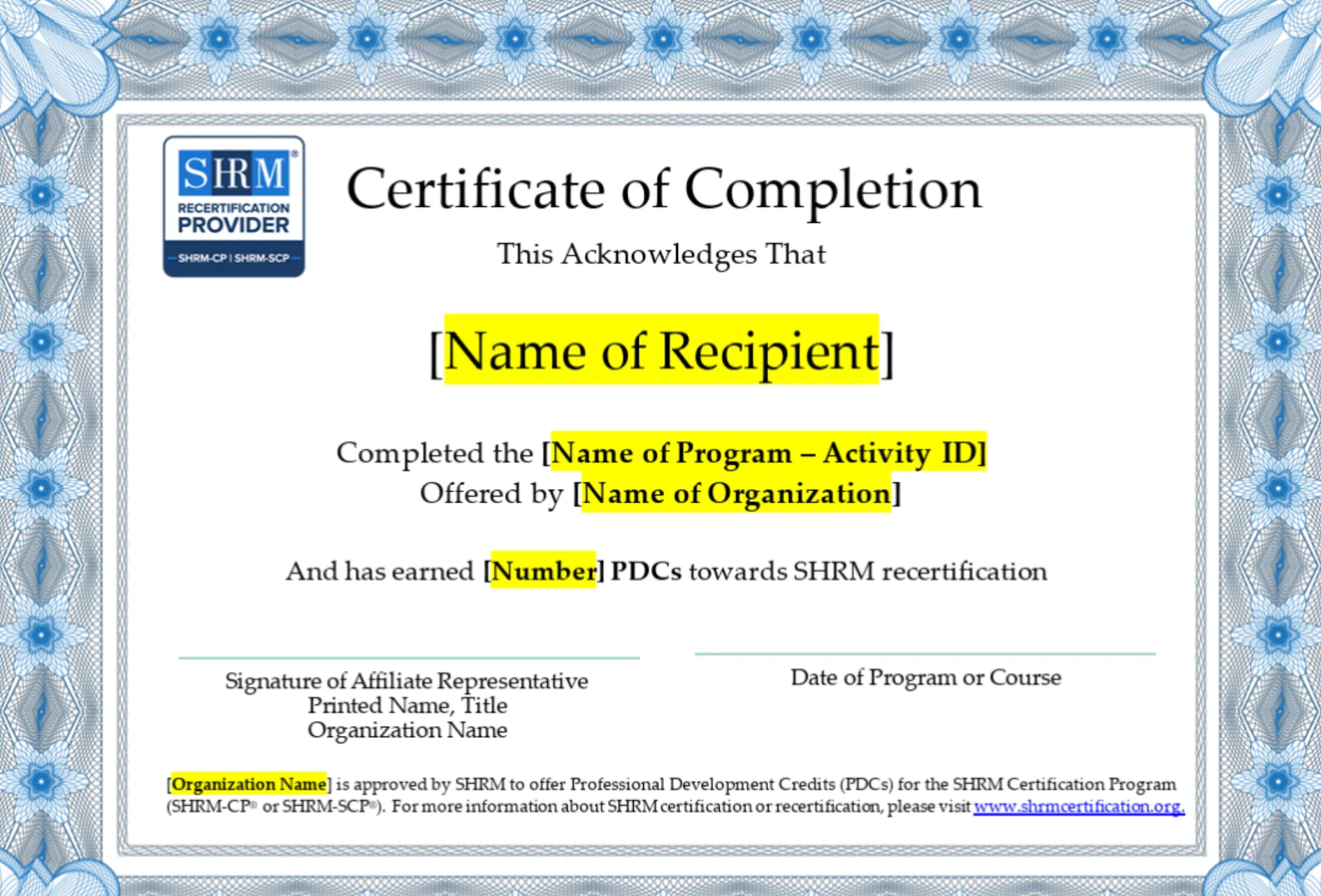
Standard SHRM PDC Certificate Template with required fields highlighted in yellow
Essential Elements:
- Attendee Name - Full legal name of the person who completed the program
- Activity ID - Unique program identifier (e.g., ACT-12345)
- PDCs Awarded - Clear statement of credits earned
- Provider Logo & Name - Official SHRM branding and organization name
- Completion Date - Program completion date
- Verification Method - QR code or verification URL
- Affiliate Representative Signature - Signature, title, and/or name of the authorized representative
- SHRM Approval Statement - Link to www.shrm-certification.org
Offering SHRM and HRCI Credits Together
Many HR training programs qualify for both SHRM PDCs and HRCI Recertification Credits (RCs). If your program is dual-approved, include both credential bodies on your certificate:
On the certificate, display:
- Both logos (SHRM and HRCI)
- Both Activity IDs (one from each body)
- Both credit amounts (may differ based on program structure)
- Verification links for both organizations
Example text:
"[Name] has earned 4 PDCs toward SHRM recertification (Activity ID: ACT-12345) and 4 RCs toward HRCI recertification (Activity ID: HR67890)."
This demonstrates that your program meets rigorous standards from multiple professional bodies and maximizes value for attendees who hold both certifications.
How to Automate PDC Certificate Issuance with Wauld
Manually creating and sending certificates is slow and error-prone. Wauld automates the entire process, from design to verification to delivery.
- 1
Upload your design
Use your custom certificate template or start with one of our pre-made SHRM-compliant designs. Include your logo, organization name, and SHRM branding elements. Ensure the template meets SHRM's logo usage guidelines.
- 2
Map dynamic fields
Attendee Name, Program Title, Activity ID, Number of PDCs, Date Completed, Provider Name and Signature, and Verification QR code (auto-generated).
- 3
Trigger distribution of certificates
Certificates can be automatically generated and sent when you upload a CSV with attendee data, integrate with your webinar platform (Zoom, GoToWebinar, Hopin), trigger from your LMS, use a Zapier automation, or manually trigger for individual attendees.
- 4
Instant delivery
Certificates are generated and emailed automatically within minutes. Each includes a unique verification link and QR code. Attendees can verify, download, and share on LinkedIn instantly, and you maintain a complete audit trail in your Wauld dashboard.
This eliminates manual work, ensures consistency, and gives attendees instant gratification, all while maintaining SHRM compliance.
Common Mistakes Providers Make When Issuing PDC Certificates
Avoid these pitfalls to ensure your certificates are legitimate and compliant:
Wrong or Missing Activity ID
- Using an incorrect Activity ID invalidates the credential
- Always double-check your registered Activity ID in the SHRM Provider Portal
- Update if you change program titles or structure
Logo Misuse
- SHRM has strict branding guidelines for the Recertification Provider logo
- The logo must not be resized disproportionately or altered
- Download the official logo from the Provider Portal, don't recreate it
Incomplete Information
- Forgetting attendee name, program title, or date
- Omitting the number of PDCs awarded
- Missing provider signature or approval statement
Late Certificate Delivery
- Attendees need certificates immediately after program completion
- Manual processes often delay delivery by days or weeks
- Automation ensures same-day delivery
No Verification Method
- Certificates must include a way for SHRM and employers to verify they're legitimate
- QR codes or verification URLs are essential
- Include a clear statement and link to www.shrm-certification.org
Failing to Maintain Records
- SHRM requires providers to keep attendance records for at least 3 years
- Documentation must be available if SHRM audits your program
- Digital records with certificates and sign-in sheets are best
FAQs on SHRM PDC Certification
How long do providers need to keep attendance records?
SHRM requires providers to maintain attendance records for a minimum of 3 years. Keep copies of sign-in sheets, certificates issued, and any supporting documentation that proves attendees completed the program.
Can a single program offer both SHRM and HRCI credits?
Yes. If your program meets the requirements of both SHRM and HRCI, you can apply for dual approval. Once approved, you'll have separate Activity IDs for each body, and you can award both PDCs and RCs on a single certificate.
Do attendees need the certificate to claim their PDCs?
Attendees don't strictly need the certificate to claim PDCs—they can report your Activity ID directly to SHRM. However, providing a certificate:
- Gives them immediate proof of completion
- Makes verification easier and faster
- Enhances your professional image
- Encourages social sharing and referrals
- Creates a record they can reference during recertification
What if I need to update my certificate template?
Contact your SHRM Provider Portal administrator or support to update your certificate template. Any changes must still comply with SHRM branding and content requirements. With Wauld, you can update your template once and regenerate all future certificates with no manual work.
Can I issue PDCs retroactively?
Only for programs that were registered with SHRM before the attendee completed them. You cannot issue PDCs for unregistered programs. If you're unsure about a past program's registration status, contact SHRM support.
Ready to issue your first credential?
Design, issue, and verify certificates and badges in minutes — free for up to 300 credentials, no credit card required.