11 Best Continuing Professional Development Software in 2026

Continuing professional development software helps you deliver training, track CPD hours, and prove that learning actually happened. The right platform keeps your people compliant, keeps auditors happy, and hands learners real credentials they can share. This guide compares the 11 best options for 2026, so you can pick one without testing a dozen free trials first.
This is for anyone who runs training, compliance, or membership education: L&D teams, professional bodies, associations, healthcare and legal educators, and course creators. Below, you'll find what each tool does well, where it falls short, and which type of buyer it suits.
What Is Continuing Professional Development Software?
Continuing professional development software is a tool that helps organizations plan, deliver, track, and evidence ongoing learning for their people. It records CPD hours or points against a professional standard, then produces proof that someone met the requirement.
In practice, CPD software usually does some mix of these jobs:
- Host courses, videos, and assessments
- Track progress, hours, and points automatically
- Manage accreditation and renewal cycles
- Issue certificates or digital badges as proof
- Report on completion for audits and compliance
Some platforms cover the whole list. Many focus on one part and connect to others.
The 3 Types of CPD Software (and Why the Difference Matters)
Before you compare products, it helps to know which kind you actually need. Most CPD tracking software fits one of three shapes. Here are the three types, with the tools in each one.
1. Credentialing platforms. These specialize in the proof: verifiable certificates and digital badges with a unique ID and a public check page. They plug into the tools below so a completed course becomes a credential people can trust.
- Tools in this category: Wauld, plus credentialing-first tools like Accredible and Credly.
2. Full learning platforms (LMS). These deliver and track courses at scale. They are great for delivery, though certificate and verification features are often basic.
- Tools in this category: Moodle, Docebo, Absorb LMS, TalentLMS, LearnUpon, and iSpring Learn.
3. Vertical continuing education software. These are built for one profession and its rules. They understand the credits, cycles, and audits that a single sector needs.
- Tools in this category: Relias (healthcare CME and CE), CLE Hero (legal CLE), Oasis LMS (associations), and Tahdah (accredited professional bodies).
The three types solve different problems, so it helps to see them side by side.
| Category | What it does best | What it lacks | Tools | Best buyer |
|---|---|---|---|---|
| Credentialing | Issues branded, verifiable certificates and badges | Does not host or deliver courses | Wauld, Accredible, Credly | Anyone who needs trusted proof of CPD |
| LMS | Hosts, delivers, and tracks courses at scale | Weak verification and credentialing | Moodle, Docebo, Absorb, TalentLMS, LearnUpon, iSpring | Teams that mainly deliver training |
| Vertical | Handles one profession's rules and accreditation | Narrow fit outside its sector | Relias, CLE Hero, Oasis LMS, Tahdah | Regulated fields like health or law |
For example, an LMS teaches and a credentialing platform proves, while a vertical tool wraps both around one profession's rules. Many teams pair two types, most often an LMS plus a credentialing platform.
How We Compared These Platforms
We looked at the things that matter to real CPD and continuing education teams:
- Delivery: how well it hosts courses, assessments, and events
- Tracking: how it records CPD hours, points, and renewals
- Proof: whether it issues verifiable certificates or badges
- Fit: the audience and industry it serves best
- Pricing: free, per user, or quote based
Alongside those five, we also incorporated a few more criteria that shape day-to-day use:
- Ease of setup: how fast a team can launch without heavy IT help
- Integrations and automation: support for Zapier, webhooks, APIs, and single sign-on
- Support and onboarding: the help, training, and documentation on offer
- Reporting and compliance: audit trails, renewal reminders, and export options
- Scalability: how well it grows from a small team to a large program
Here is the short version before we go deeper.
| Platform | Type | Best for | Standout | Pricing model |
|---|---|---|---|---|
| Wauld | Credentialing | Verifiable certificates and badges | QR-verified credentials, automation | Free tier, then paid |
| Moodle | LMS (open source) | Institutions on a budget | Endless customization | Free core, hosting costs |
| CLE Hero | Vertical (legal) | Law firms and CLE tracking | Jurisdiction rules built in | Quote based |
| Oasis LMS | Vertical (associations) | Member education | AMS integrations | Quote based |
| Relias | Vertical (healthcare) | Clinical CE and CME | Accredited content library | Quote based |
| Docebo | LMS (enterprise) | Large, complex programs | AI and extended enterprise | Quote based |
| Absorb LMS | LMS (mid to enterprise) | Clean, modern delivery | Strong UX and reporting | Quote based |
| TalentLMS | LMS (SMB) | Small teams starting out | Fast, simple setup | Free tier, then per user |
| Tahdah | Vertical (accreditation) | Professional bodies | CPD accreditation tools | Quote based |
| LearnUpon | LMS (mid market) | Multi-audience training | Separate learning portals | Quote based |
| iSpring Learn | LMS (SMB) | Quick launch with authoring | Built-in course authoring | Per user |
Now let's look at each one.
1. Wauld: Best for Verifiable CPD Certificates and Badges
Wauld is a digital credential platform. It handles the part many learning tools leave out: turning a completed course or CPD activity into a branded, verifiable certificate or digital badge.
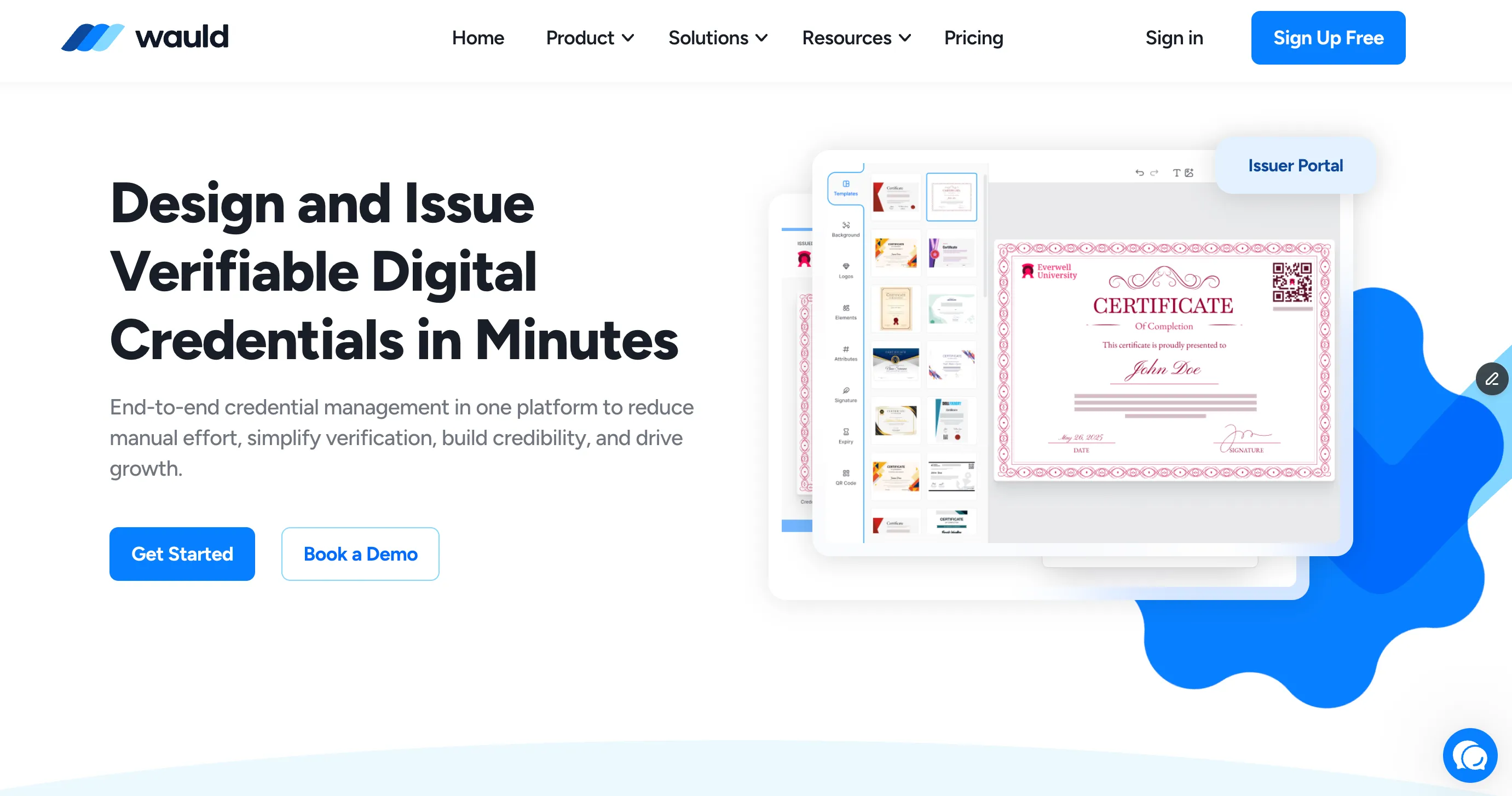
Every credential carries a unique ID, a QR code, and a public verification page. So a member, employer, or auditor can confirm it is real without logging into your system. Wauld connects to your existing tools through Zapier, webhooks, and an API, which means certificates can issue automatically the moment someone finishes.
Best for: professional bodies, training teams, and course creators who need real proof of CPD, not just a tick in a dashboard.
Keep in mind: Wauld is not a full LMS. It does not host your courses. It works alongside a learning platform to add the credentialing layer. For many teams, that pairing is the point.
Wauld's free plan covers up to 300 credentials a year, including automation and analytics, so you can test the full flow before you pay.
2. Moodle: Best Free, Open-Source LMS
Moodle is the best known open-source learning management system, used by universities, colleges, and training providers worldwide. The core software is free, and plugins let you shape it into almost anything, including CPD tracking and certificate issuing.

Best for: institutions and technical teams who want full control and low licensing costs.
Keep in mind: free software still costs time. You need hosting, setup, and someone comfortable with maintenance. Native certificates are basic, so many Moodle users add a credentialing tool for verifiable proof.
3. CLE Hero: Best for Legal Continuing Education
CLE Hero focuses on one job: helping attorneys and law firms track continuing legal education (CLE) credits. It understands that CLE rules differ by state, so it maps credits to the right jurisdiction and flags what is still owed before a deadline.

Best for: law firms and legal teams managing CLE compliance across attorneys.
Keep in mind: it is purpose-built for legal CLE. If you need general professional development software for a mixed workforce, a broader platform will fit better.
4. Oasis LMS: Best for Associations and Member Education
Oasis LMS is built for associations and member organizations that sell and deliver continuing education. It connects to association management systems (AMS), so member data, course access, and CE records stay in sync.

Best for: associations running continuing education for their members.
Keep in mind: its strengths sit inside the association world. General corporate L&D teams may find it more specialized than they need.
5. Relias: Best for Healthcare CE and CME Software
Relias is a leading choice for healthcare continuing education. It combines an LMS with a large library of accredited clinical content, which makes it a common pick for CME software and nurse CE. It also tracks compliance and competencies across large clinical teams.

Best for: hospitals, health systems, and care providers with heavy CE and compliance needs.
Keep in mind: it is priced and built for healthcare organizations. That focus is a strength in-sector and overkill outside it.
6. Docebo: Best Enterprise LMS
Docebo is an enterprise learning platform known for AI features and "extended enterprise," which means training employees, customers, and partners from separate portals. It scales to large, complex programs and reports in depth.

Best for: large organizations running many audiences and learning types at once.
Keep in mind: the power comes with complexity and enterprise pricing. Smaller teams often pay for more than they will use.
7. Absorb LMS: Best for a Clean, Modern Experience
Absorb LMS is a mid-market to enterprise platform with a polished interface and strong reporting. It handles compliance training well and includes e-commerce, so you can sell continuing education courses directly.

Best for: teams that want a modern LMS with solid analytics and course selling.
Keep in mind: pricing is quote based and aimed at established teams. Verifiable credentialing is limited, so pairing it with a badge or certificate tool helps.
8. TalentLMS: Best for Small Teams and Simple Setup
TalentLMS is a favorite for small and growing teams because it is quick to launch and easy to use. You can build courses, add quizzes, and track completion without a long onboarding.
Best for: small businesses and teams new to CPD software that want to start fast.
Keep in mind: as programs grow more complex, some teams outgrow its simpler feature set. It shines when you value speed over deep configuration.
9. Tahdah: Best for CPD Accreditation and Professional Bodies
Tahdah is built around CPD accreditation. It helps professional bodies, membership organizations, and accredited providers manage CPD activity, record points, and run accreditation processes. Members can log their own CPD, and providers can prove their courses meet the standard.

Best for: professional bodies and accredited providers who live and breathe CPD requirements.
Keep in mind: it is specialized for accreditation-heavy sectors. General training teams may not need that depth.
10. LearnUpon: Best for Multi-Audience Training
LearnUpon is a mid-market LMS designed to train different groups from one place using separate portals. That makes it a good fit when you serve employees, customers, and partners with distinct programs.

Best for: companies delivering CPD and training to several audiences at once.
Keep in mind: it is built for organizations, not individual course creators. Pricing is quote based, so it suits committed programs.
11. iSpring Learn: Best for a Quick Launch With Authoring
iSpring Learn pairs a straightforward LMS with a well-liked course authoring toolkit. You can build interactive courses, quizzes, and video lessons, then launch them fast. It is a practical choice when you want to create content and deliver it in one ecosystem.

Best for: SMBs that want to author and deliver CPD courses without extra tools.
Keep in mind: the deepest authoring features live in its Windows-based toolkit. As with most LMS options, verifiable credentialing is best added with a dedicated tool.
How to Choose the Right CPD Software
Start with the job you need done, not the longest feature list.
- If you mainly deliver courses, pick a learning platform that fits your size: TalentLMS or iSpring Learn for small teams, Absorb or LearnUpon for mid-market, Docebo for enterprise, Moodle if you want open source.
- If you serve one profession, choose a vertical tool: Relias for healthcare, CLE Hero for legal, Oasis for associations, Tahdah for accredited bodies.
- If you need trustworthy proof, add a credentialing platform like Wauld so every completion becomes a verifiable certificate or badge.
Most teams end up combining two tools. For example, you might run training in an LMS and issue the certificates through Wauld, so delivery and proof each sit with the tool that does them best.
Bring It Together With Verifiable Credentials
The best continuing professional development software for you depends on your audience, your industry, and whether you need to deliver learning, track it, or prove it. LMS platforms handle delivery. Vertical tools handle profession-specific rules. Credentialing platforms handle proof.
Whichever learning platform you choose, the credential is what your members and learners actually carry with them. Wauld makes that part simple, and you can try it free.
Turn every completed course into a verifiable credential
Create a free Wauld account and issue up to 300 branded, QR-verified certificates a year.
FAQs
What is continuing professional development software? It is a tool that helps you deliver training, track CPD hours or points, and prove that learning happened. Some platforms host courses, some track compliance for one profession, and some specialize in issuing verifiable certificates.
What is the difference between an LMS and CPD software? An LMS is a type of CPD software focused on hosting and delivering courses. CPD software is the wider category, which also includes tools for tracking hours, managing accreditation, and issuing credentials. Many teams use an LMS plus a credentialing tool together.
Is there free continuing professional development software? Yes. Moodle's core software is free to use, though you pay for hosting and setup. TalentLMS and iSpring Learn offer limited free tiers. Wauld's free plan issues up to 300 verifiable credentials a year, including automation.
Does CPD software issue certificates? Some does, but the quality varies. Many learning platforms produce a basic PDF with no way to verify it. A credentialing platform like Wauld issues certificates with a unique ID, a QR code, and a public verification page, so anyone can confirm they are real.
What is the best CPD software for small organizations? Small teams often do well with TalentLMS or iSpring Learn for delivery because both are quick to set up. Pair either with Wauld to add branded, verifiable certificates without extra cost on the free plan.
How do learners prove their CPD hours to an auditor or employer? The strongest proof is a verifiable credential. Instead of an unchecked PDF, learners share a certificate or digital badge with a unique ID that links to a public page confirming it is genuine.