How to Automatically Issue Open edX Certificates and Badges

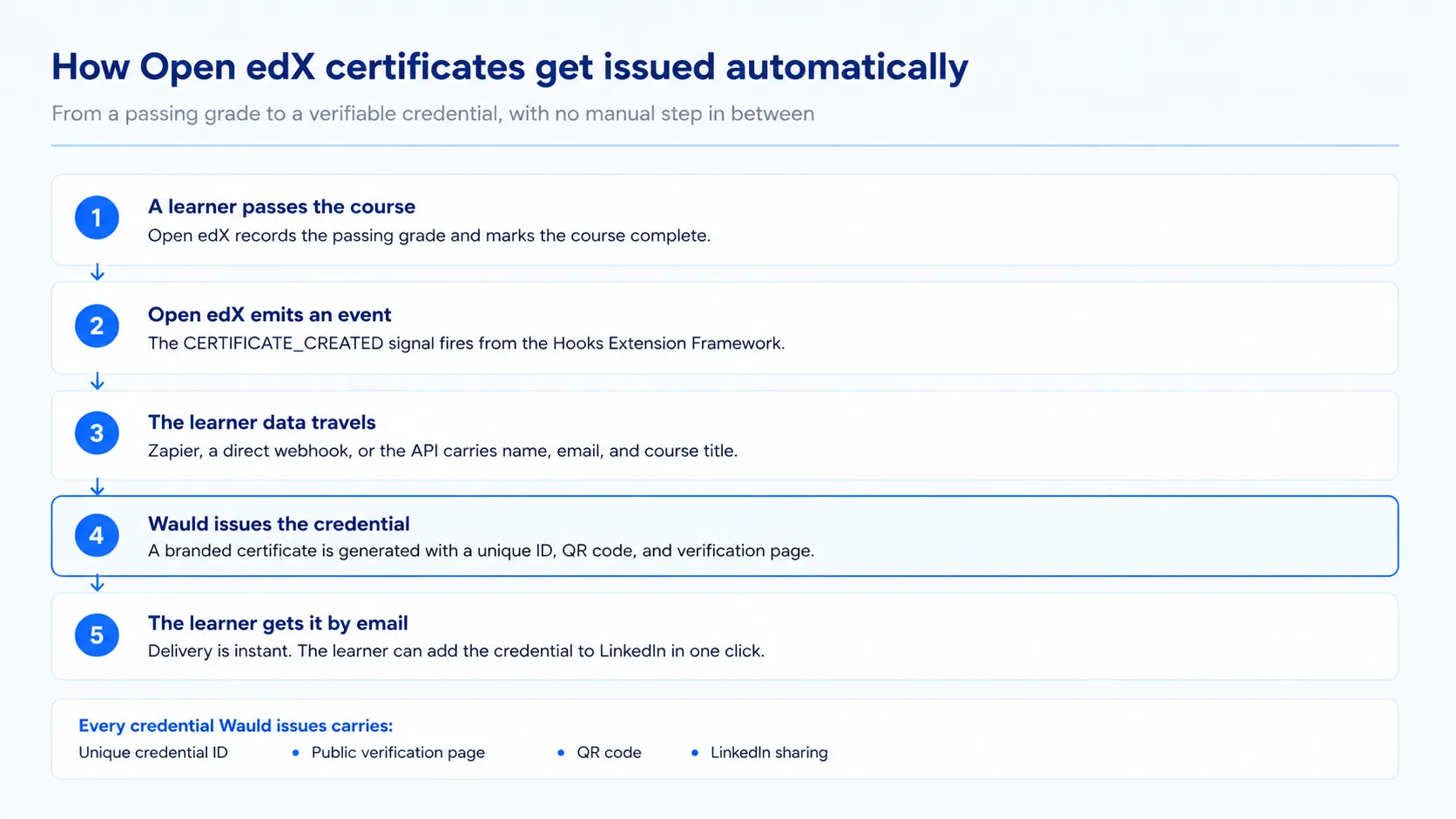
To issue Open edX certificates and badges automatically, connect an Open edX event to a credential platform. Open edX fires a CERTIFICATE_CREATED signal the moment a learner passes. You forward that signal through Zapier, a webhook, or the API. A branded, verifiable certificate or digital badge is then generated and emailed in seconds. No admin touches it.
That is the short answer. The rest of this guide covers how each route works and what it costs.
Why Open edX Certificates Need Help
A learner finishes your course. They passed every graded unit. Then the moment goes quiet.
Open edX does generate a certificate. However, the learner must find it on their dashboard. There is no automatic email, no credential they can add to LinkedIn, and no way to know whether anyone looked at it. For a MOOC or a compliance program, that gap is expensive.
Badges fare worse. A long course might deserve a badge at each module, but nothing in a stock Open edX install issues one, so the learner gets a single certificate at the very end or nothing at all.
How Native Open edX Certificates Work
Open edX is the open-source LMS behind edx.org. Universities, governments, and enterprises self-host it to run their own courses. Certificates ship with the platform, but they are not on by default.
Turning On Open edX Certificates
Enabling them is a site operator job, not a course team job. The official Open edX configuration guide sets out three steps:
- Set the
CERTIFICATES_HTML_VIEWfeature flag in bothlms.ymlandstudio.yml. - Add an HTML View Configuration under Site Administration and mark it Enabled.
- Create a certificate configuration in Studio, adding signatories, a logo, and signature images.
Open edX then generates a web certificate when a learner earns a passing grade.
What You Actually Get
| Feature | Native Open edX behavior |
|---|---|
| Trigger | Passing grade on the course |
| Output | HTML web certificate, printable to PDF |
| Branding | Logo and signatory images set in Studio |
| Verification | A URL on your own Open edX site |
| Delivery | Learner finds it on their dashboard |
| Reporting | CSV export from Instructor > Data Download |
That last row matters. We reuse that export in Method 4.
What About Open edX Badges
Certificates at least ship in the box. Badges are a different story, and it is the part most guides skip.
Open edX has carried an optional badging feature for years, but it is not a course-team tool. It is off by default, it has to be pointed at an external badge server such as Badgr, and switching it on is a site operator job in the same class as enabling certificates. It also targets the older Open Badges 2.0 specification rather than 3.0.
The practical result is that most Open edX instances issue no badges at all. On the ones that do, three things are still missing:
- No design surface. Course teams cannot lay out badge artwork the way they build a course. The image comes from elsewhere.
- No learner wallet. There is no single place a learner collects badges across your courses and shows them to someone.
- No sharing in a click. This is the big one. A learner cannot push an Open edX badge to their LinkedIn profile from the LMS, and there is no public badge page to paste into an application. Whatever they earned effectively stops at your instance.
That last point undercuts the whole reason to badge anything. A badge is a marketing asset as much as a record: when a learner shares it, their network sees your program. A badge nobody can share is a private note in a database.
Where Native Credentials Fall Short
None of these are bugs. They sit outside what an LMS is built to do.
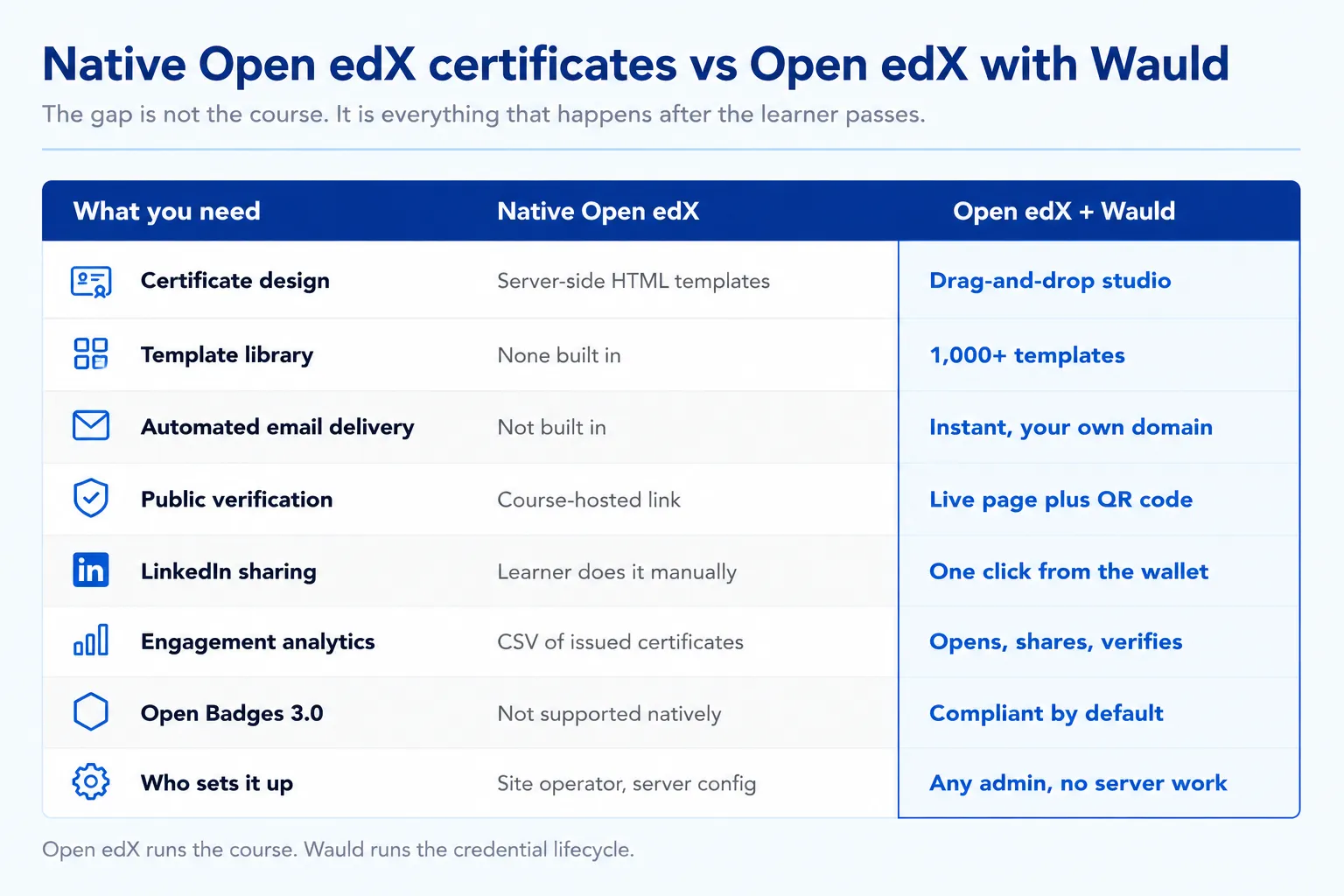
- No automated email. The learner goes looking for the certificate.
- Design lives in code. Layout changes mean editing server-side HTML templates.
- No template library. Every certificate and badge starts from blank.
- Verification is tied to your domain. If the instance moves, the link goes with it.
- No sharing layer. No one-click LinkedIn add for a certificate or a badge, and no public credential page behind either.
- No engagement data. You learn who was issued a credential, not who opened or shared it.
- No Open Badges 3.0 output. Portable badge metadata is missing, so badges do not travel to other wallets.
Therefore most teams running a serious certification program bolt a credential platform onto Open edX. Accredible published an Open edX module for this reason, and Certifier positions its Open Badges support the same way.
Where Wauld Fills The Gap
Wauld handles design, issuance, delivery, verification, and tracking for certificates and digital badges alike. Open edX keeps doing what it does well. Wauld takes over once the learner passes.
- Certificates and badges in one place. The same course can award a badge per module and a certificate at the end, from one recipient list.
- Branded design without code. A drag-and-drop studio and 1,000+ certificate and badge templates.
- Instant email delivery. The credential arrives seconds after the pass.
- Real verification. Every credential gets a unique ID, a live verification page, and a QR code an employer can scan.
- One-click LinkedIn sharing. Learners push a certificate or a badge straight to their profile from their wallet, which markets your course for you.
- Engagement analytics. Opens, downloads, shares, and verification counts, per credential.
- Open Badges 3.0 compliance. Badges stay portable, so they travel to other wallets instead of dying in your LMS.
- Dynamic attributes. Name, course title, and grade auto-fill at issuance.
Four Methods To Automate Issuance
First, an important fact. Open edX has no dedicated Zapier app. Anyone describing "the Open edX Zapier integration" is describing something that does not exist.
What exists is arguably better. Since the Maple release, Open edX ships the Hooks Extension Framework, which emits typed events any plugin can listen to. The Open edX Events reference lists them all.
| Signal | Fires when |
|---|---|
CERTIFICATE_CREATED | A certificate is created for a learner |
CERTIFICATE_REVOKED | A certificate is revoked |
PERSISTENT_GRADE_SUMMARY_CHANGED | A learner's grade changes |
COURSE_ENROLLMENT_CREATED | A learner enrolls in a course |
STUDENT_REGISTRATION_COMPLETED | A user registers on the LMS |
CERTIFICATE_CREATED is the cleanest trigger, because it fires only after Open edX decides the learner earned one. It needs SEND_CERTIFICATE_CREATED_SIGNAL enabled in your LMS config.
Method 1: Zapier Via Events
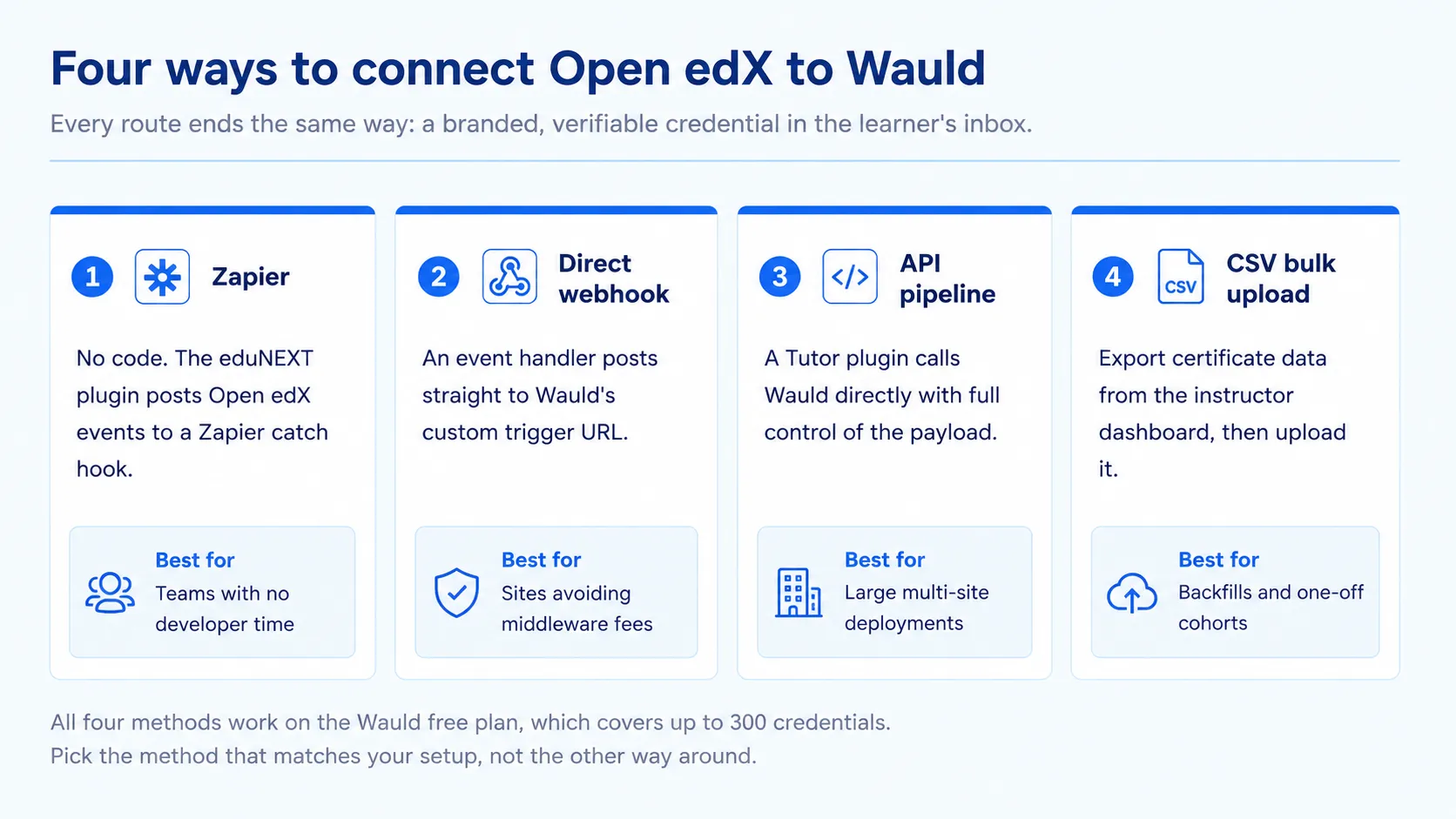
This is the closest thing to a no-code route. A small plugin forwards Open edX events to a Zapier catch hook, and Zapier issues the credential.
eduNEXT maintains an open-source reference plugin, openedx-events-2-zapier, with handlers for registration, enrollment, and grade-change events. It is built to be extended. If you have not connected Wauld to Zapier before, our guide to automating certificate issuance with Zapier walks through the Wauld half of the Zap in detail.
Steps:
- Add the plugin with Tutor's
OPENEDX_EXTRA_PIP_REQUIREMENTSsetting, then runtutor local launch. - In Zapier, create a Zap using Webhooks by Zapier as the trigger and Catch Hook as the event. Copy the URL.
- Set that URL in Django settings via an inline Tutor plugin, then run
tutor plugins enable zapier. - Extend
handlers.pyto listen forCERTIFICATE_CREATED. - Complete a test course so a real payload reaches Zapier.
- Add Wauld as the action app and pick the Issue Credential action.
- Map name, email, and course title to your Wauld attributes, then switch the Zap on.
Pros: no ongoing code once installed. Zapier links Wauld to 9,000+ apps, so one Zap can also update your CRM. Filters are easy to add, for example issuing only above a grade threshold.
Cons: installation still needs Tutor access. The free Zapier plan caps tasks and limits you to two-step Zaps. Zapier downtime delays issuance.
Best for: teams whose site operator installs the plugin once, after which program staff own the workflow.
Method 2: Direct Webhook To Wauld
If you would rather not pay for middleware, skip it. Wauld exposes a custom trigger URL for each credential document, whether that document is a certificate or a badge. Any system that can POST can issue one.
Steps:
- In Wauld, open your certificate document, go to Integrations, and generate the custom trigger URL.
- In your Tutor plugin, write a receiver for
CERTIFICATE_CREATEDusing Django's@receiverdecorator. - Have the handler POST the learner payload straight to the Wauld trigger URL.
- Map the payload fields to your Wauld template attributes.
- Run one test enrollment end to end.
Pros: no Zapier or Pabbly subscription at all. It is the fastest path, because nothing sits in between, and there is no third-party downtime risk.
Cons: you need a Python developer once, although the handler is roughly a dozen lines. Debugging means reading server logs rather than a friendly Zap history, and retry logic becomes your responsibility.
Best for: organizations already running Tutor with developer support, especially at high volume.
Method 3: API Pipeline For Routing
Large deployments want more than one-to-one mapping. A university may issue different credentials per program. Here your Tutor plugin becomes a routing service: it listens to events, applies your rules, and calls Wauld programmatically.
Rules teams commonly encode:
- Route to a different Wauld template based on
course_key. - Send subsection grades to a badge document and final grades to a certificate document, so one pipeline feeds both.
- Suppress issuance for audit-track learners.
- Attach custom attributes such as CPD hours or cohort number.
- Handle
CERTIFICATE_REVOKEDby voiding the matching Wauld credential.
Pros: complete control over routing, retries, and payload shape. It scales across many courses and sites, and credential logic stays in version control.
Cons: the most engineering effort of the four. Wauld's API access sits on the Enterprise plan, so check current pricing first.
Best for: multi-site Open edX operators with an in-house platform engineer.
Method 4: CSV Bulk Upload
Sometimes automation is the wrong tool. For a cohort that already finished, a spreadsheet beats a webhook.
Steps:
- In Open edX, go to Instructor > Data Download and download the certificates issued report.
- Clean the CSV to one column per Wauld attribute: name, email, course title, completion date.
- In Wauld, open your certificate or badge document and choose bulk issuance.
- Upload the CSV and preview a few rows.
- Issue the batch, or schedule it for a specific date and time.
Pros: zero technical setup and no plugin. It works for historical data no live trigger will catch, and you preview before issuing, so errors surface early.
Cons: it is manual, so someone runs it each time. It is not viable for continuous enrollment courses, and formatting errors are easy if the export is not cleaned.
Best for: backfills, one-off cohorts, and pilots testing whether automation is worth it.
Comparing The Four Methods
| Method | Automation | Technical effort | Extra cost | Latency |
|---|---|---|---|---|
| Zapier via Open edX Events | Full | Medium, one-time install | Paid Zapier plan for multi-step Zaps | Seconds to minutes |
| Direct webhook | Full | Medium, needs a Python handler | None | Near instant |
| API pipeline | Full, with custom rules | High | Wauld Enterprise for API access | Near instant |
| CSV bulk upload | Manual | Very low | None | Whenever you run it |
For most teams, Method 1 is the sensible start and Method 2 is the sensible destination. Prove the workflow on Zapier, then move the handler in-house once volume justifies it.
When To Issue Badges Instead
Both are credentials, so the automation is identical. What differs is what each one is for.
Reach for a badge when the achievement is small, frequent, or a step on the way somewhere: a finished module, a skill demonstrated, an enrollment worth welcoming. Badges suit long courses because they give a learner something to show at week two rather than week twelve, and something to post while they are still enthusiastic.
Reach for a certificate when the achievement is terminal and formal: the course is complete, the compliance window is satisfied, the program is finished. That is the artifact an employer or auditor expects to see.
Most mature programs run both, and the split usually looks like this:
| Moment | Credential | Open edX trigger |
|---|---|---|
| Learner enrolls | Badge | COURSE_ENROLLMENT_CREATED |
| Module or subsection passed | Badge | PERSISTENT_GRADE_SUMMARY_CHANGED |
| Course passed | Certificate | CERTIFICATE_CREATED |
| Series of courses completed | Certificate | Your own rule in Method 3 |
Other Credentials Worth Automating
Certificates are the obvious case. The same plumbing supports more, though.
- Enrollment badges. Use
COURSE_ENROLLMENT_CREATEDto issue a welcome badge. - Module milestones. Fire a badge on a subsection grade so long courses show progress.
- Program credentials. Issue one certificate after a defined series of courses.
- Compliance recertification. Wauld's expiry management sets a validity period and sends renewal reminders. Native Open edX certificates never expire.
- Revocation. Listen for
CERTIFICATE_REVOKEDand void the matching Wauld credential.
That last point matters in regulated training. A credential you cannot revoke is one an auditor will question.
What This Setup Costs
| Component | Cost |
|---|---|
| Open edX platform | Free and open source, though you pay for hosting |
| Native Open edX certificates | Included; native badging needs an external badge server |
| Wauld free plan | Free up to 300 credentials, certificates or badges, with verification and LinkedIn sharing |
| Wauld Growth plan | From $39/month, adding QR verification logs and expiry management |
| Wauld Enterprise | Custom, adding API access, white labeling, and private hosting |
| Zapier | Free tier is task-limited; multi-step Zaps need a paid plan |
Two honest trade-offs. Methods 1 to 3 all need Tutor or server access at least once, so a pure no-code path does not exist for Open edX. Wauld also adds a second system to your stack, which carries a real operational cost even on a free plan.
For a lower-friction version of the same workflow, see our guide to issuing certificates automatically from LearnDash, a platform that does have a native Zapier app.
FAQs On Certificates And Badges
Does Open edX have a Zapier integration? Not a dedicated one. There is no official Open edX app in the Zapier directory. You connect through the Hooks Extension Framework instead, using a plugin such as eduNEXT's openedx-events-2-zapier to POST event data to a Webhooks by Zapier catch hook.
Why was my Open edX certificate not emailed to the learner? Because Open edX does not email certificates. It publishes the certificate to the learner's dashboard, and the built-in flow ends there. Inbox delivery needs an external tool, which is what all four methods here add.
Can I customize the design of Open edX certificates? Only partly, and mostly through code. Course teams can set the certificate title, add up to four signatories, and upload a logo and signature images in Studio. Layout, fonts, and backgrounds live in HTML templates a developer must edit and deploy.
Are Open edX certificates verifiable by employers? They carry a verification URL hosted on your own instance, so an employer can check it while that site stays online. There is no unique credential ID standard, no QR code, and no Open Badges metadata by default.
How many Open edX events can I listen to? Dozens, spanning learning, enrollment, certificate, and authoring domains. For certificate automation, four matter most: CERTIFICATE_CREATED, CERTIFICATE_REVOKED, PERSISTENT_GRADE_SUMMARY_CHANGED, and COURSE_ENROLLMENT_CREATED.
Can I issue digital badges from Open edX too? Yes. Badges follow the same automation logic, so the event and trigger setup is identical. Only the target Wauld document changes. Many teams badge module milestones and reserve the certificate for completion.
Can learners share Open edX badges on LinkedIn? Not from Open edX itself. There is no one-click "add to profile" action and no public badge page to link to, so a learner would have to save the image and post it manually, with nothing to prove it is real. Issuing the badge through Wauld gives them a wallet they share from directly, and the credential keeps a verification page behind it.
Does Open edX support Open Badges 3.0? Not natively. Its optional badging integration targets the older Open Badges 2.0 specification and depends on an external badge server. If you need 3.0 metadata so badges stay portable across other wallets, that comes from the credential platform you connect, not from Open edX.
Should I issue a badge or a certificate for a module? A badge. Keep certificates for finishing the whole course or compliance window, and use badges for the milestones along the way. That way a long course gives learners something to show early, and the certificate still means something at the end.
Do I need native Open edX certificates enabled to use this? Only if you trigger on CERTIFICATE_CREATED, since that signal fires when Open edX creates its own certificate. Otherwise trigger on PERSISTENT_GRADE_SUMMARY_CHANGED and filter for your passing threshold.
Issue Open edX Certificates and Badges Learners Can Actually Share
Design them on brand, issue them the second a learner passes, and let learners add them to LinkedIn in one click. Free for up to 300 credentials, no credit card required.