Sakai LMS Certificates: How to Issue Verifiable Credentials

Can you issue verifiable certificates from Sakai LMS?
Yes, but not with Sakai's built-in tool alone. Sakai LMS can award a certificate on course completion, yet that certificate is only a static PDF stored inside the course site. It carries no verification link, no QR code, and no unique credential ID. To make Sakai certificates verifiable, branded, and shareable, you connect Sakai to a credential platform like Wauld.
That gap matters. A certificate is often the reason a learner enrolled. However, a PDF that lives inside an LMS cannot be checked by an employer, tracked by your team, or added to LinkedIn in one click. This guide explains what Sakai offers natively, where it falls short, and how to close the gap with Wauld.
What is Sakai LMS?
Sakai is an open source learning management system used widely in higher education and professional training. It handles course building, assessments, grading, and collaboration. Sakai is also a leader in the IMS LTI specification and ships an extensive API for deep integrations. You can review the full feature set on the Sakai LMS features page.
Because Sakai is open source, institutions self host it and extend it with community tools. Certificates are one of those extensions, which is important context for how the feature works.
Does Sakai LMS already offer certificates?
Yes. Sakai offers a community contributed Certification tool. It is a contrib tool rather than a core one, so your Sakai administrator must enable it for your site first. Once it is added, an instructor can issue a certificate automatically when a learner meets a requirement.
Here is how the Sakai Certification tool works:
- You upload a certificate design as a PDF file.
- You set the award rule. For example, tie it to a Gradebook Item, to course completion with a minimum score, to a Gradebook Item plus a required score, or add a months-until-expiration rule.
- You define value substitutions so fields inside your PDF fill with recipient data.
- Instructors view a Certification List, run Certification Reports, and export certification data.
For a basic "generate a PDF when someone passes" workflow, this works. The problems start when that certificate needs to be trusted, shared, and measured.
Where the native Sakai certificate falls short
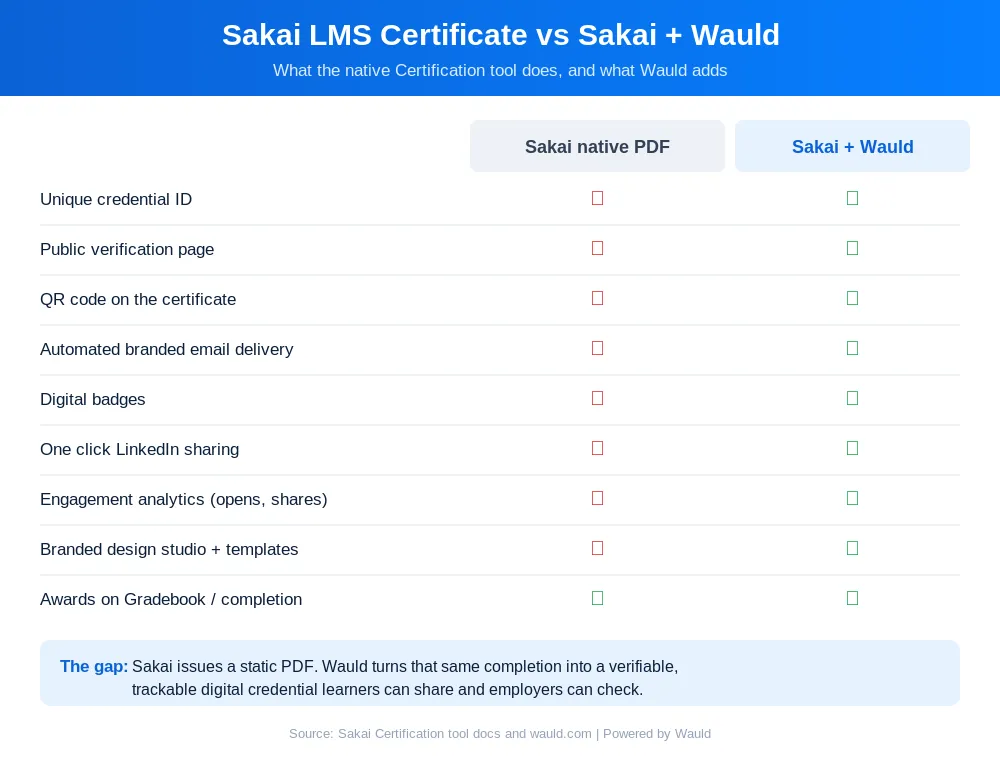
The core issue is structural. Sakai is an excellent LMS, however certificate issuance sits at the edge of what an LMS is built to do. As a result, a static PDF can be forged, gets lost in a downloads folder, and tells you nothing about learner engagement.
| What modern credentials need | Sakai Certification tool |
|---|---|
| Unique credential ID | No, the output is a plain PDF |
| Public verification page | No |
| QR code on the certificate | No |
| Automated branded email delivery | No, the learner opens it in Sakai |
| Digital badges | No |
| One click LinkedIn sharing | No |
| Engagement analytics | No |
| Branded design studio | No, you upload a fixed PDF |
How Wauld improves Sakai certificates
Wauld is a digital credential platform. It manages the full lifecycle of certificates and badges: design, issue, deliver, verify, and track. Paired with Sakai, it closes every gap above.
Here is what Wauld adds to a Sakai program:
- Verifiable by default. Every credential carries a unique ID and a public verification page. Therefore anyone can confirm it is real.
- Branded design studio. Build certificates and badges with your logo, colors, fonts, and signatures. You can also start from the 900+ template library instead of a fixed PDF.
- Automated branded delivery. Credentials are emailed the moment a learner qualifies. The email comes from your brand, so learners never hunt through the course site.
- Dynamic attributes. Placeholders auto-fill each recipient's name, email, course, date, and custom fields at issuance.
- QR codes and LinkedIn sharing. Recipients verify with a scan and add credentials to LinkedIn in one click. In turn, they promote your program for free.
- Engagement analytics. You see who opened, downloaded, shared, and verified each credential.
Wauld has closed this same gap for other course tools. For example, see the guides on automating LearnDash certificates and automating LearnUpon certificates for two detailed walkthroughs.
| Capability | Sakai native PDF | Sakai plus Wauld |
|---|---|---|
| Verification page and unique ID | No | Yes |
| QR code | No | Yes |
| Automated branded email | No | Yes |
| Digital badges | No | Yes |
| LinkedIn sharing | No | Yes |
| Analytics and tracking | No | Yes |
| Design flexibility | Upload a fixed PDF | Full studio plus templates |
How to integrate Sakai LMS with Wauld
Now for the accurate, verified part. Unlike some course platforms, Sakai does not have a dedicated Zapier app. However, it does have a robust REST API through its Entity Broker (/direct), SOAP web services (/ws), and strong LTI support. Those capabilities shape the four practical ways to connect Sakai to Wauld, ordered from lowest to highest technical lift.
Method 1: Zapier via Webhooks by Zapier
Because there is no native Sakai connector, the Zapier route uses Webhooks by Zapier as the entry point. A small scheduled job reads new completions from Sakai's REST API and posts them to a Zapier catch hook. Then Wauld's Issue Credential action issues the credential automatically.
Follow these steps:
- 1
Connect Zapier in Wauld
In Wauld, open Integrations, connect Zapier, and generate your token.
- 2
Add the catch hook trigger
In Zapier, create a Zap with "Webhooks by Zapier" (Catch Hook) as the trigger.
- 3
Post Sakai completions to the hook
Have a scheduled script query Sakai's
/directAPI for new certifications, then POST the learner's name, email, and course to the catch hook. - 4
Set the Wauld action and test
Set Wauld's Issue Credential as the action and map the fields to your template. Test with one record, then turn the Zap on.
Best for: teams that already run Zapier and want a low-code bridge.
Cost: Webhooks by Zapier and multi-step Zaps need a paid Zapier plan, from around $19.99/month billed annually.
Method 2: Webhooks and Wauld Custom Trigger
Wauld generates a unique Custom Trigger URL for each credential document. Any system that can send an HTTP POST to that URL can issue a credential. Therefore you use Sakai's REST API to detect a completion and POST the recipient data straight to Wauld, with no Zapier subscription in between.
Follow these steps:
- In Wauld, open your credential document and copy its Custom Trigger URL.
- Build a small service that reads completed certifications from Sakai's Entity Broker (
/direct, which returns JSON or XML). - Map each learner's fields and POST them to the Wauld Custom Trigger URL.
- Wauld issues and delivers the branded credential in real time.
Best for: technical teams who want the fastest, most reliable path with no third-party dependency.
Cost: no extra automation subscription. Custom Triggers and Webhooks are on Wauld's paid plans (see Wauld pricing).
Method 3: API to API integration
For institutions running Sakai at scale, connect Sakai's REST (/direct) or SOAP (/ws) web services directly to Wauld's API. This suits student information system style syncs, where completions flow automatically into credential issuance.
Follow these steps:
- Enable and authenticate against Sakai's web services. The
/direct/describeendpoint documents the available REST resources. - Pull completion and Gradebook data for qualifying learners.
- Call Wauld's API to issue and manage credentials programmatically.
- Schedule the sync to run on your chosen cadence.
Best for: universities and enterprises with developer resources and high credential volumes.
Cost: Wauld API access is included on the Enterprise plan.
Method 4: CSV bulk upload
The simplest option needs no code at all. Sakai lets instructors export certification data, so you can issue a whole cohort at once in Wauld.
Follow these steps:
- In Sakai's Certification tool, export your certification or Gradebook records.
- Format the CSV with the fields your template needs, such as name, email, course, and date.
- Upload it to Wauld and bulk issue.
- Wauld generates and emails a verifiable credential to every learner in the batch.
Best for: one-off cohorts, backfilling past completions, or teams without automation tools.
Cost: covered on Wauld's free plan, which includes up to 300 credentials and bulk issuance. For a similar CSV walkthrough, see the Skilljar certificate automation guide.
Comparing the integration methods
| Method | Automated delivery | Technical complexity | Cost |
|---|---|---|---|
| Zapier via Webhooks by Zapier | Yes | Medium | From $19.99/month (Zapier) |
| Wauld Custom Trigger and Webhooks | Yes, real time | Medium to high | No extra automation cost |
| API to API | Yes | High | Wauld Enterprise |
| CSV bulk upload | Batch | Low | Free plan available |
How a Sakai completion becomes a verifiable credential
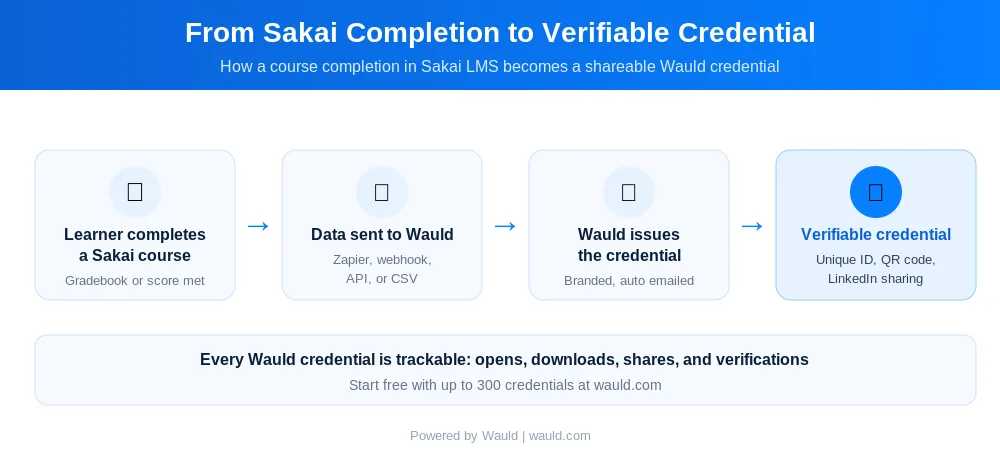
The workflow is simple once it is set up. A learner meets a requirement in Sakai. The completion data flows to Wauld through your chosen method. Wauld then issues a branded credential and emails it instantly. Finally, the learner receives a verifiable credential they can share and you can track.
Beyond certificates: extended use cases
Wauld uses the same automation logic for badges as for certificates. Therefore Sakai programs can do more than issue a single end-of-course PDF:
- Module and milestone badges. Award a digital badge for each completed unit, not only full completion.
- Stackable micro-credentials. Issue a verifiable credential per course that learners collect toward a larger qualification.
- Compliance and renewals. Sakai's tool supports an expiration rule, and Wauld's expiry management and scheduled delivery handle recurring compliance cleanly.
- Department branded workspaces. A university can run separate branded workspaces per faculty while keeping issuance central. This fits the programs described on Wauld's higher education solutions page.
Turn Sakai completions into credentials worth sharing
Sakai LMS gives you everything to build and deliver serious courses. What it does not give you is a credential system that matches that quality. Its Certification tool produces a static PDF with no verification, no branded delivery, and no analytics. Wauld closes that gap and works alongside Sakai without changing how you teach or grade.
Start with the CSV method to issue your next cohort in minutes. Then automate with webhooks or the API once you are ready. You can begin on Wauld's free plan, which covers up to 300 verifiable credentials.
Turn Sakai completions into verifiable credentials
Create a free Wauld account and issue your next cohort of verifiable Sakai certificates in minutes.
FAQs On Sakai LMS Certificate
Does Sakai LMS already offer certificates? Yes. Sakai has a community-contributed Certification tool. It awards a PDF you upload when a learner meets a Gradebook or course completion requirement. Your administrator must enable it first, and the output is a static PDF without verification, QR codes, or automated branded delivery.
How do I automatically issue certificates from Sakai LMS? You automate issuance by connecting Sakai to Wauld. Because Sakai has no native Zapier app, you use Webhooks by Zapier, post Sakai completion data to a Wauld Custom Trigger URL, or connect Sakai's REST or SOAP API to Wauld's API. Each method issues a verifiable credential the moment a learner qualifies.
Does Sakai LMS have a Zapier integration? Sakai does not publish a dedicated Zapier app. You can still use Zapier through the generic Webhooks by Zapier app, which catches completion data from Sakai's REST API. Wauld's Issue Credential action then issues the credential.
Do I need a developer to connect Sakai LMS to Wauld? No. The CSV bulk upload path requires no code and works for one-off cohorts or backfilling. The webhook and API routes give you real-time automation and do benefit from technical help.
Can Sakai certificates be verified by an employer? Not on their own, because a native Sakai certificate is a static PDF with no verification link. When you issue through Wauld, every credential carries a unique ID and a public verification page. Anyone can confirm it with a click or a QR scan.
Is there a free way to issue verifiable Sakai credentials? Yes. Wauld's free plan covers up to 300 verifiable credentials and includes bulk issuance, LinkedIn sharing, and the full template library. You can start with a CSV upload before setting up automation.