Thinkific Certificates Explained: Strengths, Gaps, and Modern Alternatives

Online learning platforms like Thinkific have made it easier than ever for educators, trainers, and organizations to deliver structured digital courses. Learners can enroll, track progress, and complete programs entirely online. But while course delivery has evolved, the way learning outcomes are recognized often hasn’t kept pace.
If you’re using Thinkific, you already have a built-in way to issue certificates. It’s simple, automated, and a great starting point for celebrating learner success. But as you scale your programs or aim for stronger branding and customization, you’ll start to notice where Thinkific’s certificates fall short.
Let’s look at what Thinkific offers out of the box, where those certificates fall short, and how the shortcomings can be remedied.
What Is Thinkific Designed to Do?
Thinkific is an all-in-one platform for building and delivering online courses. It lets creators:
- Design structured lessons with videos, quizzes, and downloads.
- Organize them into chapters and bundles.
- Track learner progress and automate communication.
- Automatically issue certificates of completion when a student finishes a course.
It’s designed to make course delivery and recognition as smooth as possible. Everything happens automatically – once a learner hits 100% completion, Thinkific instantly generates and issues their certificate.
Understanding Thinkific Certificates
Thinkific’s certificate builder is designed for simplicity. When a learner completes 100% of a course, Thinkific automatically generates a PDF certificate using one of its built-in templates.
How They’re Made
Choose a template
- Pick from seven preset layouts with fixed text and image placement.
Set up certificate content
- Edit the title and any text above or below the course name.
- Add optional notes or context fields to personalize the certificate.
Use auto-filled variables
- Thinkific automatically pulls in the learner’s name, course title, instructor name, and issue date.
- If expiry is enabled, the expiry date appears automatically.
Include additional data (optional)
- Add up to four custom fields if your site uses them (e.g., license numbers, registration IDs).
- Each certificate receives its own 10-character Certificate ID for internal reference.
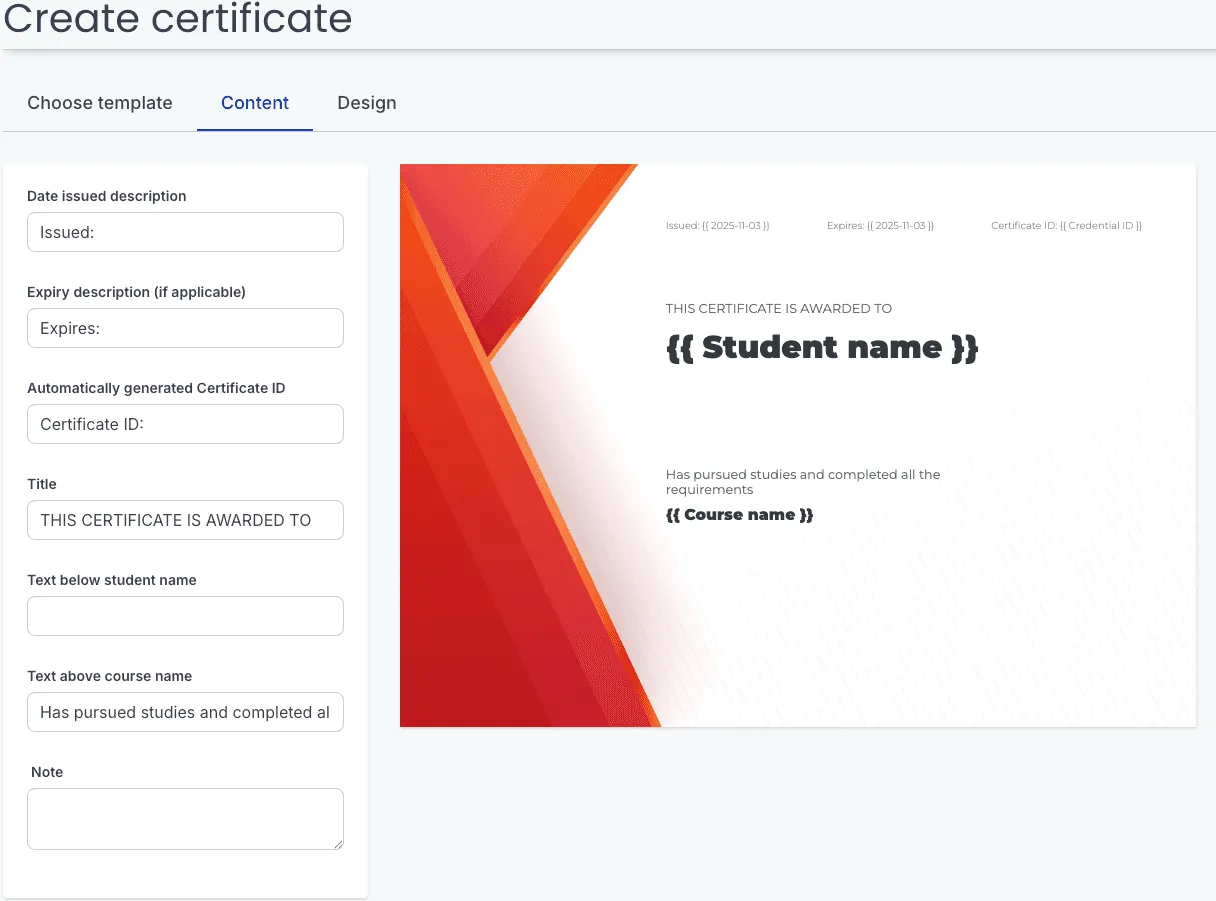
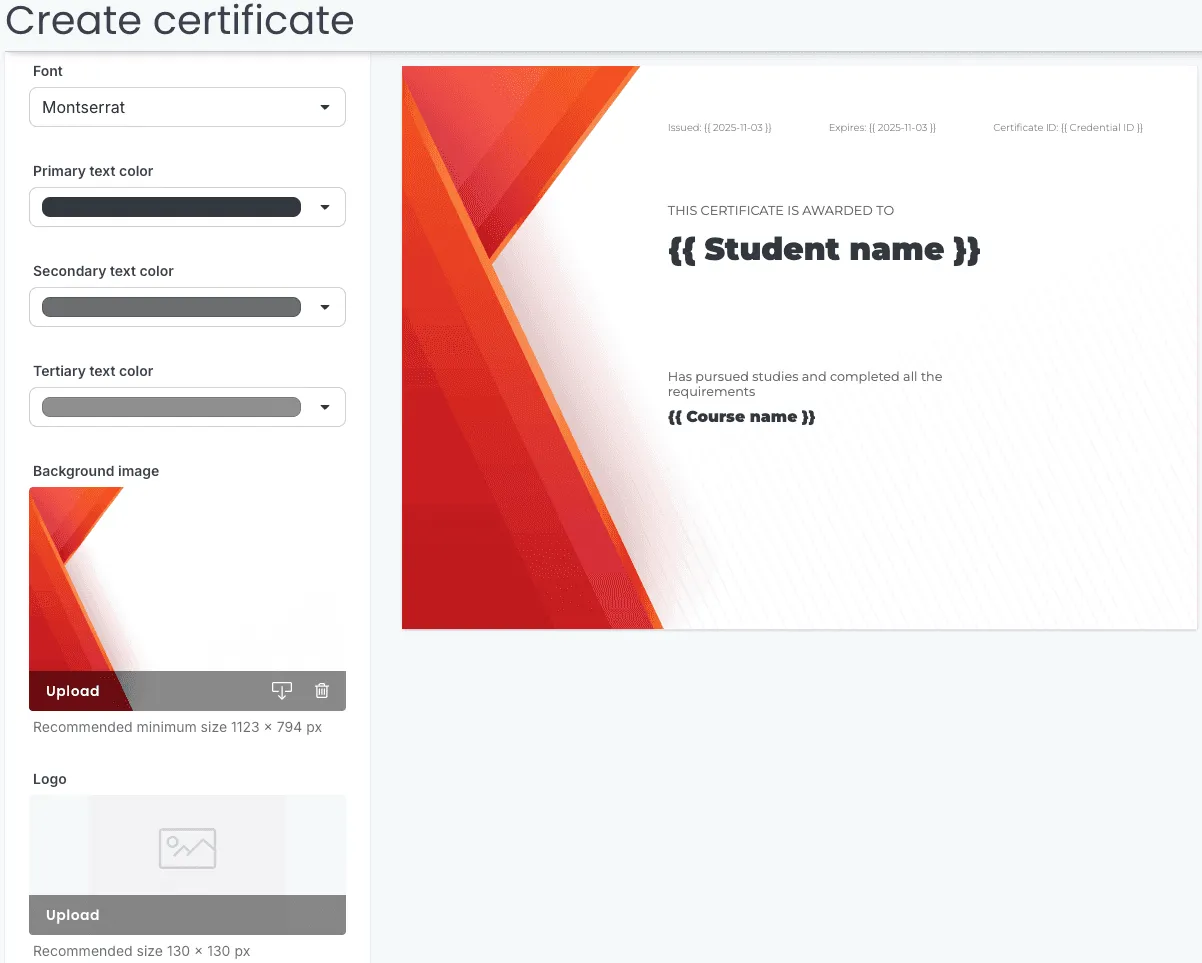
Customize your design: Choose from the 6 available fonts, colors, and optionally upload your own background image and logo
Assign to courses: Assign certificates to one or more courses.
Instant Delivery: Once the course is completed, the learner can click a “Get your certificate” button within the course to view and download a PDF of their personalized certificate.
It’s a quick, reliable way to recognize learners – ideal for creators who want something clean and functional, without needing any design skills especially if you’re running programs where recognition is more symbolic than formal.
Read more about creating Thinkific certificates here: Thinkific Certificates
What Thinkific Certificates Offer
For Learners
Thinkific certificates act as a form of recognition for learners who reach the finish line. They:
- Provide instant gratification when a learner completes a course.
- Offer a tangible token of achievement, reinforcing motivation and self-confidence.
- Create a sense of closure, marking the completion of a learning milestone.
- Can be downloaded or printed, allowing learners to showcase their progress in a simple, visual way.
For Course Creators
For instructors, coaches, and academies, Thinkific certificates add a layer of professionalism without adding operational overhead. They:
- Boost course completion rates – learners are more likely to finish when they know a certificate awaits.
- Elevate the learning experience, giving your program a polished finish.
- Offer light branding control (logo, background, and instructor name) without complex design work.
When These Certificates Are Sufficient
- Internal training programs where external verification isn’t required.
Example Use Case:
A marketing team finishes a short “AI Tools for Content Creation” course. Everyone receives a Thinkific certificate acknowledging participation. No one needs to verify it publicly – it’s about recognition within the company.
- Small coaching cohorts or short courses emphasizing participation over credential proof.
Example Use Case:
A life coach running a six-week “Mindset Reset” program uses certificates to give clients a tangible takeaway at the end.
- Pilot programs or workshops focused on learner engagement rather than credential portability.
Example Use Case:
A weekend photography workshop or a local coding bootcamp might use Thinkific’s certificates to recognize attendance and engagement, even if the course doesn’t issue formal qualifications.
Where Thinkific Falls Short
Once you start offering professional or skills-based training, the minimalism that makes Thinkific certificates easy to use starts becoming a limitation. They look fine, but they don’t communicate the depth of what the learner actually accomplished.
Here’s where the gaps appear:
Design limits:
- There are only seven templates, and each has fixed text and image placement.
- This means every certificate looks almost identical, leaving little room for brand expression or visual variety across different programs.
No customization freedom:
- You’re limited to six built-in fonts only: Source Sans Pro__Droid Serif__Lato__Montserrat__Open Sans__Raleway
- There’s no option to upload or import your own fonts, which restricts brand consistency.
- As a result, even well-designed courses end up with certificates that feel plain and mismatched with their overall brand tone.
No verification or tracking:
- Learners can download and share the PDFs, but there’s no way to confirm authenticity or see when or where they’re being used.
- It’s fine for informal programs, but not ideal when credibility or traceability matters – for instance, in professional development or compliance training.
No wallet storage:
- Certificates can only be downloaded or shared through a static link.
No metadata:
- Issued certificates are not OpenBadge compliant.
- The certificate doesn’t store details about what was learned, who issued it, or the skills gained.
- Without this contextual data, the certificate becomes a decorative document rather than a meaningful credential that captures learning outcomes.
No authenticity markers:
- There’s no way to include QR codes, digital signatures, or serial identifiers.
- That makes certificates easy to copy or alter – not a dealbreaker for casual programs, but risky for courses where trust and verification count.
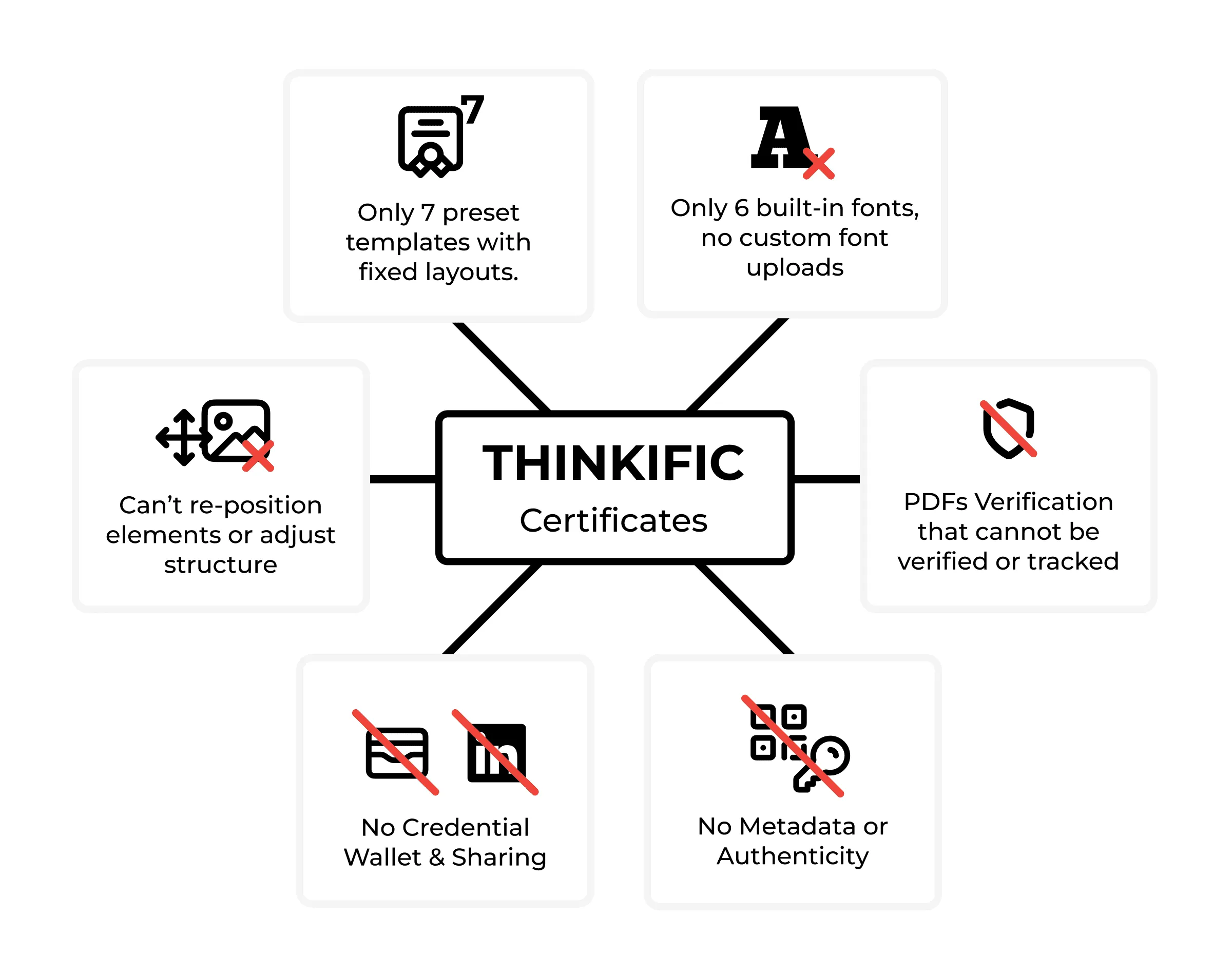
And here’s the thing – a certificate without evidence is like a handshake with no eye contact. Polite, sure, but doesn’t inspire much confidence.
At this point, you might be thinking: “But my learners don’t really need a verified certificate.” Maybe not today, but as your brand grows, the way you recognize learning becomes part of your credibility story.
How Digital Credentials Are Different
Digital credentials take the traditional certificate a step further.
They’re not just an image with a name and date – they’re verifiable, data-rich, and shareable records of achievement.
A digital credential can:
- Verify the learner’s identity and achievement.
- Include metadata like course details, skills, and evidence links.
- Be shared instantly on LinkedIn, email, or in third-party Wallets.
- Stay valid, trackable, and revocable when needed.
They give your learners something they can confidently showcase, and they give your brand long-term visibility every time someone shares your credential online.
Wauld - Designed & Issued Digital Certificates
Wauld enables course creators and organizations to issue verifiable, standards-based digital credentials, including certificates and badges, that are directly linked to learner achievements.
Unlike static PDFs, Wauld credentials are both visually dynamic and digitally verifiable, providing a lasting and secure record of achievement.
Did you know?
Thinkific offers 7 preset certificate templates, whereas Wauld includes more than 600 – each fully customizable for layout, colors, and custom fields, along with the option for users to design a certificate from scratch, allowing them to also customize the size of their certificates!
How Wauld stands out
Design Capabilities
- Access to more than 600 fully customizable templates for both certificates and badges.
- A comprehensive credential designer with complete freedom to move, resize, and style text and graphic elements.
- Dynamic fields for learner name, completion date, score, and skill tags.
- Ability to add or upload digital signatures for instructors or issuers.
- Option to insert a verification or custom QR code that links directly to the credential’s validation page or a URL of your choice.
Verification and Security
- Each credential includes a unique verification link and digital signature that confirms authenticity.
- Built-in tools for expiry, renewal, and revocation, allowing full credential lifecycle management.
Metadata and Standards Compliance
- Credentials are Open Badge 3.0 and W3C Verifiable Credential compliant, ensuring interoperability across systems.
- Embedded metadata includes issuer details, learning outcomes, skill tags, and evidence links.
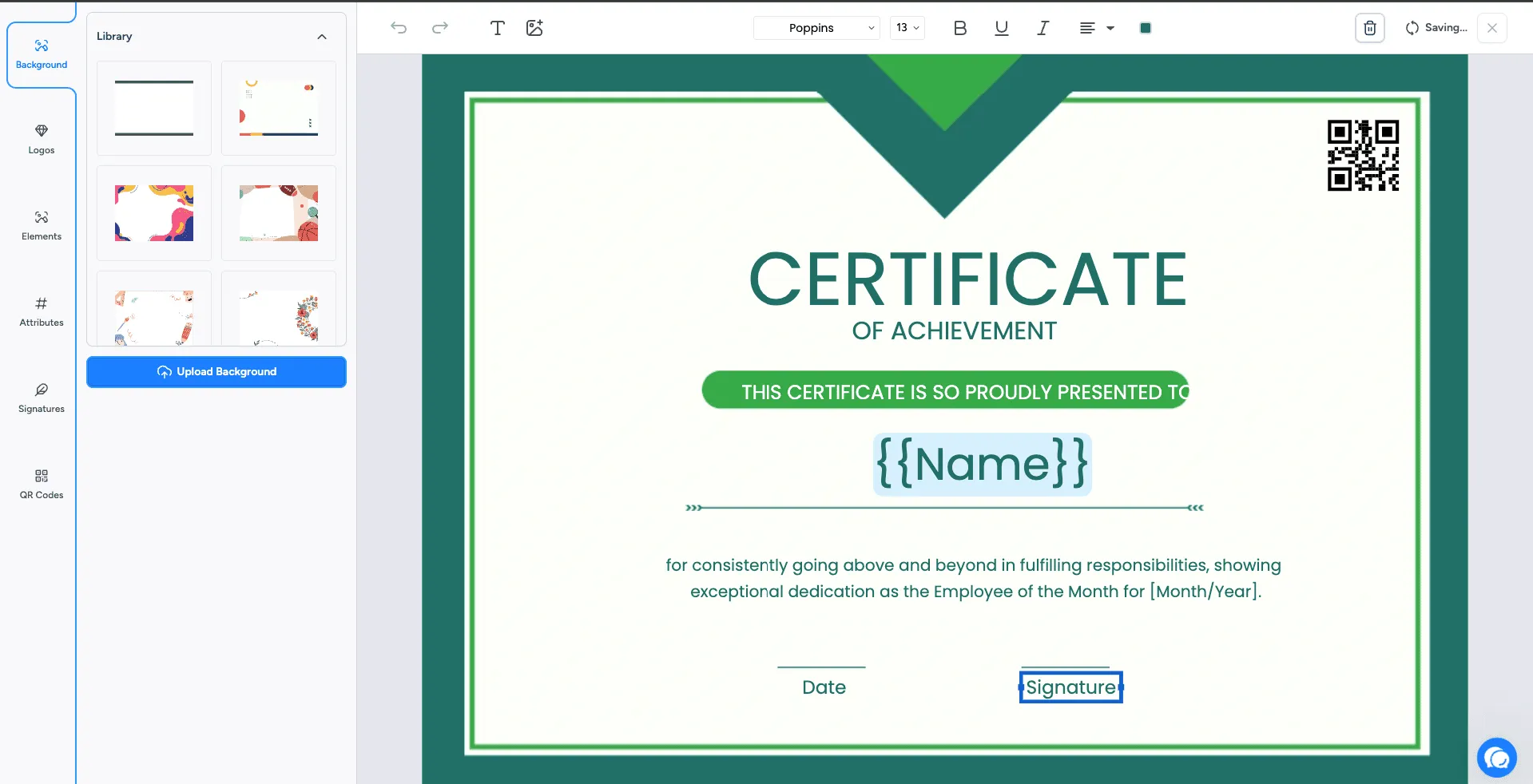
Your learners get certificates that say, “I earned this,” and Wauld backs them up like a digital bodyguard.
A Few Things to Keep in Mind
Wauld brings a lot of creative and professional flexibility to credentialing, but it’s worth noting a few things before you dive in.
- Requires initial setup to connect Thinkific and Wauld through API or Zapier.
- Some configuration is needed to set up branding, templates, and automation rules.
| Feature | Thinkific Certificates | Wauld Digital Credentials |
|---|---|---|
| Verification | Manual tedious process | Instantly verifiable |
| Portability | PDF/link only | Shareable on LinkedIn, Wallet, or via link, email, PDF. |
| Design Capabilities | 7 templates, Static field positioning, Only 6 font options | 600 templates, Fully customizable, 20+ fonts |
| Certificate Analytics | None | Built-in advanced credential analytics |
| Standards | Non-standard | Open Badges 3.0 / W3C compliant |
| Setup Complexity | Simple (in-app) | Moderate (via API/webhook) |
| Use Case Fit | Internal/basic learning | Public, professional, verifiable credentials |
The Bigger Picture
Imagine this: A learner completes your data analytics course, gets their certificate, and shares it on LinkedIn. The post includes a live verification link, your brand colors, and your logo. Every click on that post brings someone new to your Thinkific page.
Thinkific helps you deliver learning beautifully.
Wauld helps you materialize it.
Together, they let you give your learners something that looks good and stands up to scrutiny – a modern, verifiable record of achievement.
When learners can easily share proof of what they’ve accomplished, your brand benefits from that visibility too. Each verified credential is a reflection of your course quality and your credibility as an educator.