How to Issue SurveySparrow Certificates with Wauld

SurveySparrow is useful for post-training surveys, event feedback, assessments, customer education, and employee pulse checks. But SurveySparrow does not issue verifiable certificates by itself.
That is where Wauld fits. You collect the response in SurveySparrow, send the response data to Wauld, and Wauld issues a branded certificate with a QR code, verification link, public credential page, PDF download, and share options.
This guide covers the practical ways to issue SurveySparrow certificates with Wauld:
- Direct SurveySparrow webhook to Wauld
- SurveySparrow API-managed webhook setup
- Zapier
- Pabbly Connect
- Integrately
- Make
- CSV upload for manual review
What You Need Before You Start
Before building any automation, prepare the certificate workflow in Wauld.
- Create a certificate in Wauld's certificate platform.
- Add dynamic fields such as
recipient_name,recipient_email,course_name,completion_date,score, orsurvey_name. - Decide the rule for issuing a certificate. For example, issue only when the respondent completes the survey, scores at least 80 percent, selects "completed training", or matches a specific cohort.
- Copy the Wauld custom trigger or webhook URL from the certificate's integration settings.
- Submit one test response in SurveySparrow so you know the exact field names.
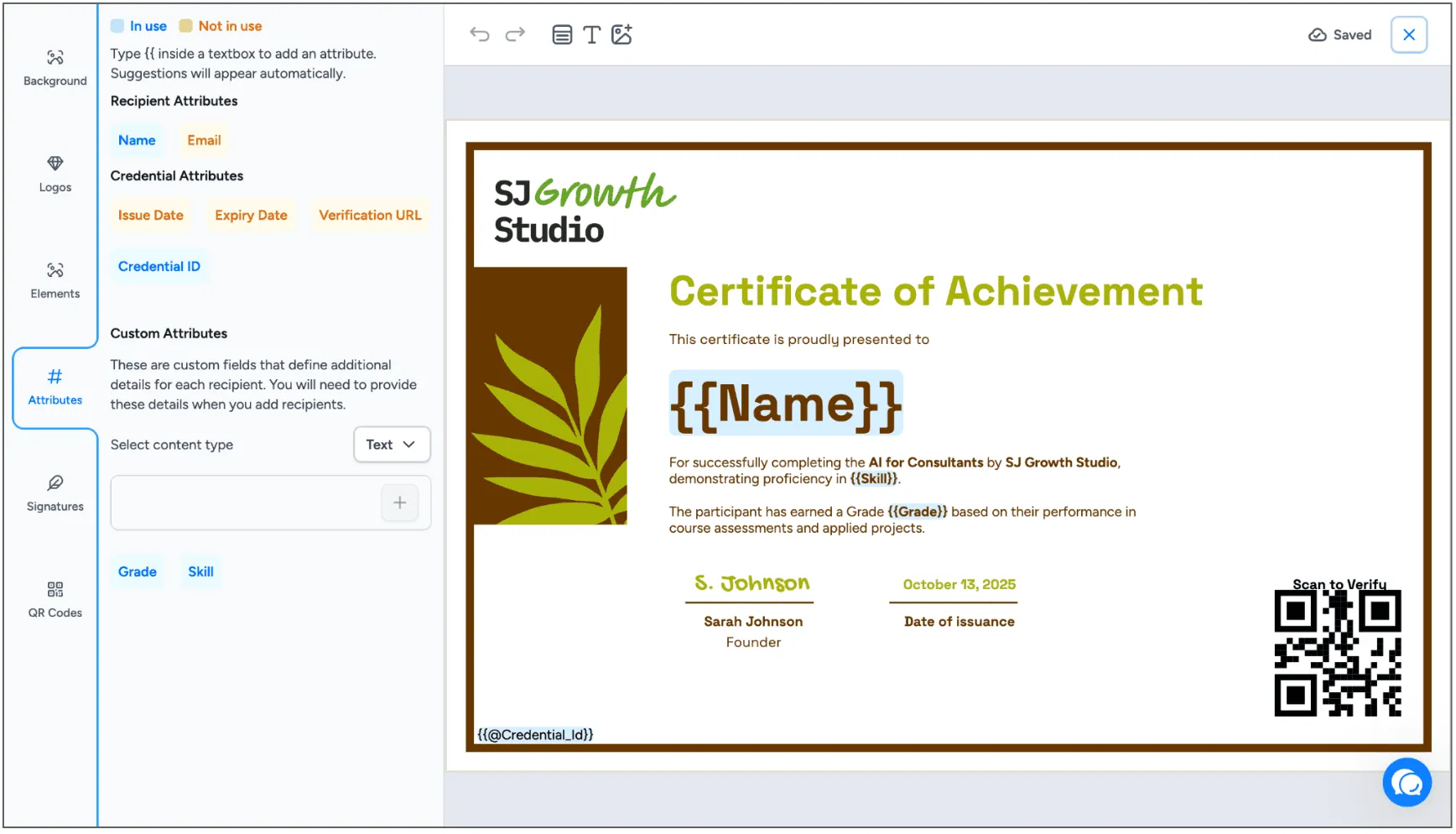
If you are still designing the credential, start with Wauld certificate templates or review how SurveyMonkey responses can become certificates in this related guide: Create Digital Certificates from SurveyMonkey Responses.
Method 1: Direct SurveySparrow Webhook to Wauld
Use this when you want the fastest workflow with no middleware.
SurveySparrow webhooks can push survey response data to a configured webhook URL whenever a new response is submitted. Wauld can receive that payload, map the fields to your certificate, and issue the credential automatically.
How It Works
- A respondent completes your SurveySparrow survey.
- SurveySparrow sends the response payload to your Wauld webhook URL.
- Wauld maps fields such as name, email, course, date, and score.
- Wauld issues the certificate and emails it to the recipient.
- The recipient gets a verifiable certificate with a QR code and credential link.
Setup Steps
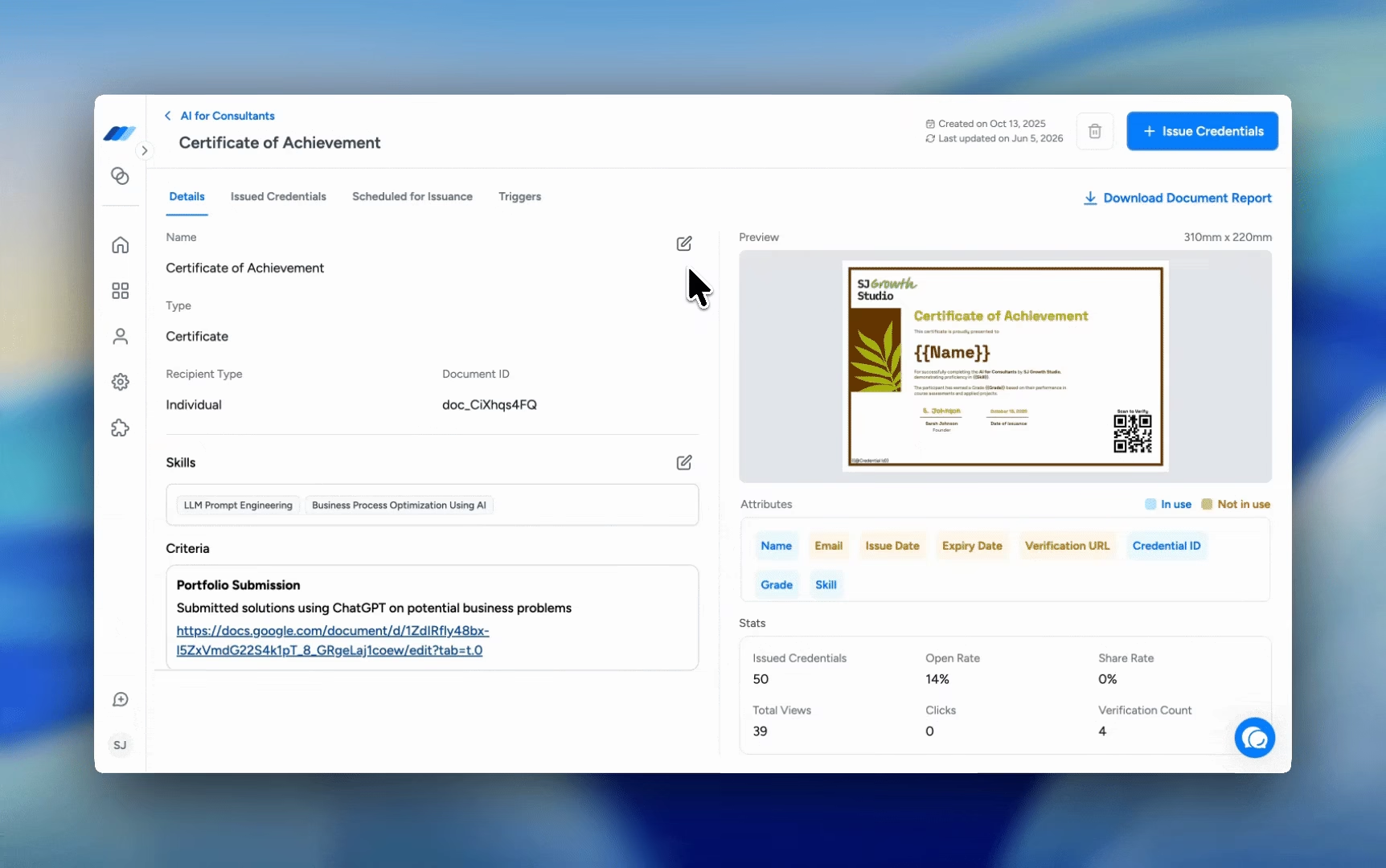
- In Wauld, open the certificate you want to issue.
- Go to Integrations and copy the custom trigger or webhook URL.
- In SurveySparrow, open the survey.
- Go to integrations or workflow settings and add a webhook.
- Paste the Wauld URL as the destination.
- Use
POSTand send the payload as JSON. - Include the required recipient fields. At minimum, send name and email.
- Submit a test response.
- In Wauld, map each SurveySparrow field to the matching certificate attribute.
- Turn on the workflow.
At a Glance
| Factor | Details |
|---|---|
| Best for | Training feedback forms, webinar attendance confirmations, simple pass or fail assessments, internal training acknowledgements |
| Pros | No middleware cost, near real-time delivery, fewest moving parts, good fit for technical teams comfortable testing payloads |
| Watchouts | Test the payload carefully before going live, fix survey fields first if name and email are not clean, use SurveySparrow workflow logic or middleware for conditional issuance |
Method 2: Use the SurveySparrow API to Create and Manage Webhooks
Use this when you manage many surveys or want developers to control webhook creation.
SurveySparrow's developer docs include a webhooks API with endpoints to get, create, update, and delete webhooks. The create webhook endpoint uses POST /v3/webhooks and supports fields such as url, survey_id, event_type, object_type, http_method, headers, and payload settings.
SurveySparrow's API docs also note that authentication uses OAuth 2.0. Private apps can generate an access token, and API base URLs vary by data center.
How It Works
- Your developer creates or updates SurveySparrow webhooks through the API.
- The webhook URL points to Wauld's custom trigger URL or to a small middleware endpoint.
- SurveySparrow sends completion data when the configured event fires.
- Wauld issues the credential.
When to Add Middleware
Use a small middleware function when you need to:
- Rename fields before sending them to Wauld
- Combine first name and last name into one recipient name
- Block certificates when the score is below the threshold
- Add a fixed course ID or cohort name
- Verify a shared secret before accepting the webhook
- Retry failed requests
A simple serverless function is usually enough. It receives the SurveySparrow payload, validates it, transforms it, and sends a clean JSON request to Wauld.
At a Glance
| Factor | Details |
|---|---|
| Best for | Organizations with many surveys, agencies building repeatable client workflows, teams that need version control and deployment discipline |
| Pros | Full control over field transformation and security checks, webhooks created and updated programmatically, easy to replicate across surveys |
| Watchouts | Needs developer time, OAuth setup, and awareness that API base URLs vary by data center |
Method 3: SurveySparrow to Wauld with Zapier
Use this when you want a no-code setup and your team already uses Zapier.
SurveySparrow has a Zapier integration. You can use SurveySparrow as the trigger app and Wauld as the action app. Wauld also has a dedicated Zapier integration page that explains common certificate automation workflows.
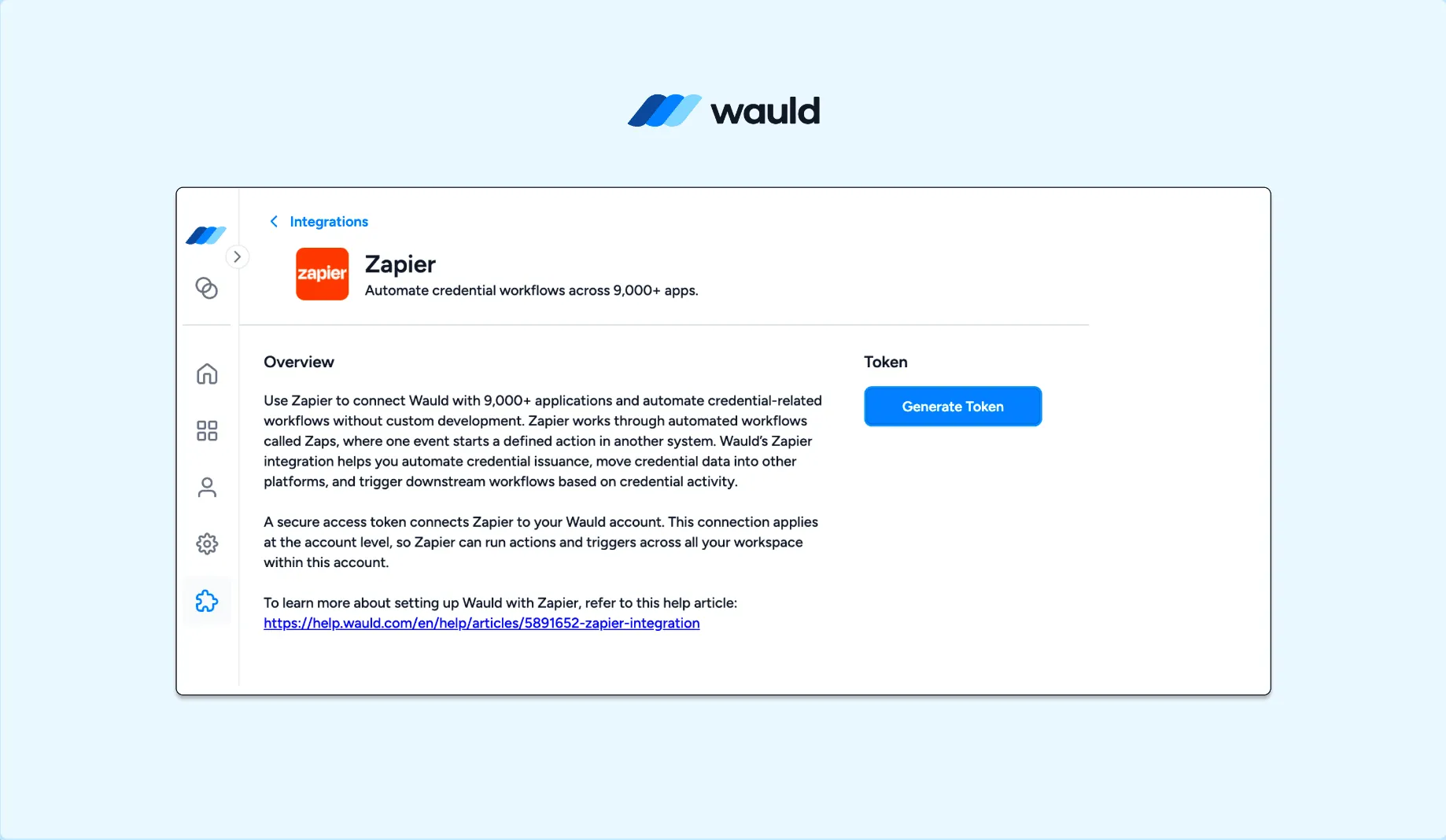
Setup Steps
- Create a Zap in Zapier.
- Choose SurveySparrow as the trigger app.
- Select the relevant trigger, usually a new survey response or completed submission.
- Connect your SurveySparrow account.
- Test the trigger and confirm the sample response includes name, email, course, and score.
- Add a Filter step if certificates should be issued only for qualified responses.
- Add Wauld as the action app.
- Choose the Wauld action that issues a credential.
- Map SurveySparrow fields to Wauld fields.
- Test the Zap and turn it on.
At a Glance
| Factor | Details |
|---|---|
| Best for | Non-technical teams, one or two certificate workflows, teams already paying for Zapier, workflows needing filters, paths, or formatters |
| Pros | Fast to launch, easy field mapping, good visibility into failed runs, works well for multi-step workflows |
| Watchouts | Recurring cost at scale, multi-step Zaps usually need a paid plan, each workflow depends on Zapier availability |
For another no-code form workflow, see How to Auto-Generate Certificates from Tally Forms for Free.
Method 4: SurveySparrow to Wauld with Pabbly Connect
Use this when you want a Zapier-style setup with a different pricing model.
Pabbly Connect lists SurveySparrow integrations and lets you build workflows with triggers and actions. Wauld also supports Pabbly Connect, covered in June 2026 product updates.
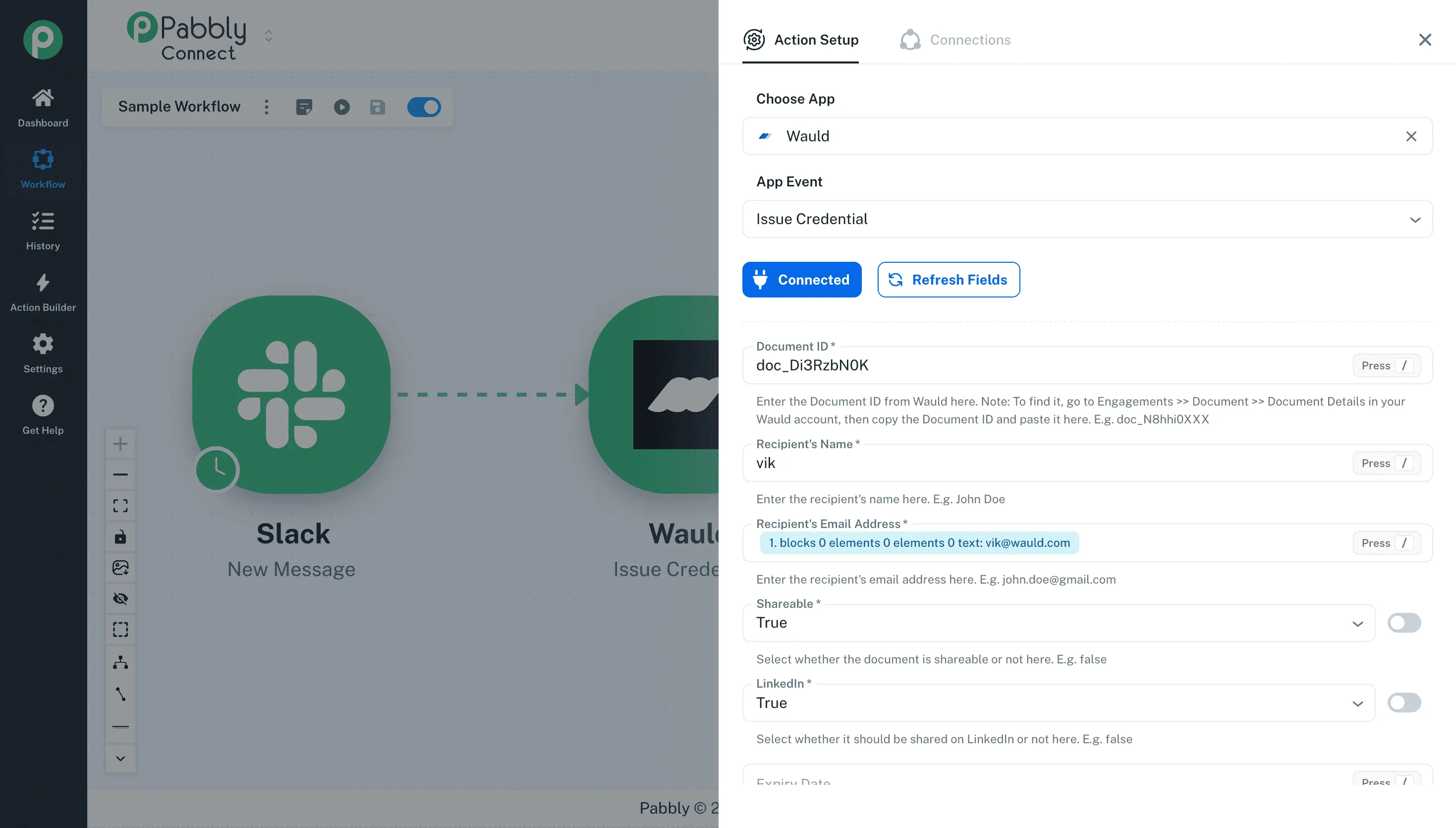
Setup Steps
- Create a workflow in Pabbly Connect.
- Choose SurveySparrow as the trigger app if available for your required event.
- If the exact trigger is not available, use Pabbly's webhook trigger and paste its webhook URL into SurveySparrow.
- Submit a test response in SurveySparrow.
- Check the captured data in Pabbly.
- Add filters if certificates should only be issued after a score threshold or completion answer.
- Add Wauld as the action app, or use an API request step to call Wauld's webhook URL.
- Map fields and test the workflow.
- Turn the workflow on.
At a Glance
| Factor | Details |
|---|---|
| Best for | High response volume, teams that want no-code automation without Zapier task costs, workflows with filters and routers |
| Pros | Lower cost per run than Zapier at volume, native Wauld Issue Credential action, filters and routers included |
| Watchouts | Confirm the SurveySparrow trigger you need is available in your account, otherwise the webhook trigger route is slightly more technical |
Method 5: SurveySparrow to Wauld with Integrately
Use this when you prefer a simple one-click automation builder.
Integrately's SurveySparrow integration supports SurveySparrow with 1,500+ apps and lists automations based on new SurveySparrow form submissions. If Wauld is not available as a direct Integrately action in your account, use Integrately's webhook or API action to call Wauld.
Setup Steps
- Open Integrately and search for SurveySparrow.
- Choose the new SurveySparrow submission trigger.
- Add a condition if only qualified respondents should receive certificates.
- Choose Wauld if available.
- If Wauld is not available, choose Webhook or API as the action.
- Paste the Wauld webhook URL.
- Map recipient name, recipient email, certificate name, completion date, and score.
- Test with a real SurveySparrow response.
At a Glance
| Factor | Details |
|---|---|
| Best for | Simple survey-to-certificate workflows, teams that want a lighter setup experience, teams already running Integrately automations |
| Pros | One-click automation templates, quick to configure, low learning curve |
| Watchouts | Less control for complex logic, test with every required field filled in, check whether empty fields arrive as blank strings or are omitted |
Method 6: SurveySparrow to Wauld with Make
Use this when you want visual branching and more control than a basic Zap.
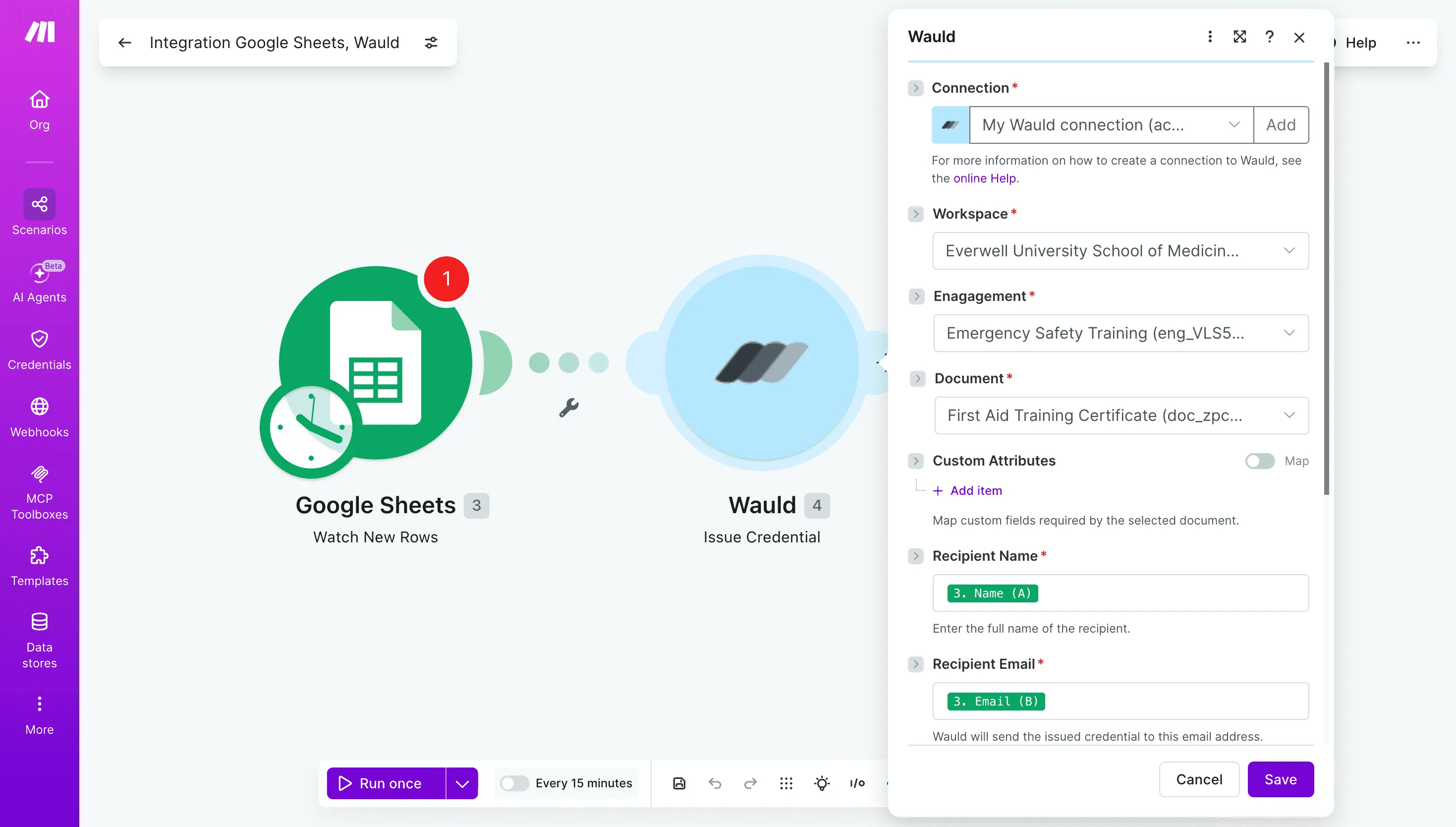
Make lists a SurveySparrow integration for connecting SurveySparrow with other business tools. Wauld's Make integration is mentioned in the June 2026 product update, with credential issue actions planned through Make scenarios.
Setup Steps
- Create a Make scenario.
- Add SurveySparrow as the trigger module if it supports your event.
- If you need a generic route, add a webhook module and paste that URL into SurveySparrow.
- Add filters for score, completion status, cohort, or survey ID.
- Add Wauld as the issue credential action when available.
- If Wauld is not available in your Make account yet, use an HTTP module to call Wauld's webhook URL.
- Run one test scenario and inspect the mapped fields.
- Schedule or activate the scenario.
At a Glance
| Factor | Details |
|---|---|
| Best for | Branching logic, multiple certificate types based on score or answer, teams already using Make for CRM or training operations |
| Pros | Visual scenario builder, routers and filters, custom attribute mapping, handles more complex workflows than Zapier or Integrately |
| Watchouts | More setup decisions than a simple Zap, and operations counting affects cost at high volume |
Method 7: CSV Upload from SurveySparrow to Wauld
Use this when you want human review before issuing certificates.
CSV upload is not real-time, but it is often the right workflow for assessments, compliance programs, and surveys where someone must verify responses first.
Setup Steps
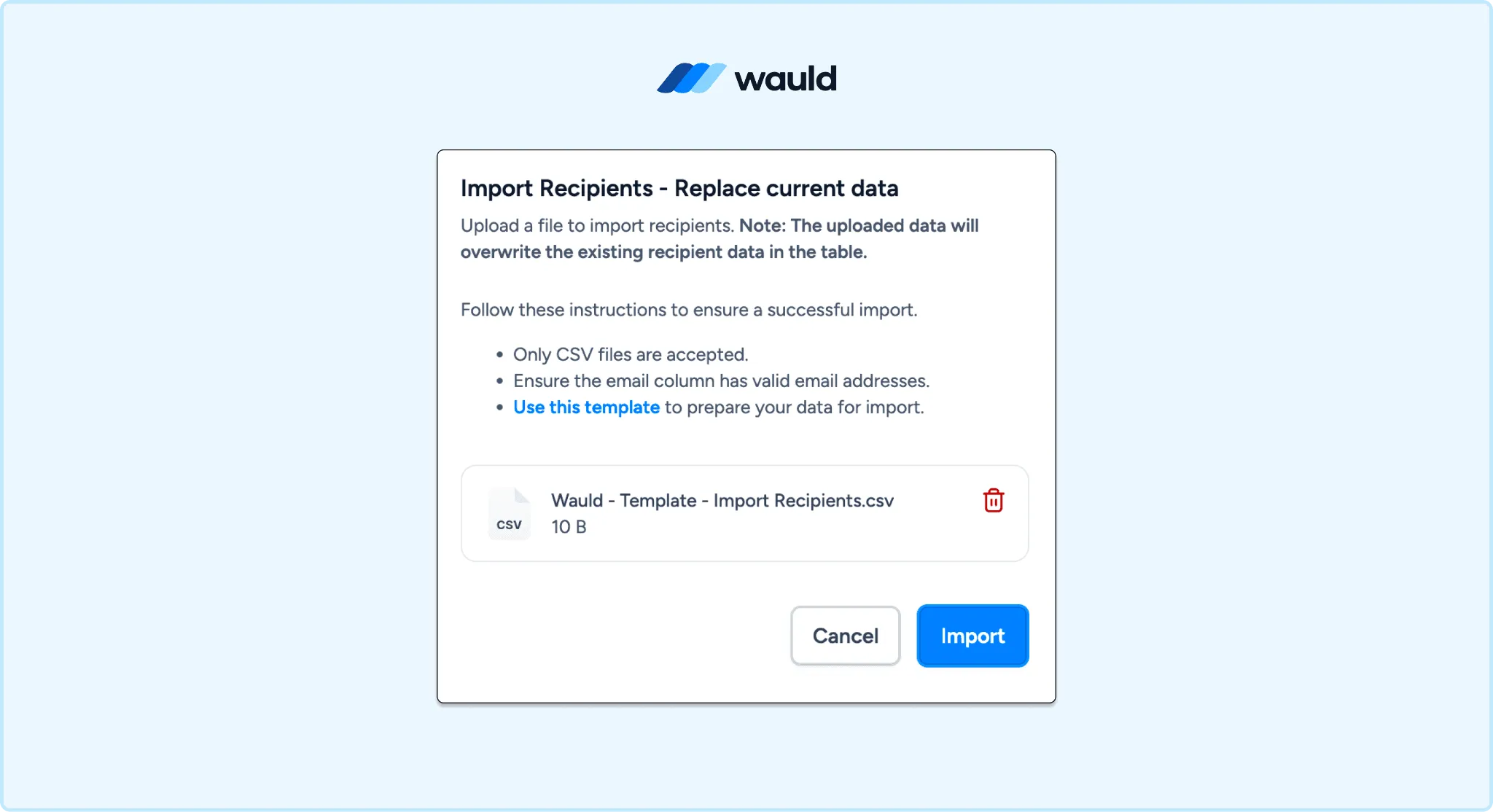
- Export SurveySparrow responses as CSV.
- Remove incomplete, duplicate, or ineligible rows.
- Rename columns to match Wauld fields, such as
recipient_name,recipient_email,course_name, andcompletion_date. - Upload the CSV in Wauld.
- Preview a few certificates.
- Issue the batch.
At a Glance
| Factor | Details |
|---|---|
| Best for | One-time events, backdated certificates, high-stakes programs that need review, teams testing Wauld before automating |
| Pros | No code, no middleware subscription, full control over who receives a certificate |
| Watchouts | Not real-time, manual work after every survey, prone to human error at scale |
Wauld's pricing page shows current limits and plan options, including the free plan for smaller credential volumes.
Which Method Should You Choose?
| Method | Coding Needed | Best For | Main Tradeoff |
|---|---|---|---|
| Direct SurveySparrow webhook to Wauld | Low | Fast real-time issuance | Needs payload testing |
| SurveySparrow API-managed webhooks | Medium | Many surveys and developer control | Requires API setup |
| Zapier | No | Fast no-code launch | Recurring task cost |
| Pabbly Connect | No to low | Cost-conscious no-code workflows | Trigger availability varies |
| Integrately | No to low | Simple automations | Less control for complex logic |
| Make | Low | Branching workflows | More setup decisions |
| CSV upload | No | Manual review and one-time batches | Not real-time |
Recommended Setup
For most teams, start with this order:
- Use direct SurveySparrow webhook to Wauld if every completed response should receive a certificate.
- Use Zapier if your team wants the simplest no-code setup.
- Use Pabbly Connect if cost per workflow run matters.
- Use Make if you need branching, retries, or custom validation.
- Use CSV if a person needs to review responses before issuing.
Final Workflow Example
Here is a clean SurveySparrow certificate workflow:
- A learner completes a post-training SurveySparrow form.
- SurveySparrow sends the response to Wauld through webhook, Zapier, Pabbly, Integrately, or Make.
- The workflow checks that the learner is eligible.
- Wauld issues a branded certificate.
- The learner receives the certificate by email.
- The certificate can be verified through QR code and shared as a live credential link.
SurveySparrow collects the response. Wauld turns that response into a credential people can verify and share.
Turn every survey response into a verifiable certificate
Create a free Wauld account and connect it to your SurveySparrow survey in an afternoon.
FAQs on SurveySparrow Certificates
Does SurveySparrow issue certificates on its own? No. SurveySparrow collects and reports on responses, but it does not generate a branded, verifiable certificate. Wauld fills that gap by turning the response data into a credential with a QR code and a public verification page.
Which method is fastest to set up? The direct SurveySparrow webhook to Wauld is the fastest if every completed response should receive a certificate. If you would rather not touch payloads, Zapier is the quickest no-code option.
Can I issue certificates only to respondents who pass? Yes. Add a filter before the Wauld step: a Filter in Zapier, a filter or router in Pabbly Connect and Make, or a condition in Integrately. You can also use SurveySparrow's own workflow logic to fire the webhook only for qualifying responses.
Do I need a paid plan to automate this? Wauld's automation works on its free plan, which covers up to 300 credentials. Middleware may cost extra: multi-step Zaps usually need a paid Zapier tier, while direct webhooks avoid that recurring cost entirely.
How do I handle first name and last name as separate survey questions? Combine them before they reach Wauld. Use a formatter step in Zapier, a text function in Pabbly or Make, or a small middleware function if you are calling the SurveySparrow API directly.
Can recipients verify their SurveySparrow certificate? Yes. Every Wauld credential carries a unique ID and a QR code that links to a public verification page, so anyone can confirm it is genuine without access to your SurveySparrow account.
Can I issue digital badges instead of certificates? Yes. Digital badges use the same triggers and workflow as certificates in Wauld. Many teams issue a badge for a short survey or module and reserve the full certificate for a complete program.
What if I already collected responses before setting this up? Export those responses as CSV and bulk upload them in Wauld. Method 7 works retroactively, so past respondents can still receive a verifiable certificate.