Eventleaf Certificate: How to Issue Verifiable Certificates for Eventleaf Events

What Is Eventleaf?
Eventleaf is an event management platform for online registration. It handles check-in, badge printing, and attendee engagement in one place. It also tracks CEUs and PDH hours through its event registration software.
Eventleaf's certificate features come in two separate workflows, covered below.
Here is what an Eventleaf certificate workflow handles well today:
| Feature | Available in Eventleaf |
|---|---|
| Online registration and ticketing | Yes |
| Check-in and check-out tracking | Yes |
| Badge printing at check-in | Yes |
| CEU and PDH time tracking | Yes |
| Survey completion certificates | Yes (manual Word template) |
| Session attendance certificates | Yes (manual Word template) |
| Verifiable digital credentials | Not available |
| Certificate engagement analytics | Not available |
| Native check-in trigger for Zapier | Not available |
| Documented outbound webhook console | Not listed in documentation |
Registration and attendance tracking are solid on Eventleaf. The certificate layer, though, sits on top of a manual workflow. It is not a verification system.
How to Issue an Eventleaf Certificate Today
Eventleaf has two separate certificate workflows, triggered differently.
Survey Completion Certificates
Full steps: Issue survey completion certificates.
- Go to Communications > Surveys and open or create a survey
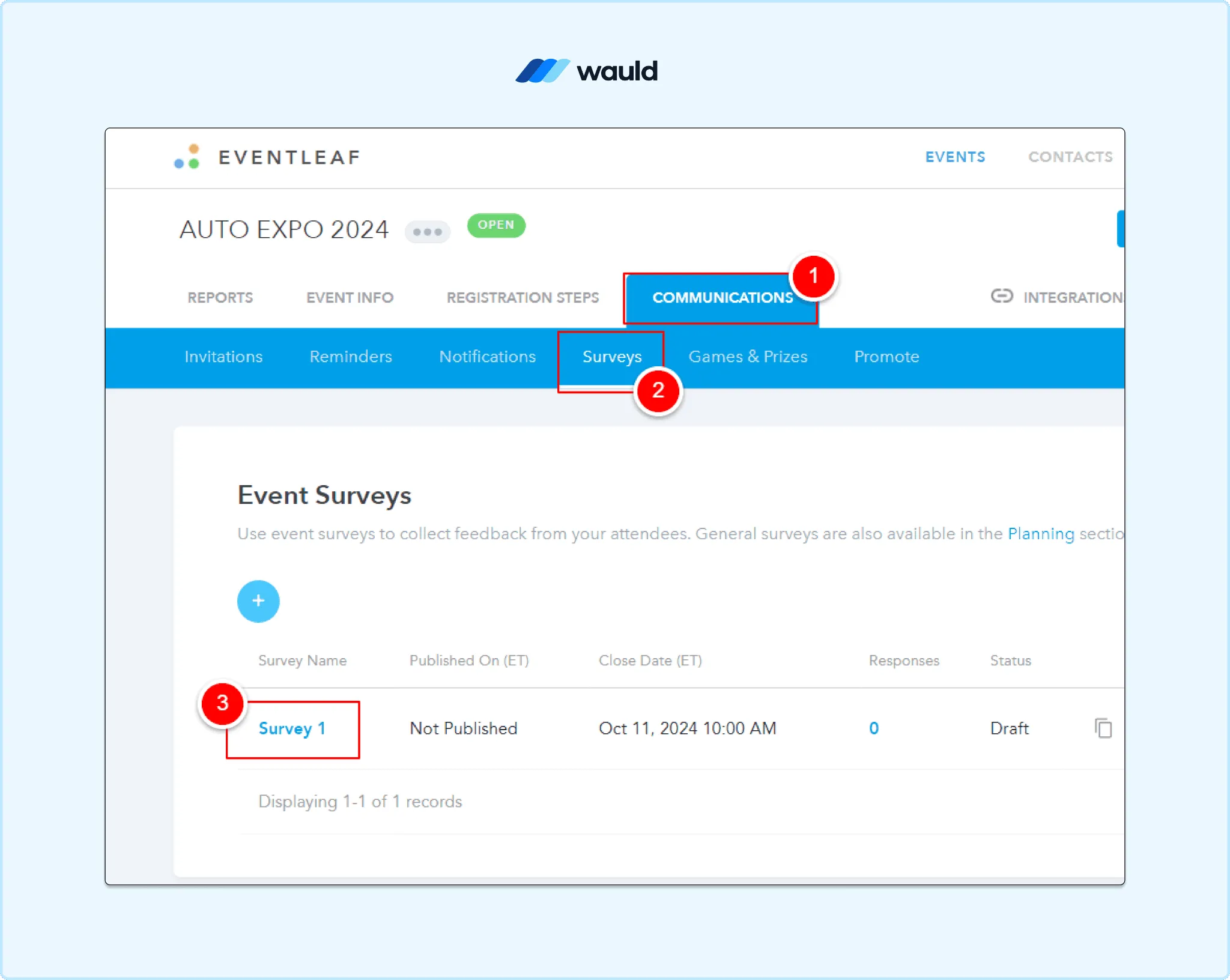
Navigate to the Surveys section in Eventleaf to create and manage survey-based certificate workflows.
- Scroll to Survey Permission and choose who can take it
- Pick from three options: all registered attendees, checked-in attendees, or checked-in for one session
- Scroll to Completion Acknowledgement Email, check the box, and enter email settings
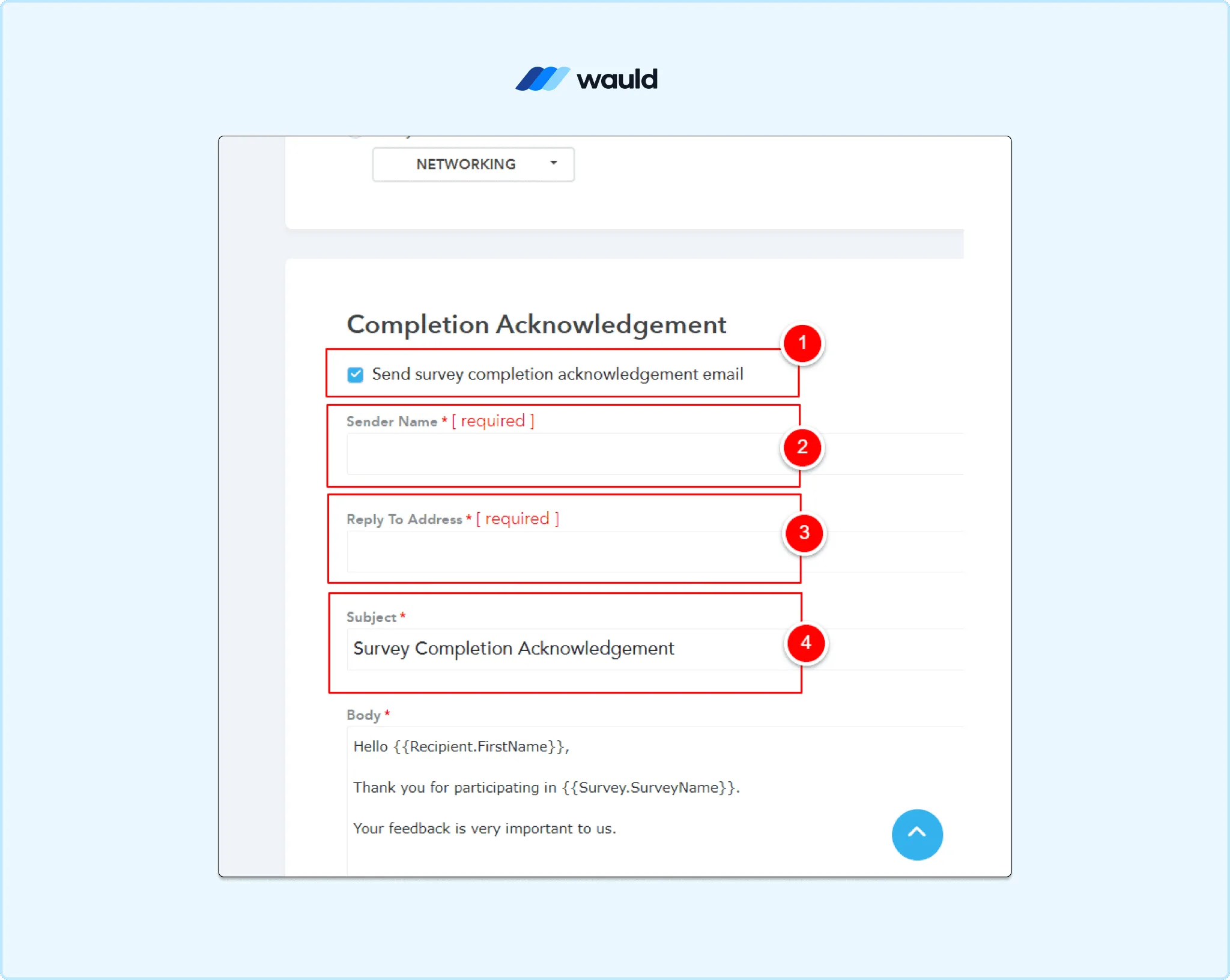
Enable and configure automatic survey completion emails that deliver certificates to attendees.
- Click in the Body field and insert tokens like
{{Recipient.FirstName}} - Check Attach attendance certificate PDF from Word template
- Click the Word template link to download Eventleaf's blank template
- Edit the template with your design, add tokens, and save it in Word format
- Click Browse and upload the finished Word file
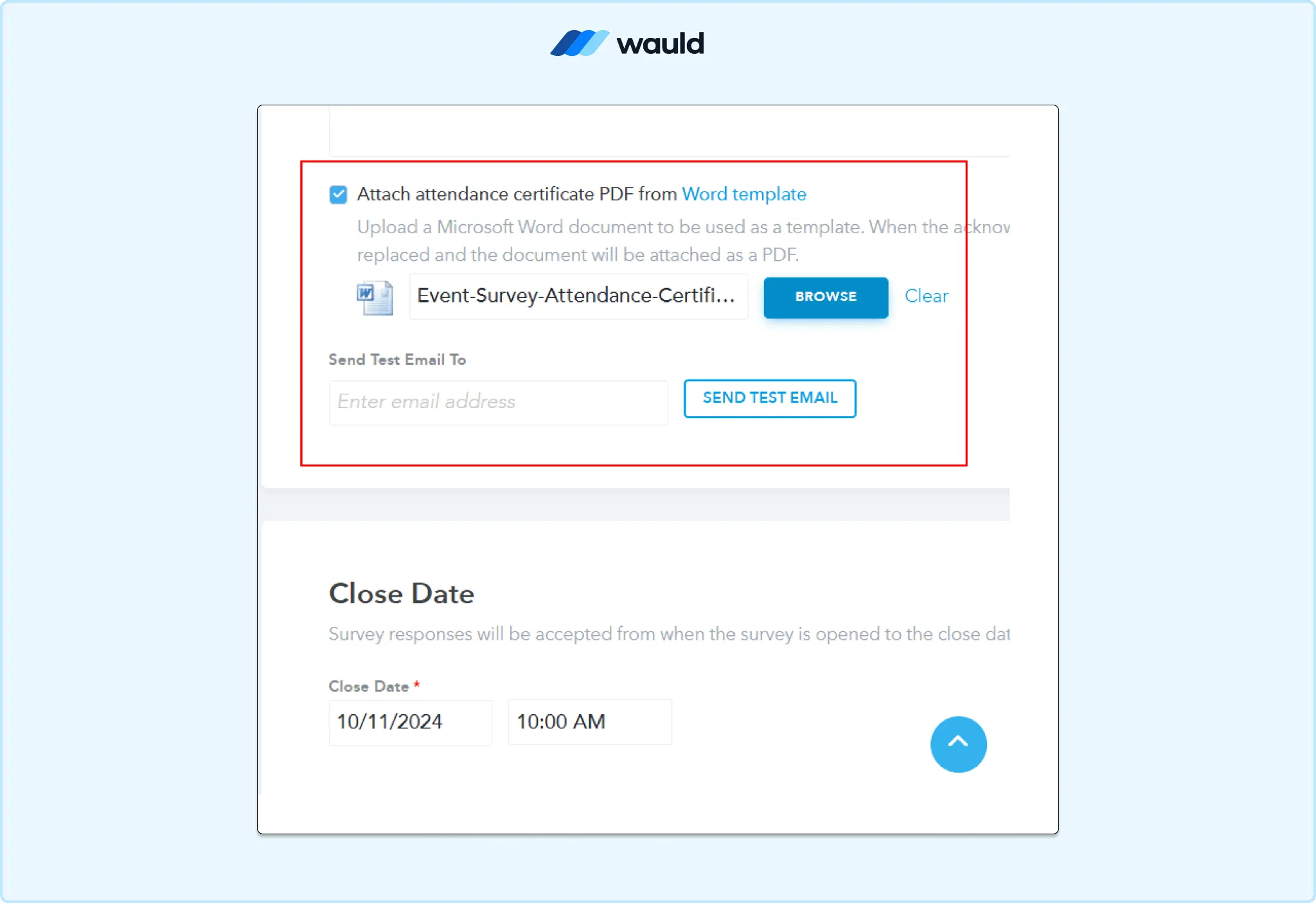
Upload a Word-based certificate template and preview the certificate email before publishing.
- Use Send Test Email to preview before going live
When an attendee completes the survey, Eventleaf merges their data automatically. The certificate becomes a PDF, attached to the acknowledgement email. Email is the only delivery method for this certificate type. There is no portal download option, unlike attendance certificates.
If the email is missed, bounces, or lands in spam, no resend path exists. The "Send Test Email" button only previews the look for you, the organizer. It does not confirm that tokens will merge correctly for every real attendee.
Session Attendance Certificates
Full steps: How to Issue Attendance Certificates in Eventleaf.
- Log in to your event on Eventleaf
- Click Event Info, then Agenda
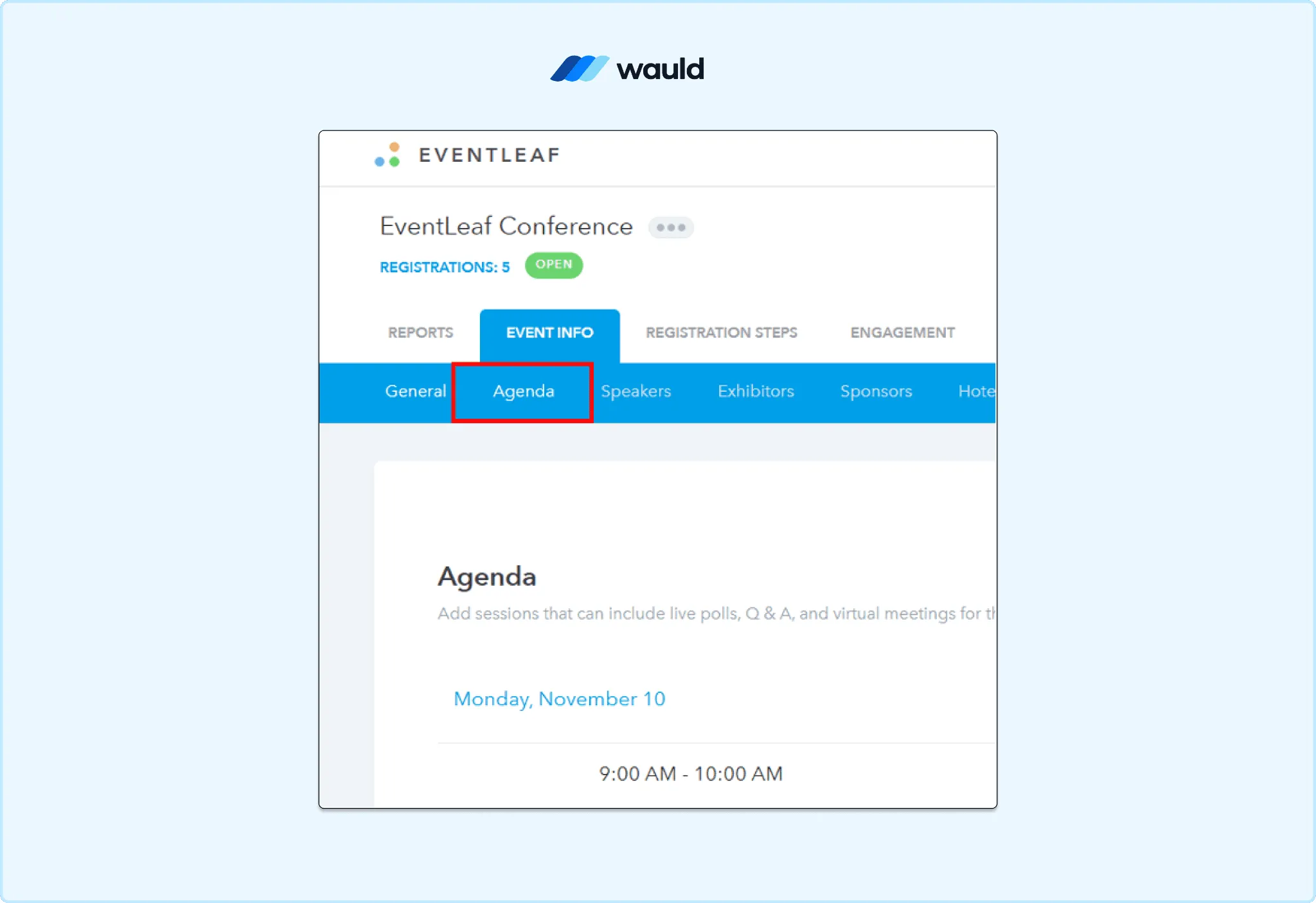
Open the Agenda section to configure attendance certificates for individual event sessions.
- Select the session you want to issue a certificate for
- Scroll to Attendance Certificate and click Browse to upload a template
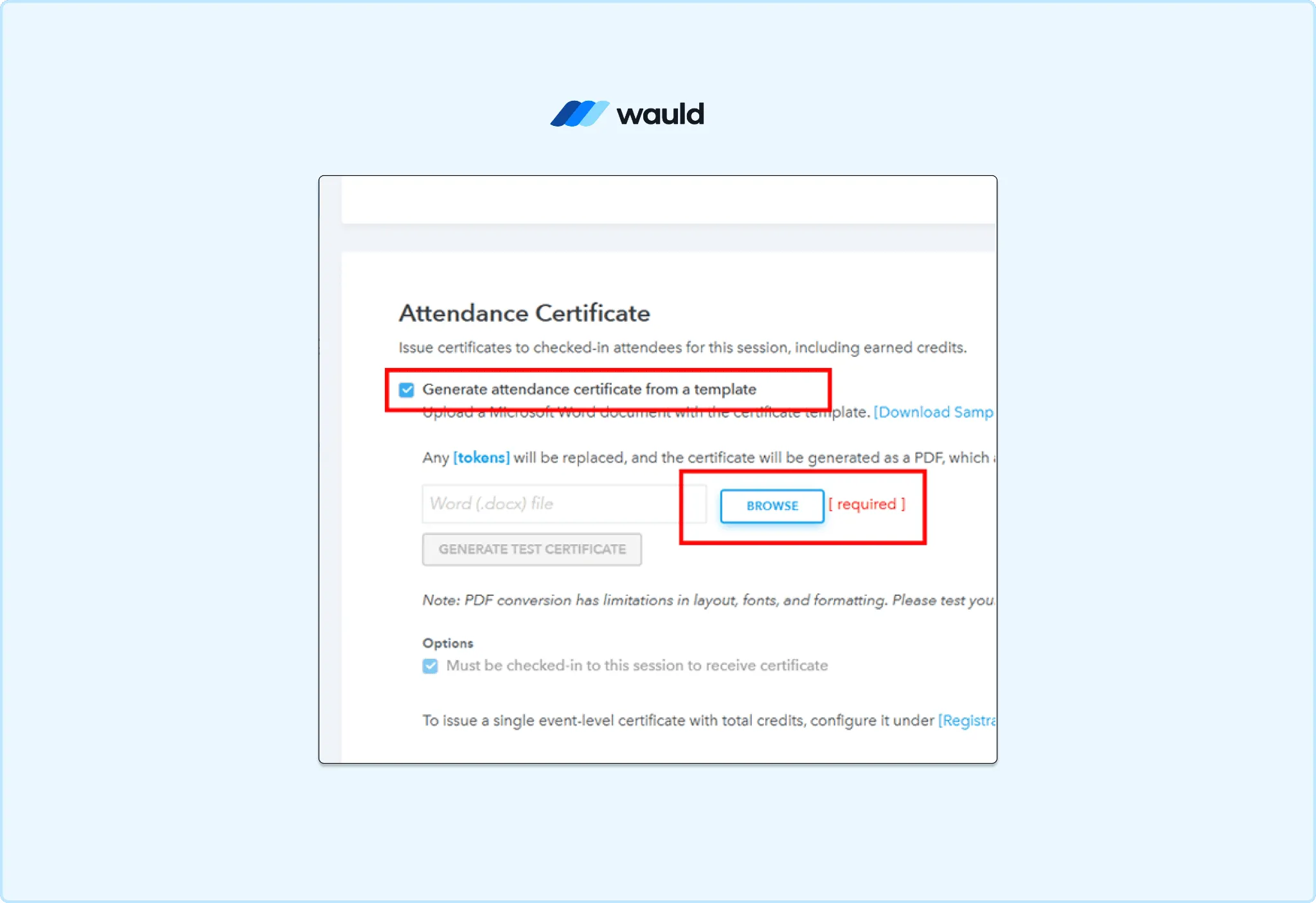
Generate attendance certificates from a Word template for checked-in session attendees.
- Before uploading, insert tokens like
[First Name]into the Word document
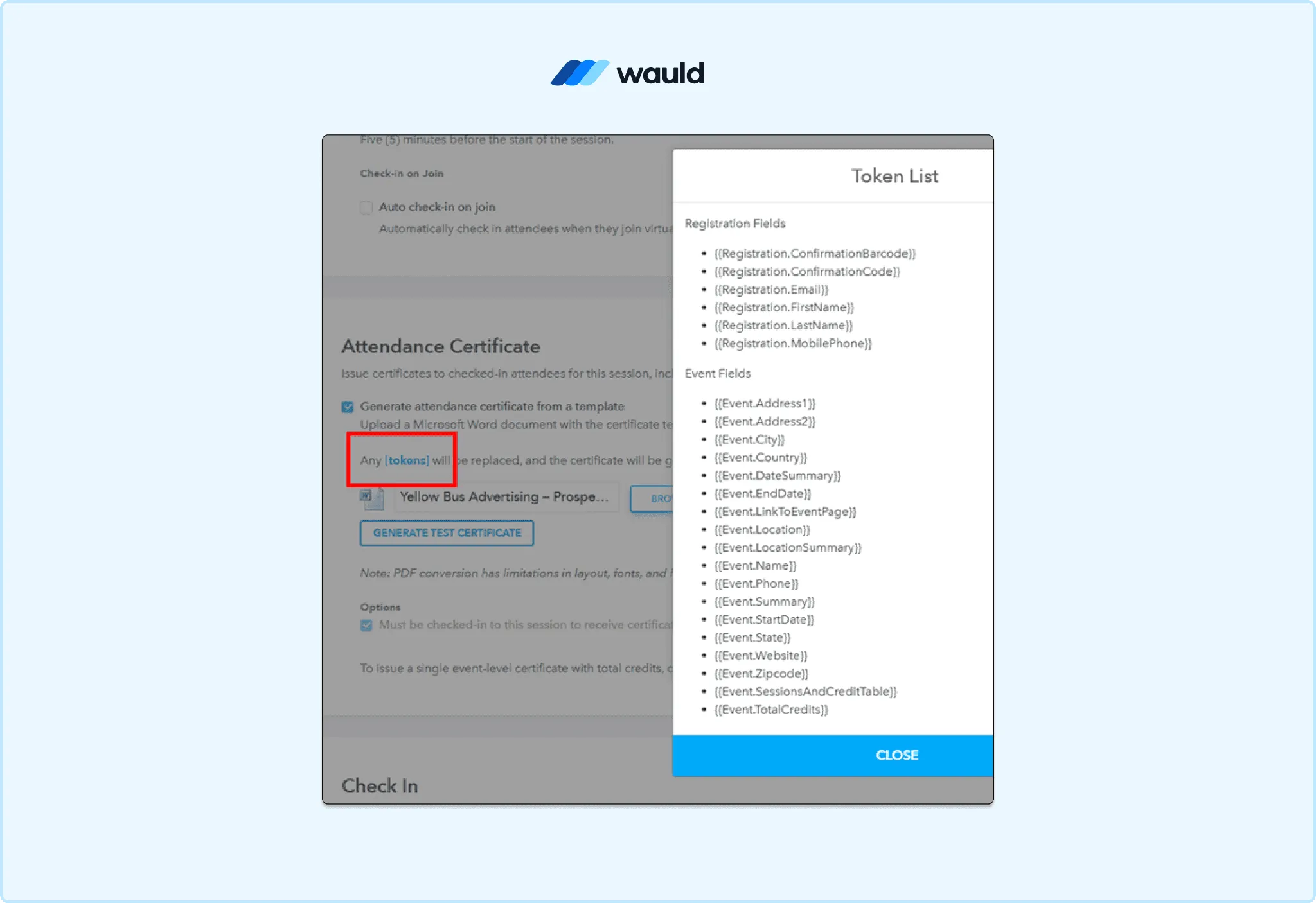
Use Eventleaf tokens to automatically personalize certificates with attendee and event information.
- Attendees then download the certificate themselves from the attendee portal
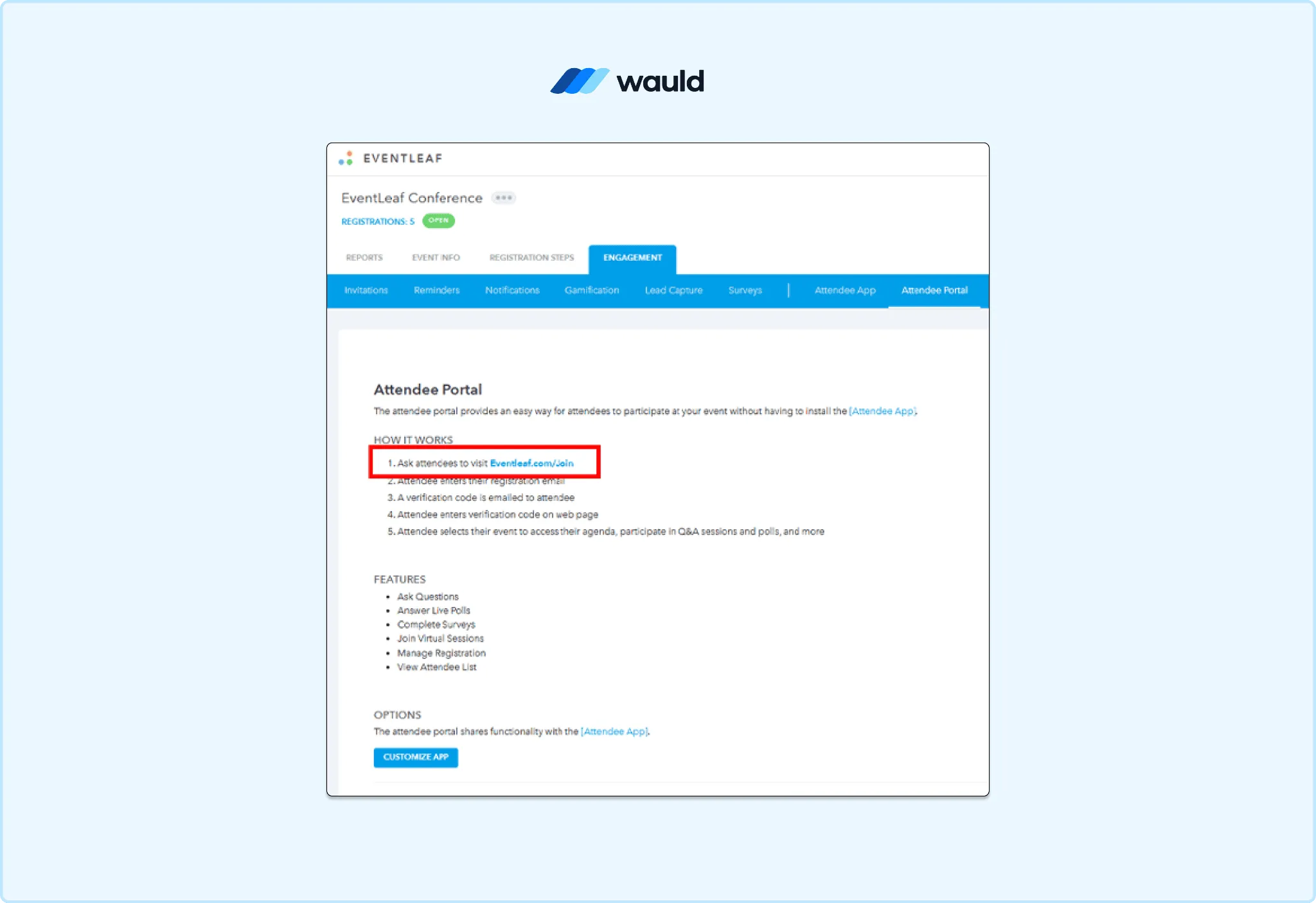
Attendees can access and download eligible certificates through the Eventleaf attendee portal.
Certificates here are gated strictly by check-in status for that specific session. Attendees who registered but never checked in cannot download one. Attendees use their registration email to log into the Eventleaf attendee portal.
This setup is per session, not per event, so a multi-session conference needs a separate template upload repeated for every single session.
Pro Tip: Eventleaf recommends keeping certificate formatting simple. Complex Word layouts can break during PDF conversion.
The Problem With Eventleaf's Native Certificate System
Eventleaf's own guide calls manual certificate emailing a real burden. It cites "errors and delays" as the cost of doing this by hand. Even with automation, seven specific gaps remain.
- No verification. Once the PDF leaves Eventleaf, nothing stops tampering. Anyone can edit a name on a static PDF in seconds. For accredited conferences in medicine, law, or engineering, this is a real liability.
- No tracking. Eventleaf cannot show opens, shares, or LinkedIn additions.
- No lifecycle management. A misspelled name means manually regenerating the file.
- No resend option. A bounced or spam-filtered certificate email has no documented resend path. There is no way to resend just one attendee's copy.
- No-show risk by default. Survey permission defaults to all registered attendees, regardless of attendance. The organizer must manually restrict it to checked-in attendees.
- Repetitive per-session setup. Attendance certificates need a separate template upload for every session. This adds setup time at multi-session events.
- No built-in design tool. Eventleaf's own FAQ confirms there is no certificate builder. You use the default sample or design the entire layout in Word yourself.
This is the gap a dedicated digital credentialing platform is built to close.
How Wauld Makes Eventleaf Certificates Verifiable
Wauld is a digital credential platform for issuing certificates. It tracks verifiable certificates and badges after they go out. Where Eventleaf treats a certificate as a file, Wauld treats it as a credential.
Every credential is personalized automatically from your attendee data. Security details are on Wauld's Trust Center, pricing on the Pricing page.
Every certificate issued through Wauld includes:
- Unique credential ID: a tamper proof identifier, verifiable in one click
- QR code verification: instant offline checks for audits and licensing boards
- Branded design: your logo, colors, and signature from 1,000+ templates
- LinkedIn add to profile button: one click sharing for attendees
- Engagement analytics: opens, downloads, shares, and LinkedIn additions per attendee
Not sure whether your program needs a certificate or a badge? See Digital Badges vs Certificates for the difference.
This pairs naturally with the events Eventleaf already serves. Think corporate training programs and memberships and associations. Academic seminars under higher education credentialing fit just as well.
3 Methods to Connect Eventleaf and Wauld
Method 1: Bulk CSV Upload
This is the most reliable method for an Eventleaf certificate today. Check-in and attendance reporting is already a core, well built feature.
- In Eventleaf, open your event's check-in or attendance report
- Export the attendee list as a CSV
- Remove any rows for no-shows or test registrations
- Log in to Wauld and choose a template from the template gallery
- Upload the cleaned CSV and map the name and email columns
- Preview a sample certificate to confirm personalization
- Click Issue. Certificates are delivered to every attendee by email
Pro Tip: Eventleaf's check-in log already powers its CEU and PDH calculations. The same export works for both credit reporting and certificate issuance.
Best for: Most Eventleaf organizers and CEU or compliance programs. See how much time credential automation can save per certificate for a breakdown.
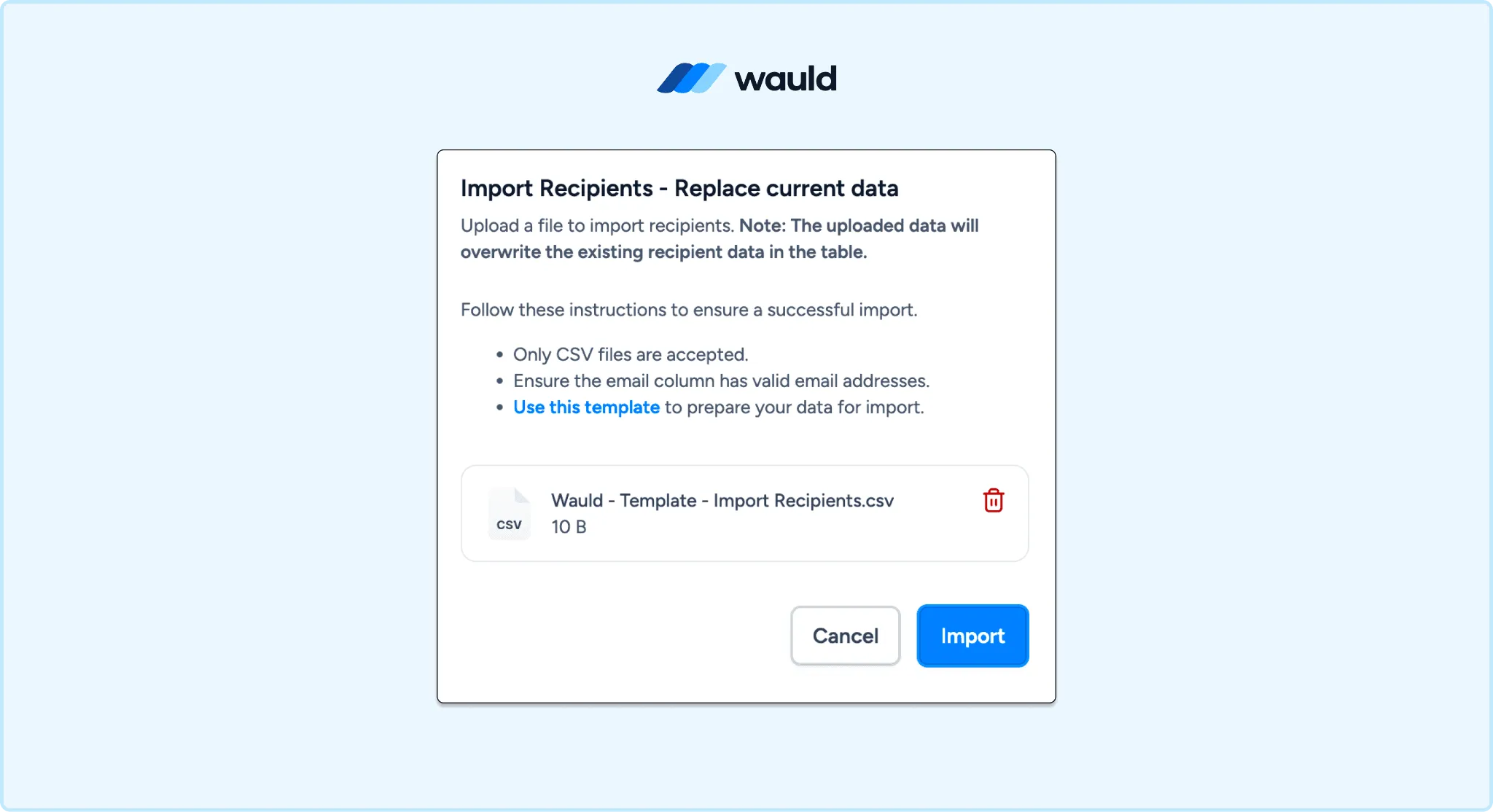
Import attendee data into Wauld using a CSV file to issue verifiable digital credentials at scale.
Method 2: Zapier Automation
Available triggers in Eventleaf's Zapier app:
- New/Updated Event: fires when an event is created or updated
- New/Updated Event Registration: fires when a registration is added or updated
| Step | Tool | Action |
|---|---|---|
| 1 | Eventleaf | New/Updated Event Registration (trigger) |
| 2 | Filter | Exclude registrants without a check-in, if needed |
| 3 | Wauld | Issue Credential (action) |
Pro Tip: Eventleaf has no native "attendee checked in" trigger. The registration trigger fires on signup, not on actual attendance. Add a Filter by Zapier step to handle this gap.
Best for: Smaller events, or certificates tied to survey completion. See how to automate certificate issuance with Zapier and Wauld for a walkthrough.
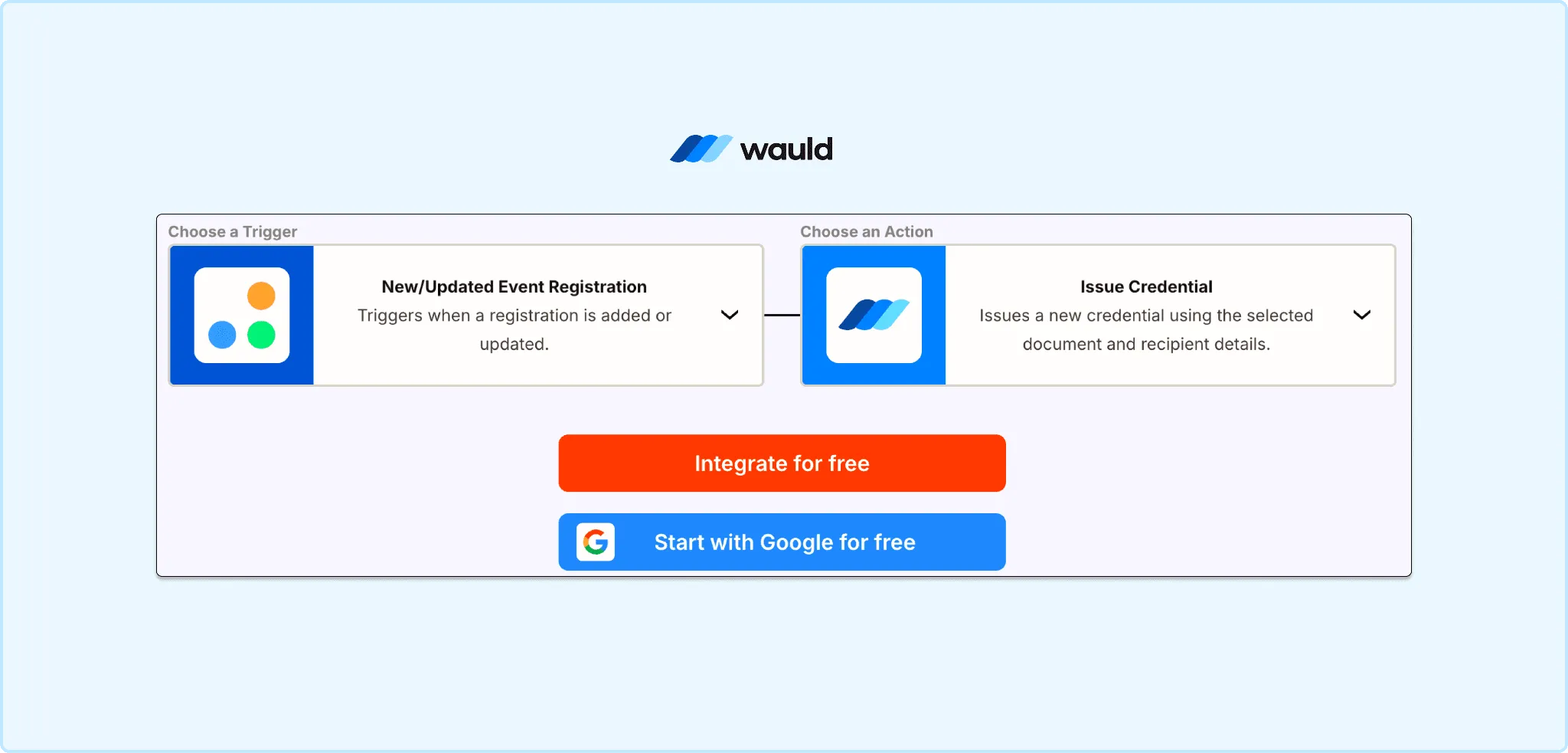
Automate certificate issuance by connecting Eventleaf registrations to Wauld credentials through Zapier.
Method 3: Webhook Relay
Eventleaf does not list a dedicated outbound webhook console. The available path uses Zapier's Webhooks by Zapier connector as a relay.
- Generate an API key from your Eventleaf Profile menu
- Use Zapier's Webhooks app to query the registration endpoint
- Forward that data to a small serverless function
- Call Wauld's API from that function to issue the credential
Best for: Recurring events with developer resources on hand.
Manual vs Zapier vs Wauld for Eventleaf Certificates
| Manual (Word + Email) | Zapier Alone | Wauld | |
|---|---|---|---|
| Setup time | Hours per event | 30 minutes | 15 to 25 minutes |
| Technical skill needed | Low | Low to medium | None |
| Triggered by actual check-in | No | Not natively | Yes, via CSV export |
| Verifiable credential | No | No | Yes |
| LinkedIn integration | No | No | Yes |
| Engagement analytics | No | No | Yes |
| Edit, reissue, or void | Manual | Manual | Built in |
| Free plan available | N/A | No | Up to 300 credentials |
What Happens After You Issue a Certificate
- Attendees get a personalized email with their certificate link
- They open a hosted page with name, branding, and a QR code
- They click Add to LinkedIn, and your organization appears as verified issuer
- Your dashboard shows who opened, downloaded, and shared each certificate
Final Thoughts
Eventleaf handles registration, check-in, and attendance tracking well. Its native certificate features work fine for basic proof of attendance. Neither produces a credential that is verifiable, trackable, or easy to share.
Pairing Eventleaf's check-in data with Wauld closes that gap. The free plan covers up to 300 verifiable credentials. It includes 1,000+ templates, QR code verification, and LinkedIn sharing.