Certificate Expiry Management: A Complete Guide for Issuers

What is certificate expiry?
Certificate expiry is the date after which a credential is no longer considered current. Before that date, the certificate is valid. After it, the certificate still shows what the person achieved. However, it is marked as expired, so anyone checking it knows to ask for a renewal.
That single date does a lot of quiet work. It tells employers your credential reflects skills someone holds today, not skills they held four years ago. Therefore, it protects both your recipients and your reputation as an issuer.
This guide covers how to pick a validity period, build a reminder schedule people respond to, and run it without a spreadsheet.
Expired, voided, and revoked are three different things
People mix these up constantly. Here is the plain-English version.
- Expired. The credential reached its planned end date. For example, think of a driver's license that needs renewing.
- Voided. You are marking the credential invalid because it should not stand, perhaps because it went to the wrong person.
- Revoked. Similar to voiding, although it usually follows a breach of conduct.
The takeaway: never use the void function for routine expiry. Voiding suggests something was wrong, whereas expiry says the credential ran its natural course.
Why expiry is built into the credential itself
In digital credentialing, expiry is structured data rather than text on a PDF. Open Badges 3.0, published by 1EdTech and aligned with the W3C Verifiable Credentials Data Model, models this through validFrom and validUntil. A credential expires once the date passes validUntil. Because that date is machine-readable, anyone verifying the credential gets an unambiguous answer without emailing you.
Why certificates expire in the first place
Not every credential needs an expiry date. A degree does not expire, and neither does a one-off webinar attendance certificate. Plenty of credentials should expire, though, for four honest reasons.
- Regulation requires it. Safety and clinical certifications are legally tied to renewal cycles, as most compliance certificates are.
- Knowledge goes stale. A cybersecurity certification from four years ago describes a threat landscape that no longer exists.
- Skills fade without practice. Abilities like CPR degrade when unused, which is why refresher training exists.
- Membership is time-bound. Association credentials track a membership year, so the certificate should too.
How long should your certificate be valid?
There is no universal answer, but there is a decision path. Start with regulation, then knowledge decay, then your program rhythm. These real cycles show how wide the range is.
| Credential type | Typical validity | What drives it |
|---|---|---|
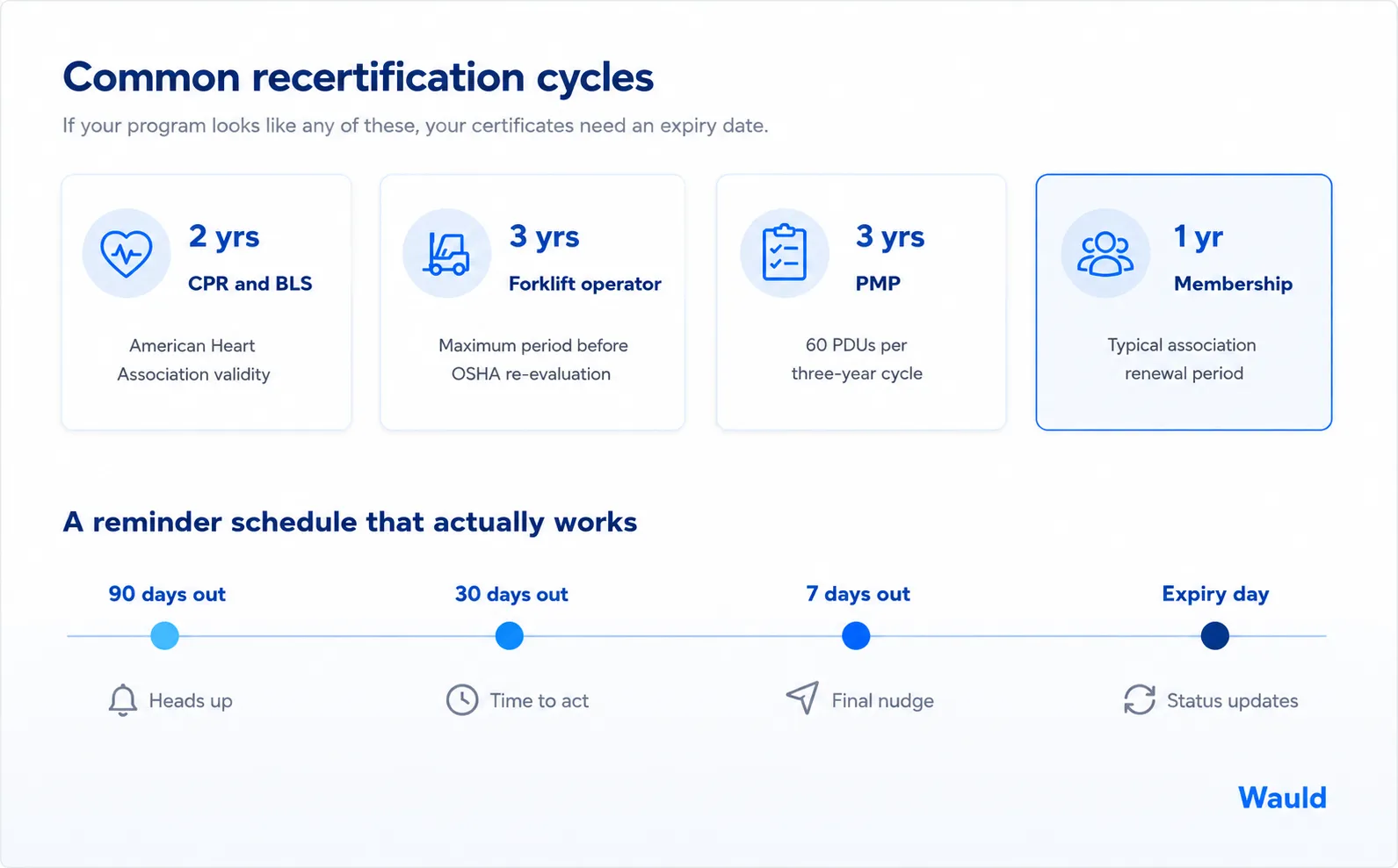
| CPR and BLS (American Heart Association) | 2 years | Skill retention and guideline updates |
| Forklift operator (OSHA) | Up to 3 years | Mandatory operator re-evaluation |
| ServSafe Food Handler | 3 years (state rules may shorten it) | Public health regulation |
| PMP (Project Management Institute) | 3 years | 60 PDUs per certification cycle |
| Association membership | 1 year | Membership term |
The AHA's CPR and BLS certifications are valid for two years, and OSHA requires forklift operator re-evaluation at least every three years. Matching a familiar cycle makes your certificate easier for employers to read.
A good rule of thumb: pick the shortest period you can support with a renewal path. Although a short cycle looks rigorous, an expiry date with no way to renew is a dead end.
The real cost of tracking expiry manually
Most issuers start with a spreadsheet. It works fine for fifty certificates, then stops working all at once. Spreadsheets break down for certification tracking because dates can be edited, copied incorrectly, or sorted into the wrong row without anyone noticing. The failure mode is painful.
- Nobody notices until it is too late. An expired certificate goes undetected until an audit exposes the gap.
- Reminders get skipped. Manual emails are the first thing to fall off when your team is stretched.
- Renewal revenue leaks. People who would happily have renewed simply forget.
- Nobody can prove the record is accurate. During a compliance review, "here is our spreadsheet" is a weak answer.
This is a tooling problem, not a people problem. Purpose-built certificate management software treats expiry as a first-class feature, which an LMS certificate module rarely does.
What good certificate expiry management looks like
Five things, in order.
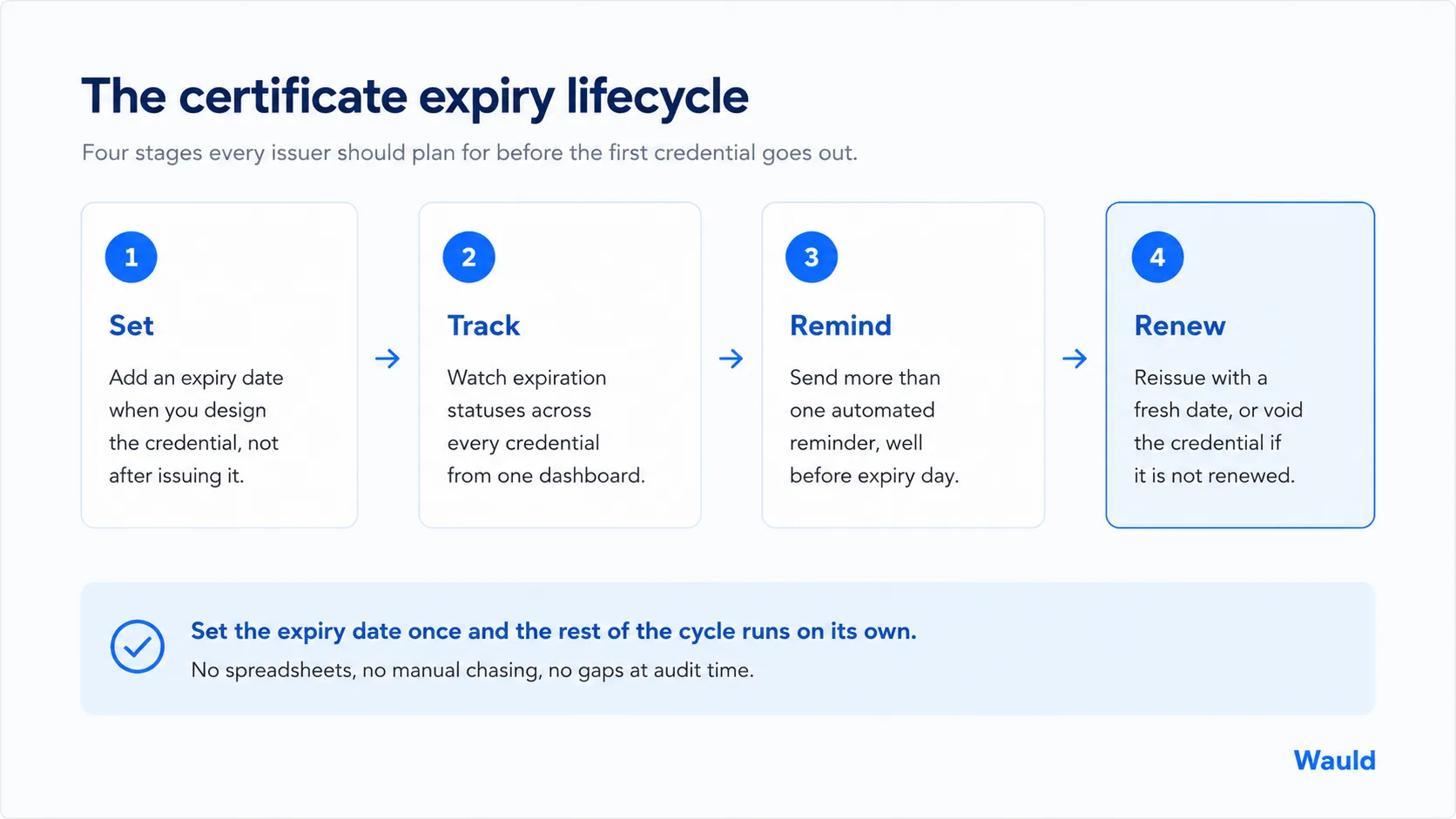
1. Set the expiry date when you design the credential
Do this at design time, not as a follow-up. Build it into the template so every certificate in the program inherits the same validity period. Therefore, nobody has to remember on batch number seven.
2. Make the status visible to everyone
Recipients and verifiers should both see when a credential expires without contacting you. When certificates are verifiable through a link or QR code, the expiry status travels with the credential.
3. Send a series of reminders, not one
One email 14 days out is not a reminder system. It is a coin flip. For example, this cadence works well for most programs.
- 90 days out. A friendly heads up, with runway to book a refresher course.
- 30 days out. A clearer nudge with the renewal link front and center.
- 7 days out. The final reminder, short and direct.
- On the expiry date. A confirmation, with the renewal path still open.
Adjust the numbers to your cycle. A one-year membership might use 60, 14, and 3 days.
4. Give people somewhere to go
Every certificate renewal reminder should answer one question: what now? Link straight to the refresher course or renewal form. If renewal requires continuing education credits, say how many and where to get them.
5. Track the whole picture from one place
You should be able to answer "how many credentials expire next quarter?" in seconds. Consequently, expiry stops being a fire drill and becomes something you can plan around.
How to set certificate expiry in Wauld
Wauld is built around the full credential lifecycle, so expiry is not bolted on.
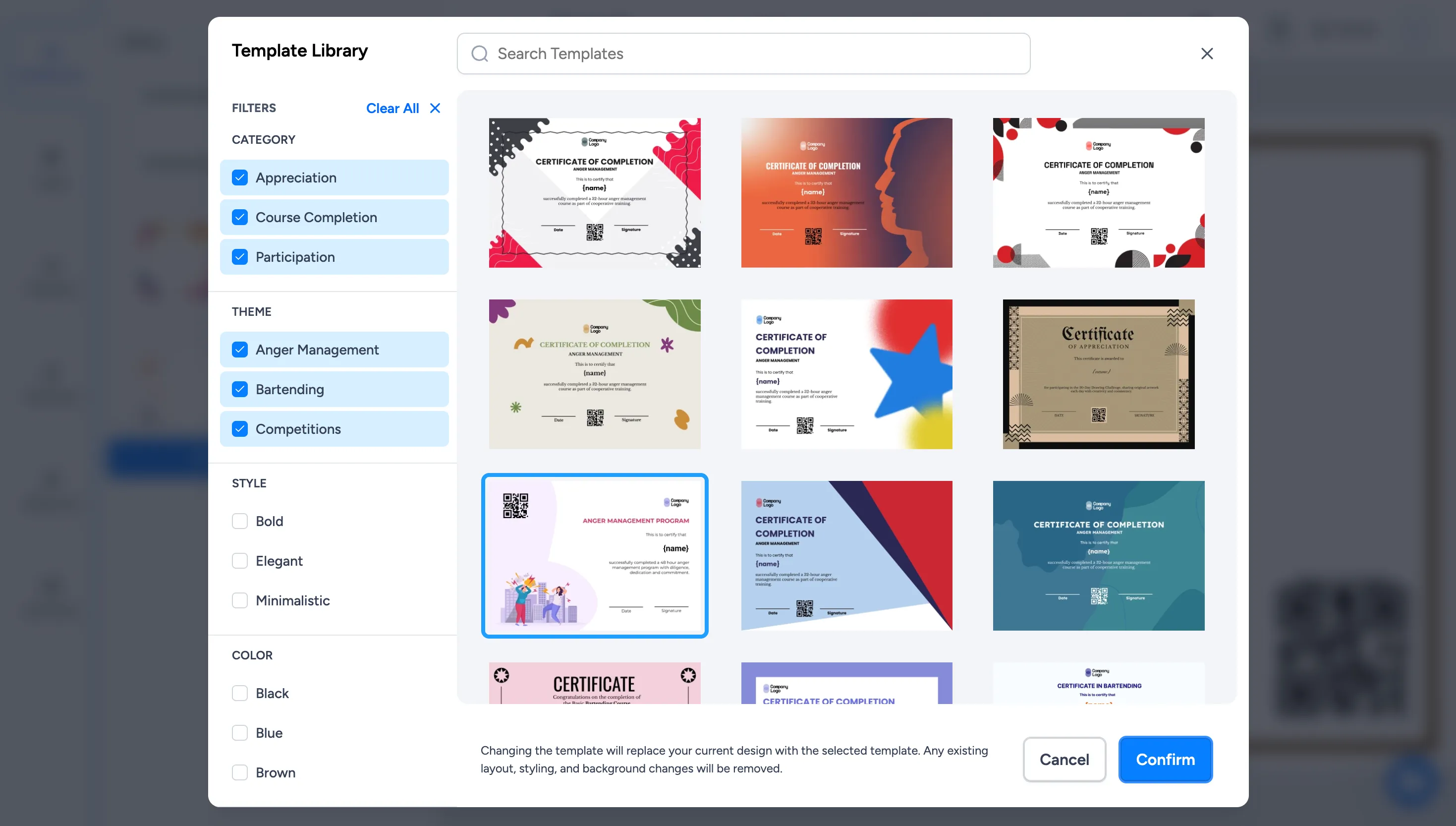
- Open your credential design. Pick one of Wauld's 1000+ templates or upload your own branded certificate.
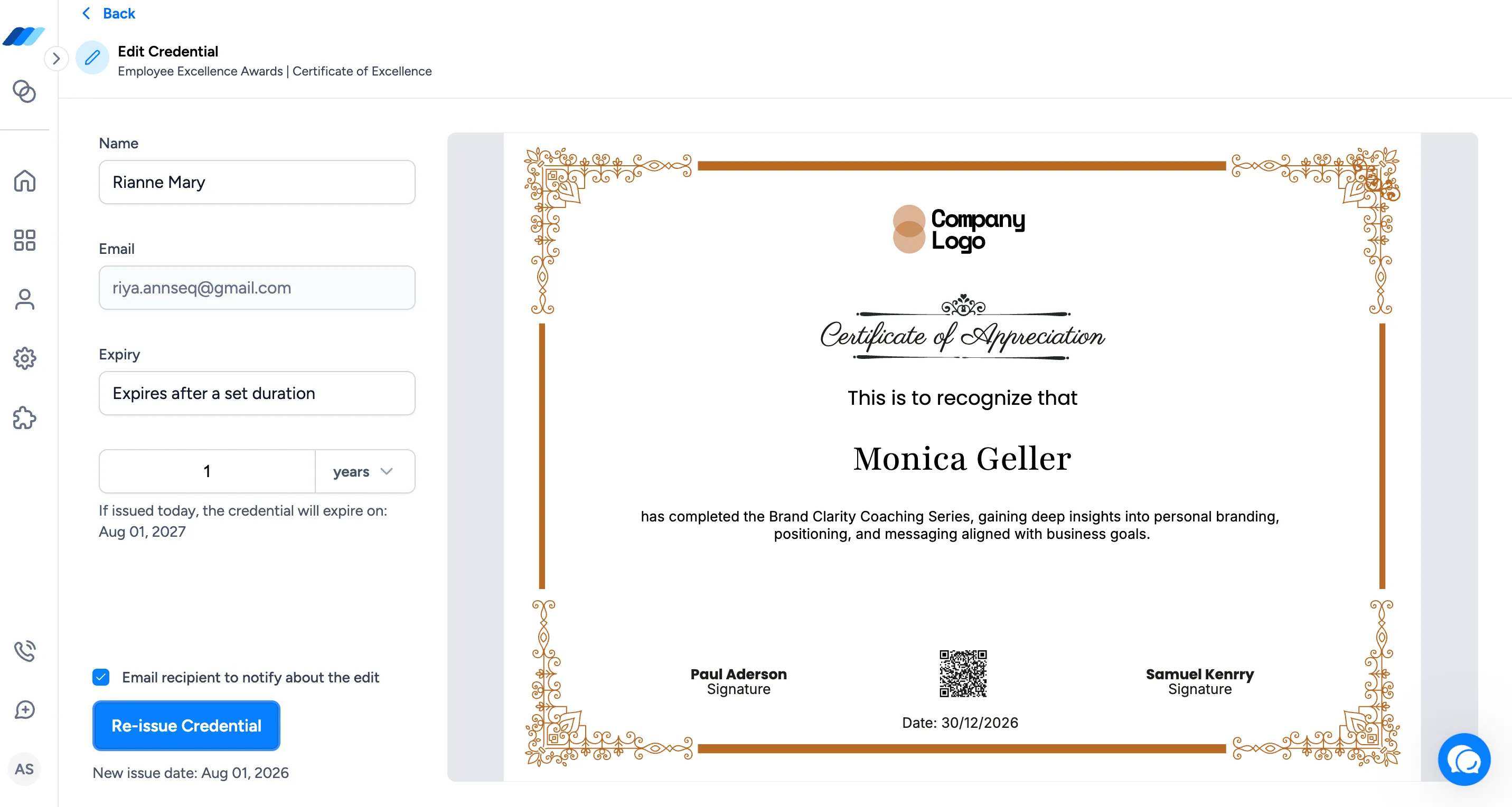
- Add the expiry date. Set the validity period on the credential itself, so every recipient in a batch inherits it.
- Schedule your reminders. Wauld sends multiple automated reminders rather than one, so recipients have real time to renew.
- Track, then reissue or void. The Track dashboard shows expiration statuses across every issued credential, alongside opens, shares, and LinkedIn additions. When someone renews, reissue with a fresh date. Otherwise, void it.
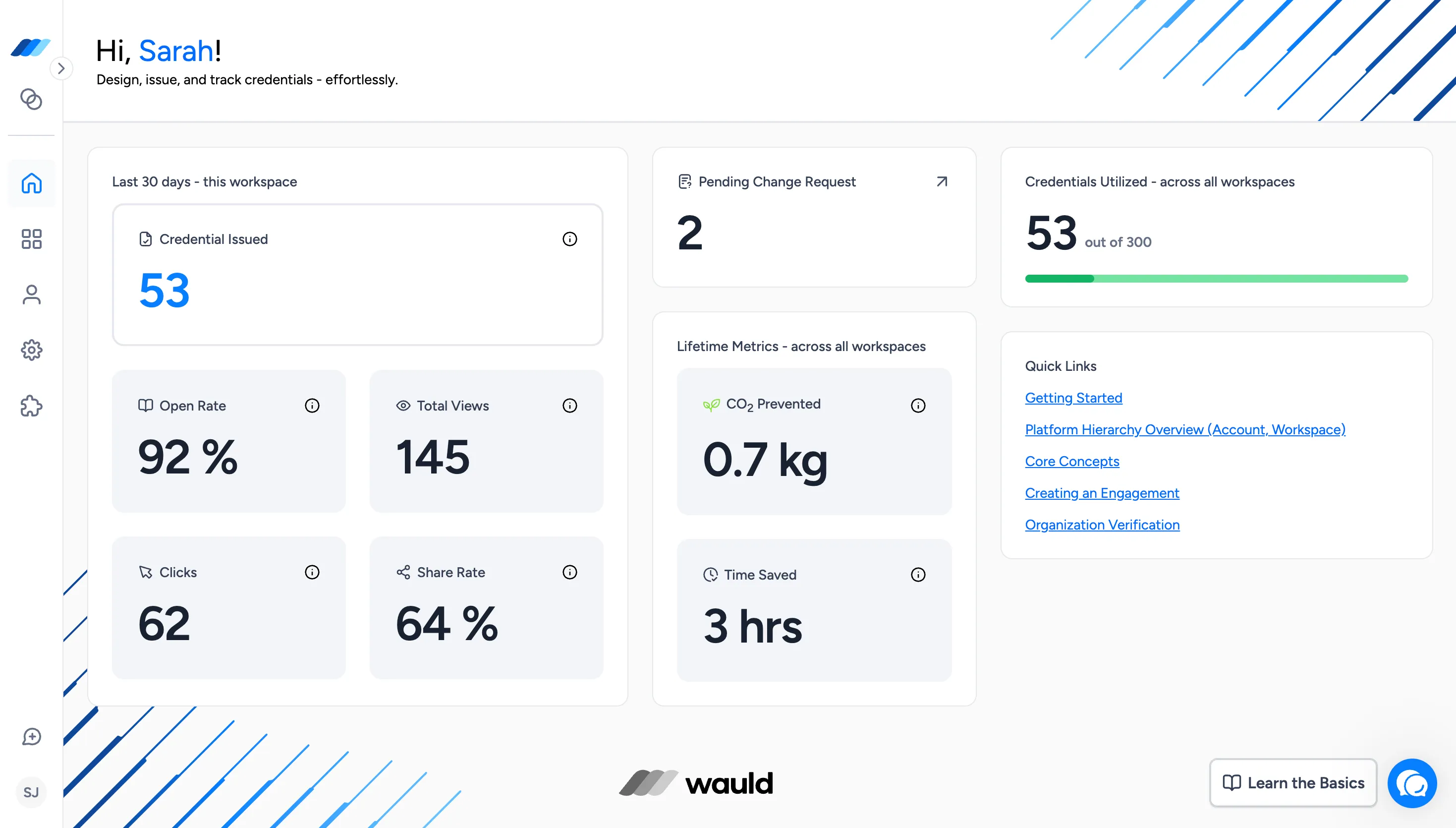
Wauld credentials comply with Open Badges 3.0, so expiry stays intact wherever the badge travels, including a recipient's credential wallet. That is the point of digital credential management: design, issue, track, remind, and renew in one place.
Start managing certificate expiry properly. Create your free Wauld account.
Conclusion
Certificate expiry feels like extra work until you see what it protects. It keeps your credentials honest, gives employers a reliable signal, and gives past learners a reason to come back.
The mechanics are simple. Set the date at design time. Make the status visible. Send reminders in a series. Give people a path to renew. Then track it from one place. Get that right, and certificate expiry management becomes one of the more dependable parts of your digital credential management program.
Frequently Asked Questions
What happens when a digital certificate expires?
The credential is marked as expired but does not disappear. It still shows what the person achieved, and it remains verifiable. However, anyone checking it sees that it is no longer current. With Open Badges 3.0, expiry is part of the credential's data, so verification tools report the status automatically.
How to check certificate expiry?
Open the credential's verification link or scan its QR code. The verification page shows the issue date, the expiry date, and the current status. Recipients can also check expiry dates in their credential wallet. Meanwhile, issuers see the full picture from a dashboard rather than checking credentials one at a time.
Does a Coursera certificate have an expiry date?
No. Coursera course and Specialization certificates do not expire, and they stay in your account once earned. Although there are time limits on finishing a paid course, the certificate itself carries no expiry date. Professional certifications from bodies like PMI or the AHA differ, because those require periodic recertification.
Does a food safety certificate expire?
Yes, although the period varies by program and jurisdiction. A ServSafe Food Handler certificate is commonly valid for three years, whereas the Food Protection Manager certification runs longer. State and local health departments can set shorter windows, so confirm your area's rule before setting a certificate expiration date.
Is an expired certificate the same as a revoked one?
No. An expired certificate reached its planned end date and needs renewing. A revoked or voided certificate was invalidated by the issuer, usually because it was issued in error or the holder no longer meets the requirements. Using the wrong one sends the wrong message.
When should I send certificate renewal reminders?
Send more than one. A schedule of 90, 30, and 7 days before the certificate expiration date works well for multi-year cycles, with a final note on the day itself. Shorten the intervals for annual credentials. Every reminder should link directly to the renewal step.
Can I set expiry dates on certificates in Wauld?
Yes. You can set expiry dates, monitor expiration statuses from a single dashboard, and send multiple automated reminders so recipients renew on time. You can also reissue a credential with a new date, or void it if it should no longer stand.
Do expired certificates still show on LinkedIn?
The credential stays on the profile. However, because Wauld credentials are verifiable, anyone following the verification link sees the current status. That is why expiry dates are worth setting: they keep the public record accurate without you policing anyone's profile.
Track expiring credentials in one dashboard
Set expiry dates and let automated reminders do the chasing. Wauld is free to start, with no onboarding fees and over 1,000 templates.