Automatically Generate Certificates from Superhuman Docs

You wrapped the cohort on Friday. Everyone left buzzing. And by Sunday afternoon? You were still hunched over a design file, typing names in one at a time.
If that stings a little, you are in good company. Every coach and trainer I know has lost a weekend exactly like it. Here is the part that surprises people, though: your tools did not let you down, they were simply never built for this last step. On July 8, 2026, Coda became Superhuman Docs. If you work in it every day, you barely noticed the switch: your tables stayed put and your automations kept running just as before. The one thing it still does not do, and never set out to do, is hand your clients a finished certificate.
I learned that the hard way after a three week workshop. Twenty two happy participants, and one whole evening of my life vanishing into exported PDFs. If you are trying to scale a coaching practice without burning out, that is exactly the kind of task worth handing off for good.
What Changed in Superhuman Docs
Most of the rebrand is cosmetic, which matters when you build automations on top of it.
| Area | Status after the rebrand |
|---|---|
| Docs, tables, formulas, Packs | Unchanged |
| Automations | Unchanged |
| Old coda.io links | Redirect to docs.superhuman.com |
| API endpoints | coda.io/apis/v1 still works |
| Zapier listing | Renamed to Superhuman Docs |
| Zapier triggers | Same two: New Row and Updated Row |
One thing to actually do: search Zapier for Superhuman Docs, not the old name. Same app, new label. Your Packs and data sources keep syncing, and there is a new Mac desktop app.
Why Docs AI Cannot Certify
The rebrand added Docs AI, an AI-powered chat panel that drafts content and builds tables. Useful for planning a curriculum. It cannot issue a credential.
Here is the distinction. AI writes and structures information. A certificate is not information. It is a claim about your client that a stranger must verify months later.
The rest of the Superhuman suite has the same limit. Superhuman Mail is an email app, Grammarly handles AI writing, and Superhuman Go is an AI assistant. None run a verification page. Your doc can even reach outside AI tools through MCP, including ChatGPT and Claude, and still produce no certificate.
So your doc knows Sarah finished on Tuesday. It has nowhere to send that news.
Why Certificates Grow Coaching Businesses
For a coach, a certificate is not admin. It is marketing your clients do for you.
- Referrals. A client who shows off a credential on LinkedIn puts your program in front of their whole network.
- Credibility. A verifiable link beats a PDF anyone could edit, which matters for independent practitioners.
- Completion rates. A badge per module, not just at the end, keeps a cohort moving.
- Your brand. Your logo and signature on something people keep for years.
Wauld's coaches and creators page goes deeper.
Where Wauld Fills the Gap
Wauld handles the credentialing half. Your doc decides who earned it. Wauld decides what it looks like and proves it is real.
| What you do manually today | What Wauld does automatically |
|---|---|
| Retype names into a design file | Pulls data straight from your row |
| Export PDFs one at a time | Generates each credential at issuance |
| Email attachments individually | Sends a branded email to your client's inbox |
| No proof of authenticity | Adds a unique ID and public verification page |
| One template per program | One template, dynamic fields for every cohort |
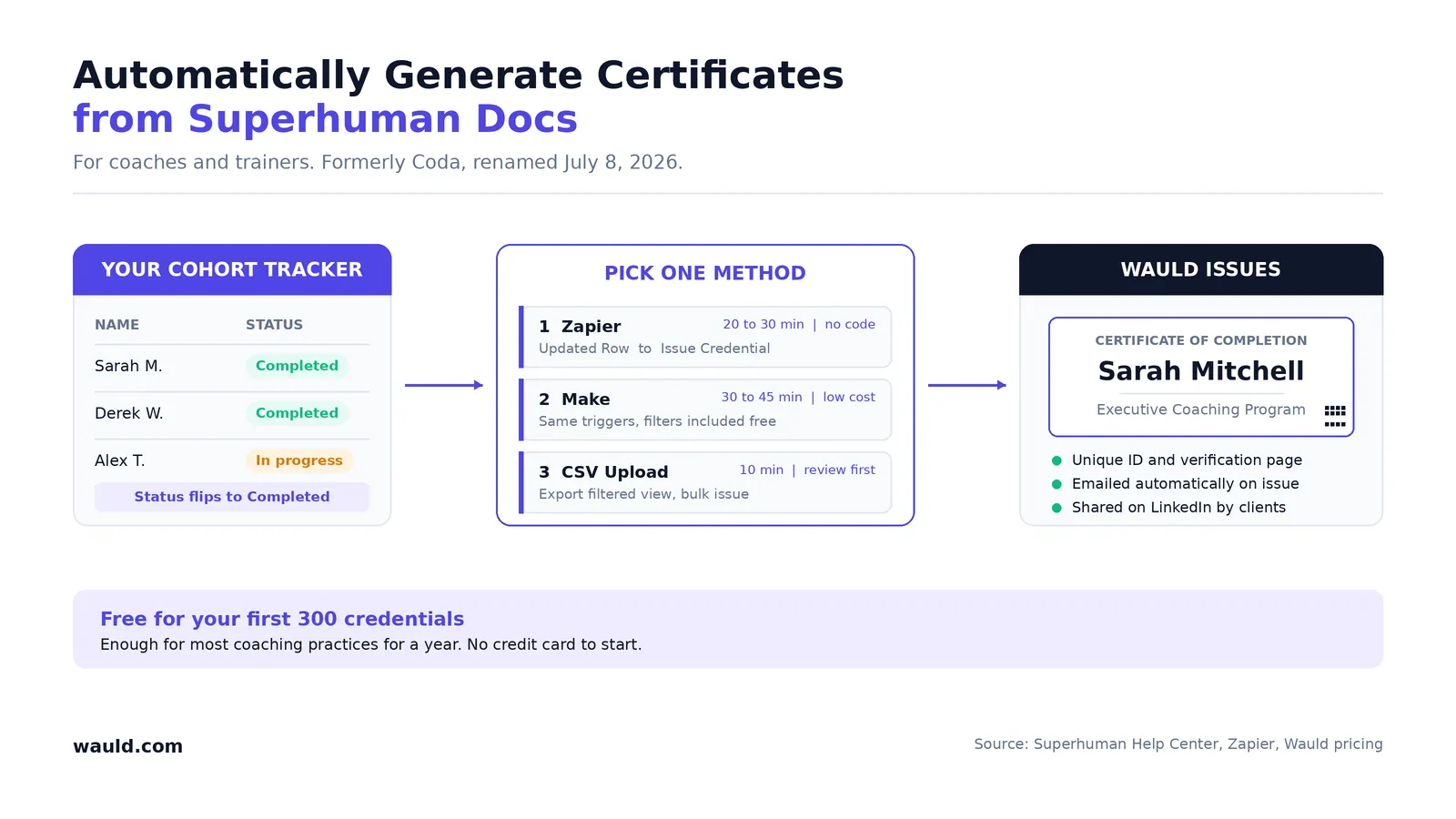
Your cohort tracker stays the single source of truth. Wauld reads from it, removing the repetitive tasks without you switching tabs all evening. The free plan covers 300 credentials, every integration included. See Wauld pricing.
Three Ways to Automate Certificates
Each adds one piece to your tech stack. Pick the workflow that matches how you work.
Zapier for No Code Workflows
Best for: most coaches and trainers.
The Superhuman Docs app on Zapier offers two triggers, New Row and Updated Row. Wauld offers an Issue Credential action. Zapier links thousands of apps, from Salesforce to Jira, but only a credentialing tool issues the certificate.
Use Updated Row, since cohort trackers flip a Status column at completion.
- In Wauld, open Integrations, select Zapier, and click Generate Token.
- In Zapier, set the trigger app to Superhuman Docs, event Updated Row.
- Add a filter so the Zap continues only when Status equals Completed.
- Set the action to Wauld, event Issue Credential, then pick your workspace, engagement, and document.
- Map Full Name and Email, plus fields like Program Name or Score.
- Test with your own email, then publish.
Skip step 3 and everyone gets a certificate, including people still halfway through. Ask me how I know.
Our Zapier and Wauld guide covers each screen.
Two things to plan for. The row change trigger ignores formula columns, so use a plain helper column. And Zapier's free tier caps Zaps at two steps, so that filter moves you to a paid plan.
Make for Cheaper Multi-Step Automation
Best for: solo coaches watching every subscription.
Make lists the same row triggers, and Wauld connects to it natively on every plan. The logic matches the Zapier recipe above.
Filters and routers sit inside one scenario instead of pushing you up a pricing tier. Pabbly Connect works the same way. Same result, lower running cost, slightly rougher setup.
CSV Upload for Past Cohorts
Best for: one off workshops, and everyone who finished before today.
- Filter your table to participants who completed.
- Hover the table, open Options, then the three-dot menu, and choose Download as CSV.
- Upload the file to Wauld and map the columns.
- Preview a sample, then issue the batch.
This is the only method that covers your backlog, since automations fire on new activity only. Our bulk certificate guide walks through it.
If you have a developer: there is no built-in outbound HTTP action. To POST straight to Wauld's custom trigger URL, build a Pack or script against the Docs API. Most coaches never need this. Enterprise plans add the controls larger training providers ask for.
Comparing the Three Integration Methods
| Zapier | Make | CSV Upload | |
|---|---|---|---|
| Setup time | 20 to 30 min | 30 to 45 min | 10 min |
| Skill needed | None | Low | None |
| Review first | No | No | Yes |
| Past cohorts | No | No | Yes |
| Filters included | Paid plan | Free tier | Not needed |
Unsure? Run a CSV batch for your last cohort this week, then streamline workflows with a Zap before the next one starts.
Start Issuing Certificates Today
The rebrand changed your logo. Your doc still tracks real people finishing real work with you.
The missing piece is turning those rows into something clients can share and prove. One afternoon, once, then it runs for every cohort after.
Create a free Wauld account, design one certificate, and connect your tools. Your first 300 credentials cost nothing, which covers most coaching practices for a year.
Then go enjoy your Sunday. I wish I had.
Turn your next completed row into a real credential
No onboarding fees, 1,200+ templates, and verifiable delivery. Your first 300 credentials are free.
FAQs on Superhuman Docs Certificates
Is Coda gone, and do my automations still work? Nothing was removed. Your tables, Packs, formulas, and automations work as before. Old coda.io links redirect to docs.superhuman.com, so anything you shared with clients still opens.
Can Superhuman Docs send certificates on its own? No. There is no certificate designer, verification page, or credential delivery in the product, and the AI chat panel cannot create one. To automatically generate certificates from Superhuman Docs, connect a platform like Wauld using Zapier, Make, or CSV upload.
Do I need technical skills to set this up? No. The Zapier and CSV routes are both no code. If you can build a table and follow six numbered steps, you can issue certificates automatically. Budget one afternoon for setup.
Can I brand certificates with my own logo and colors? Yes. Wauld includes 1,200+ templates you can customize with your logo, colors, and signature. Dynamic fields fill in each participant's details, so one design serves every cohort.
Is this worth it for a small coaching cohort? Often yes, because the value is not only saved time. A credential your clients share brings referrals a static PDF never will. The free plan covers 300 credentials, so test it on one cohort at no cost.
Can I issue certificates for people who finished earlier? Yes, through CSV upload. Export a filtered view of past completions and bulk issue them in Wauld. That clears your backlog before live automation starts.