What is an Online Certificate Maker? The Complete guide

What Is an Online Certificate Maker?
An online certificate maker is a browser-based design tool that empowers anyone, including educators, trainers, HR managers, event organizers, and online course creators, to design, customize, and download professional certificates without any prior design experience. Unlike traditional design software such as Canva or Adobe Illustrator, a dedicated free online certificate maker is purpose-built for certificates, offering specialized certificate templates, automated name-filling features, and one-click PDF generation.
A modern certificate generator typically includes a visual editor, a library of free certificate templates, font customization, logo upload capabilities, and multi-format export (PDF, PNG, SVG). Many platforms also support certificate automation, allowing you to generate certificates in bulk from a spreadsheet or connect via API to issue certificates automatically when conditions are met, such as course completion or event attendance.
In short: An online certificate maker bridges the gap between professional certificate design and accessibility. You don't need Canva, Photoshop, or any offline tool. Just open your browser, choose a template, and create your certificate for free in minutes.
The best certificate maker tools go beyond static design. They allow you to send personalized certificates directly to recipients by email, embed QR codes for verification, generate certificates instantly from data, and even integrate with learning management systems (LMS) like Moodle, Video Conferencing Platforms like Zoom, Survey tools like Google Forms, Community Platforms like Circle, CRMs like Salesforce, and automation platforms like Zapier, Make or Pabbly.
Why Use a Free Online Certificate Maker Over Traditional Tools?
Traditional design tools like Canva are versatile, but they weren't purpose-built for certificate creation. While Canva offers some certificate design features, a dedicated free online certificate maker outperforms it when it comes to speed, automation, certificate-specific templates, and bulk generation. Here's why thousands of organizations are switching to dedicated certificate generators:
- Create Certificates Instantly Generate certificates instantly from pre-built templates with no design setup and no delays.
- Design Custom Certificates Full drag-and-drop control over fonts, colors, logos, and layouts to create custom certificates that match your brand.
- PDF Certificates Download high-resolution PDF certificates print-ready at 300 DPI, pixel-perfect every time.
- Certificates in Bulk Upload a CSV and generate thousands of certificates automatically in minutes.
- API Integration Use the certificate generator API to automate certificate creation inside your platform.
- Send Certificates Send certificates directly to recipients via email with a single click or fully automate delivery.
How to Create a Certificate Online in Under 5 Minutes
Creating professional certificates has never been easier. Follow these simple steps to create your certificate for free using our online certificate maker:
Step 1: Choose a Template Browse our wide range of templates, from academic certificates and professional certificates to award certificates and completion certificates. Choose a template that fits your purpose, or start from a blank canvas.
Step 2: Customize Your Certificate Design Use the drag-and-drop editor to customize your certificate. Change the font, upload your logo, adjust colors, add a signature, and personalize the text. Design custom certificates that reflect your brand identity with no design experience needed.
Step 3: Add Recipient Details Enter the recipient's name, the date of issue, the reason for recognition, and any other personalized information. For bulk certificate generation, upload a spreadsheet to fill in individual certificates automatically.
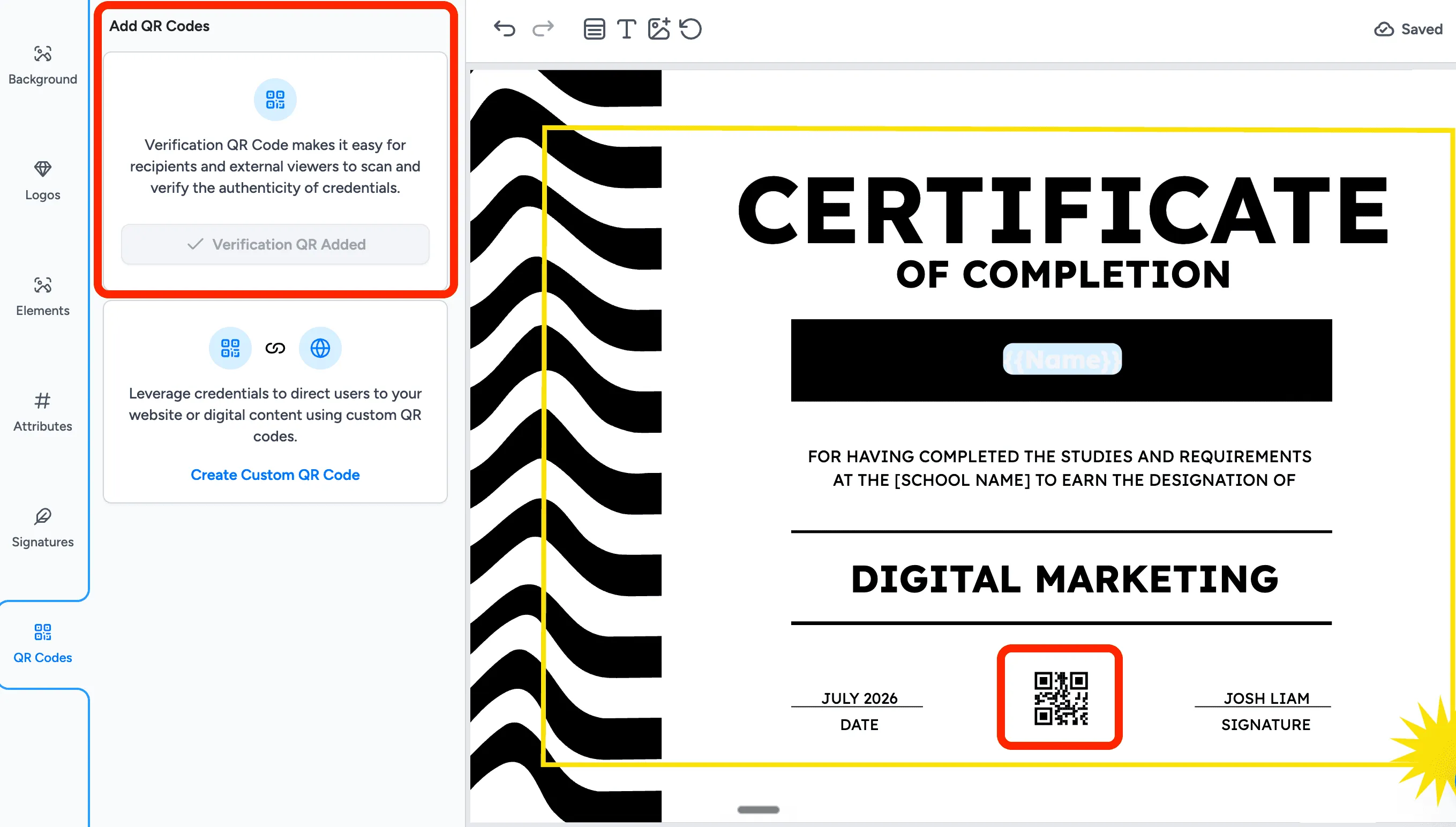
Step 4: Add a QR Code for Verification (Optional) Embed a QR code on your certificate so recipients and verifiers can scan and validate digital certificates online in seconds. QR codes add an extra layer of credibility to your certification.
Step 5: Download or Send Certificates Download your certificate as a PDF or PNG, print the certificate on quality cardstock, or send certificates directly to recipients by email. You can also share online via a link or embed the certificate on your platform.
Pro Tip: With our certificate maker tool, you can create and download certificates for free for individual use, or upgrade to generate certificates in bulk and send certificates automatically at scale.
Certificate Templates: A Wide Range for Every Need
Our free certificate maker includes a curated library of 1,000+ free certificate templates designed by professional designers. Each certificate template is fully customizable. Change the layout, swap the font, update the color scheme, or upload your logo to create branded certificates that feel uniquely yours.
Whether you're looking for a minimalist professional certificate template, a vibrant award certificate for students, an elegant course completion certificate, or a bold sports certificate of recognition, our free templates have you covered. Every certificate template is available in multiple aspect ratios (landscape and portrait) and can be exported as a high resolution PDF or PNG. You can check out our template gallery below.
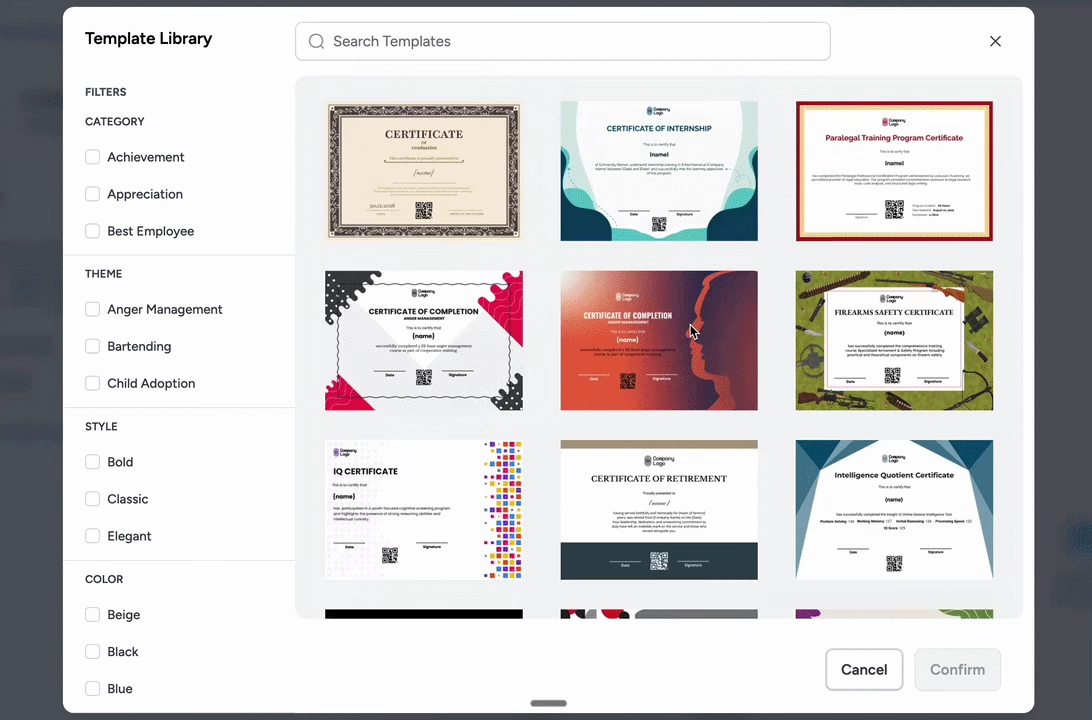
All certificate templates are free. All design templates offer additional customization, including advanced fonts, branding, QR code and white-label branding for organizations issuing certificates at scale.
Unlike generic design tools, our certificate templates are built with the right structure out of the box, with clear placement for the recipient's name, issuing authority, date, and signature. This means you spend less time adjusting layout and more time creating certificates that make recipients proud. Moreover, all our certificate templates create certificates which are Open Badges 3.0 Complaint.
Font Matters Choose a font pairing that conveys authority. A serif display font works well for the title, and a clean sans-serif font suits the supporting details. Our editor includes 50+ font options.
Brand Consistency Upload your logo and apply your brand colors across all certificate templates to create branded certificates that reinforce your identity.
High Resolution Always download at high resolution (300 DPI) to ensure certificates look crisp whether displayed on screen or printed on A4 or letter-size paper.
File Formats for Downloading and Printing Certificates
A great certificate maker tool gives you flexible export options. Depending on whether you're printing certificates or distributing digital certificates online, you'll need different formats. Here's a complete breakdown of the file formats supported by our online certificate generator:
PDF: Best for printing, formal distribution, and archiving. 300 DPI high resolution. Best for printable certificates; preserves fonts and layout perfectly. Download your certificate as a PDF for professional use.
PNG: Best for digital sharing, social media, and LMS embedding. Up to 300 DPI. Supports transparent backgrounds. Ideal for digital certificates shared online or embedded in web platforms.
JPEG: Best for email attachments and online display. 72 to 150 DPI. Smaller file size. Good for certificates shared via email when file size matters.
SVG: Best for large-format print and scalable digital use. Infinitely scalable, making it perfect for high-resolution banner printing or large display certificates.
DOCX: Best for further editing in Microsoft Word. Useful for teams that need to make final edits in a word processor before printing.
Recommended: For most use cases, download your certificate as a PDF for printing or attach the PNG for digital delivery. For bulk certificate generation, our platform exports a ZIP file containing individual certificates in your chosen format, ready to send certificates to each recipient.
No Design Skills Needed: Create Professional Certificates Without Design Experience
One of the most common questions people ask is: "Do I need design skills to create custom certificates?" The answer is an emphatic no. Our free certificate maker is purpose-built for people with zero design background. Unlike complex tools that have steep learning curves, a dedicated certificate maker tool removes every design barrier between you and stunning certificates.
Here's how we make it possible to create professional certificates without design skills:
- Visual Certificate Editor: Move, resize, and rearrange any element on your certificate with simple drag-and-drop interactions. No code, no technical knowledge needed.
- Pre-designed certificate templates: Every design template comes pre-composed with professional typography, spacing, and layout chosen by expert designers.
- Font pairing done for you: Each free certificate template already features curated font combinations. You can swap the font from 50+ options if you want, but the default pairing already looks beautiful.
- One-click color customization: Apply your brand colors or choose from pre-built color palettes with a single click. Customize the entire certificate design in seconds.
- Smart layout guides: Alignment and spacing guides snap elements into place, ensuring your certificate always looks polished even if you've never designed anything before.
- Upload your logo instantly: Upload your logo in seconds and it's automatically placed on your certificate in the optimal position.
Compared to Canva: While Canva is a powerful general-purpose design tool, Wauld's certificate maker is purpose-built for certificate creation, which means better certificate templates, smarter automation, bulk generation, and QR code verification out of the box. No design experience needed at any step.
What Information Should Be Included on a Certificate?
A well-structured certificate communicates credibility and inspires pride in the recipient. Whether you're creating a course completion certificate, an award certificate, or a professional certification, every certificate should include these key elements:
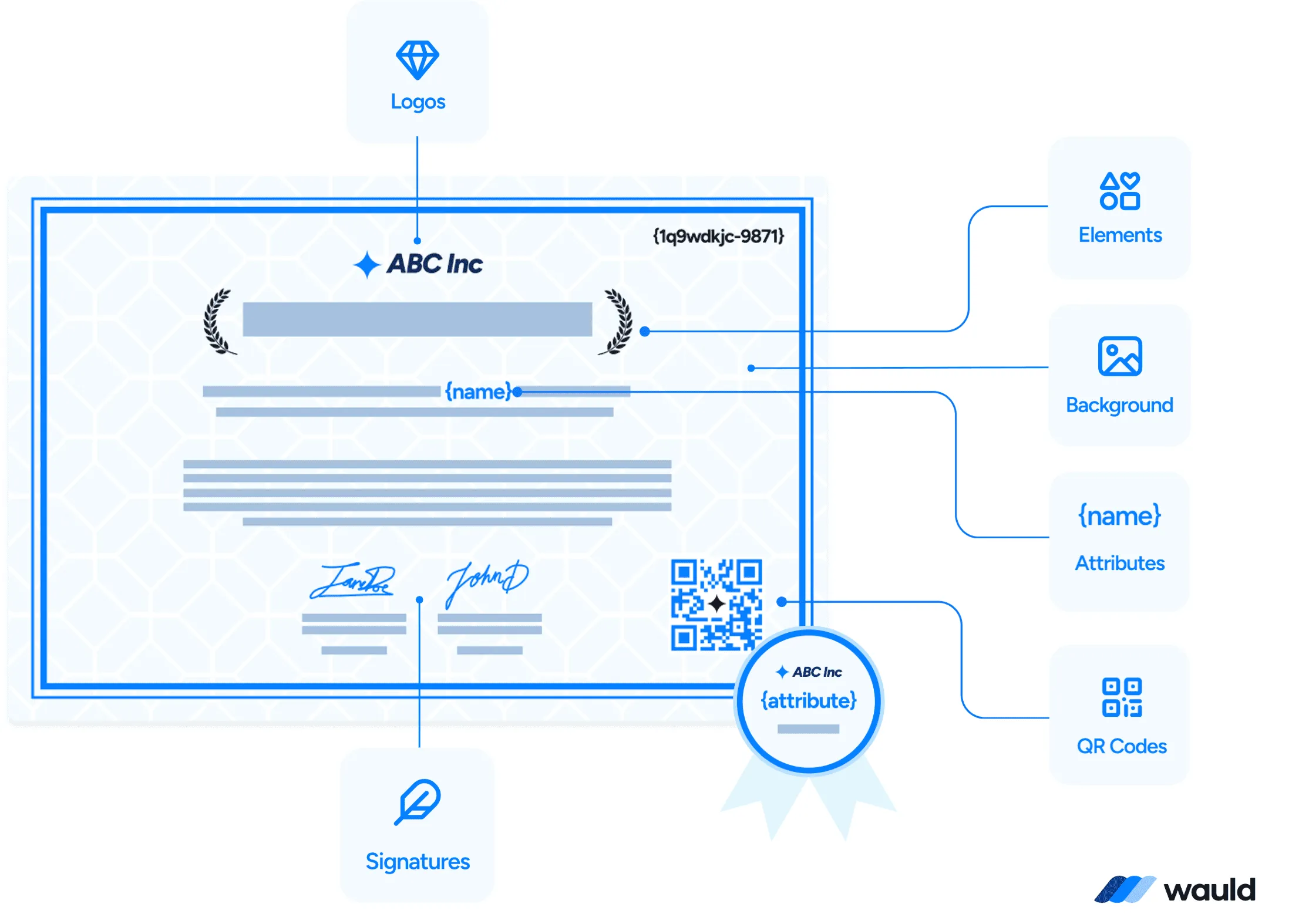
_ Wauld Certificate Skeleton
_
- Certificate Title: Clearly state what kind of certificate it is, such as "Certificate of Achievement," "Certificate of Completion," "Certificate of Recognition," or "Award Certificate." The title sets the tone and purpose immediately.
- Recipient's Full Name: The recipient's name should be the most visually prominent element, displayed in a large, elegant font that communicates importance. For personalized certificates and individual certificates, make sure the name is spelled accurately.
- Reason for Award: A brief line explaining the achievement, for example "for successfully completing the Advanced Python Course," "in recognition of outstanding leadership," or "for volunteer service completed." This gives the certificate context and meaning.
Include the total number of CPD hours, credits, or CUEs (Continuing Units of Education) earned, as professional bodies and regulatory authorities require specific CPD hours/CUEs for license renewal, re-certification, or maintaining professional standing. 4. Issuing Organization Name and Logo: Your organization's name and logo are essential for branded certificates. Upload your logo to establish authority and make your certificate instantly recognizable as an official credential. 5. Date of Issue: Include the date the certificate was issued. This is especially important for professional certificates, certifications, and compliance certificates where the validity period matters.
PInclude the date the certificate expires. This is especially important for professional certificates, certifications, and compliance certificates where the validity period matters. 6. Authorized Signature A handwritten or digital signature from the issuing authority, such as a teacher, CEO, course instructor, or event director, adds legitimacy and a personal touch to every certificate. 7. Certificate ID and QR Code (Highly Recommended): Add a unique certificate ID and a QR code for instant online verification. Recipients can share their certificate online, and employers or institutions can verify authenticity by scanning the QR code, making your digital certificates truly trustworthy.
Pro Tip: When selecting a certificate maker to issue credentials at scale, check if the platform allows recipients to request changes to their certificate themselves (DIY). In practice, at least 2-5% of recipients typically approach the issuer to request changes, so this self-service capability significantly reduces the administrative burden on the issuing organization, saving time and resources.
Types of Certificates You Can Make Online
Our online certificate maker supports a comprehensive range of certificate types across every industry and use case. Whether you need to create certificates online for education, corporate training, sports events, volunteer recognition, or professional certification, our certificate generator has the right template and tools for you. Here are the most common certificate types:
- Academic Certificates: Diplomas, honor roll, graduation, subject excellence, and scholarship certificates for schools and universities.
- Professional Certificates: Employee of the month, training completion, work anniversary, and professional development certificates for organizations.
- Course Completion: Online course completion certificates for eLearning platforms, bootcamps, and continuing education programs.
- Award Certificates: Competition winners, best-in-class recognition, and leadership award certificates for any occasion.
- Sports and Events: Marathon finisher certificates, tournament participation, and sports achievement certificates.
- Volunteer Certificates: Community service, nonprofit volunteer hours, and charity contribution certificates of recognition.
- Compliance and Safety: Safety training, health certification, first-aid, and regulatory compliance certificates for workplace use.
- Membership Certificates: Professional association, club enrollment, and community membership certificates.
- Healthcare and CPR: Medical training, CPR certification, and healthcare compliance certificates for regulated industries.
- Appreciation Certificates: Customized certificates for recognizing contributions, loyalty, and exceptional service across any sector.
- Workshop Participation: Conference attendance, seminar participation, and workshop completion certificates for events.
No matter what type of certificate you need to create, our free certificate maker gives you the design tools, templates, and automation features to design certificates quickly and easily and issue certificates to recipients at any scale.
Generate and Send Certificates in Bulk: Create Thousands of Certificates Automatically
Manually creating individual certificates for hundreds or thousands of recipients is time-consuming and error-prone. Our certificate generator solves this with powerful bulk certificate generation. Whether you need to make 50 certificates for a workshop or create thousands of certificates for an online course platform, our bulk tools make it fast, accurate, and effortless.
Here's how bulk certificate creation works:
- Upload a spreadsheet: Import a CSV or Excel file containing recipient names, dates, and any personalized fields. Our system maps each row to an individual certificate automatically via dynamic attributes.
- Preview before generating: Review a sample of your customized certificates before committing to the full batch, ensuring every certificate looks perfect.
- Generate certificates instantly: Click generate and watch our certificate generator create multiple certificates simultaneously, hundreds in seconds and thousands in minutes.
- Download certificates: Download all certificates as a ZIP file containing individual PDF certificates or PNG files, ready for distribution.
- Send certificates automatically: Configure automatic email delivery to send certificates to each recipient immediately after generation, with certificates instantly delivered to every inbox.
Real-world use case: A coach offering online courses on Circle wanted to issue certificates to 1,200 learners within an hour. Using our bulk certificate maker and automate feature, they generated and sent certificates automatically to all 1,200 students in under 8 minutes.
Certificate Generator API: Automate Certificate Generation at Scale
For developers and organizations looking to fully automate certificate creation within their own platforms, our certificate generator API provides a powerful, flexible integration. The API allows you to programmatically generate certificates, send certificates to recipients, and retrieve certificate data, all without manual intervention.
What You Can Do With Our Certificate API:
- Trigger certificate generation automatically when a user completes a course or passes an assessment
- Generate certificates instantly and send certificates to recipients without any manual steps
- Retrieve certificate data, download links, and QR code verification URLs via REST API calls
- Integrate with Zapier or webhooks for no-code automation workflows
- Automate certificate delivery across LMS platforms, Community platforms, video-conferencing tools, CRMs, HR systems, and event platforms
- Create branded certificates dynamically using your own templates and data via API
- Scale from individual certificates to generating thousands of certificates per day via API
The API supports JSON-based requests and responses, RESTful design, and OAuth 2.0 authentication. Whether you're a solo developer building a certification feature or an enterprise integration team scaling certificate automation across multiple systems, our API adapts to your workflow.
Integration-ready: Our API integrates with Teachable, Thinkific, Moodle, Kajabi, HubSpot, Salesforce, and hundreds of other platforms through Zapier. Automate your entire certificate workflow from generation to delivery without writing complex code.
Best Practices for Stunning Certificate Design
Even with beautiful free templates and an intuitive drag-and-drop editor, a few design principles can take your certificates from good to stunning. Here are the best practices to keep in mind when you design certificates using our online tool:
Typography Hierarchy: Use a large, elegant display font for the certificate title and recipient name. Use a lighter font for supporting text. The font choice communicates the formality and prestige of the certificate.
White Space Is Your Friend: Don't clutter your certificate design. Generous white space makes certificates feel prestigious and easy to read. Less is more, especially for professional certificates.
High Resolution Exports: Always download at high resolution (300 DPI PDF). Low-resolution certificates look unprofessional when printed. A high resolution download ensures crisp text and sharp logos at any print size.
Consistent Branding: Upload your logo and apply your brand colors consistently across all certificate templates. Branded certificates reinforce your organization's identity and look more official.
Add a QR Code: A QR code transforms a static certificate into a verifiable digital credential. Recipients can share their certificate online, and verifiers can instantly confirm authenticity with no extra tools needed.
Personalize Thoughtfully: For personalized certificates, ensure every variable field (name, date, achievement) is spelled correctly and positioned prominently. Errors on certificates undermine their credibility significantly.