Ideal Printable Certificate Size, Resolution and Format

Ideal Printable Certificate Format
Do you remember the first certificate you ever received?
Maybe it was for topping your class, winning a race, or simply showing up at a summer camp. I still remember mine - the paper was thick, the ink had a slightly glossy shine, and yes, it even had a smell. Earthy & slightly musty!
Funny how a piece of paper could carry so much weight. It wasn’t just an award, it was proof that I had done something worth recognizing.
That’s the thing about certificates. They’re not just documents. They are symbols of effort, achievement, and pride. Which is why, even today, when you create certificates for your learners or employees, every design choice matters more than you think. The size you pick, the resolution you use. These aren’t just technical details. They decide whether that certificate is something people want to frame on their wall, share on LinkedIn, or tuck away in a file they never look at again.
In this blog, let’s explore how to choose the ideal dimensions, what resolution to use for crisp results, and the differences between traditional print and digital certificates.
Standard certificate sizes
Depending on where you are and how formal the award needs to be, certificates come in a few common paper sizes. Here are the ones you’ll use most often.
- US Letter (8.5 × 11 inches) – the typical certificate size in North America. It offers enough space for names, dates and logos while fitting standard printers and frames. At 300 DPI (dots per inch) the design should measure about 2,550 × 3,300 pixels for high‑quality prints.
- A4 (8.27 × 11.69 inches) – the most popular size outside of North America. Slightly narrower and longer than US Letter, it suits international frames and printers. For printing at 300 DPI, set your canvas to roughly 2,480 × 3,508 pixels.
- Oversized certificates (11 × 14 inches or 16 × 20 inches) – larger formats used for diplomas, detailed announcements or when you want extra space for branding and signatures. These sizes accommodate long names or elaborate designs, but they’re less common and may require special frames.
Portrait vs landscape:
Once you pick a size, decide whether the certificate should be taller than it is wide (portrait) or wider than it is tall (landscape). Portrait layouts feel more traditional and are ideal for text-heavy documents, whereas landscape orientations give you room for wide logos or decorative borders. Your choice depends on the content and how recipients will display the certificate.
Wauld Tip: Don’t stress over choosing between portrait or landscape. With Wauld’s 600+ certificate templates, you get both styles ready to go. And if your event calls for something unique, Wauld also lets you design in custom sizes
Getting the resolution right
Resolution determines how sharp your certificate looks when printed or viewed on screen. For printed certificates, aim for 300 DPI. At this resolution, a US Letter certificate translates to roughly 2,550 × 3,300 pixels and an A4 certificate to 2,480 × 3,508 pixels. This ensures that text and logos stay crisp when printed on paper or framed.
For digital certificates shared online, you can work at the same high resolution to future‑proof the design, then export scaled versions for web or email. High‑resolution files look professional even when zoomed, while smaller versions load quickly on mobile devices. Pay attention to file size: if your PDF or image is too large, recipients may struggle to download it. Many designers export a full‑size print‑ready version and a compressed digital version.
Choosing the best format
After you select your size and resolution, think about how you’ll deliver your certificates. Here’s a comparison of Print Certificates, PDF Certificates and Digital Credentials issued via Wauld.
Print certificates and PDFs share several limitations: they require manual printing, signing, scanning and emailing, making the preparation process time‑consuming. PDF files also lack a security code and can easily be edited or counterfeited, so authenticity relies on physical signatures or trust. Once issued, these documents cannot be updated without creating a new file, and recipients must store physical copies or manage standalone files.
Digital credentials, in contrast, are created and issued through automated platforms. They can’t be altered once issued and are protected by cryptographic methods; verification is performed instantly via tamper‑proof URLs or QR codes. Digital credentials are easily shareable on social networks or via email, can be updated or revoked by the issuer when needed, and remain accessible through cloud storage. Because of these benefits: greater security, efficiency and future‑proofing - digital credentials issued by platforms like Wauld are increasingly recommended for modern recognition and certification
Certificate Delivery Formats Compared
| Aspect | Digital Credentials (Wauld) | Print Certificates |
|---|---|---|
| Ownership & control | Issuer‑managed; credentials can be updated or revoked by the issuer | Holder‑controlled; physical copies can be misused |
| Preparation & automation | Fully automated issuance and delivery; issue hundreds of certificates quickly | Manual printing and distribution; time‑consuming |
| Security | Cannot be faked; issued on a secure platform with cryptographic safeguards connected to a credential registry | Easy to fake or alter; no cryptographic protection |
| Verification | Instantly verifiable via a unique URL or QR code; trackable and tamper‑proof | Manual validation; authenticity relies on physical signatures |
| Shareability | One‑click sharing via email or social media; includes metadata (skills, criteria) | Requires physical delivery or scanning and emailing |
| Updatability | Can be updated, revoked or modified by the issuer when details change | Cannot be updated; must reprint a new certificate |
| Durability / accessibility | Stored in the cloud; recipients can access credentials anytime via digital wallets | Paper can be lost or damaged; requires physical storage |
| Future‑proof | Designed for modern ecosystems; integrates with open standards and emerging tech | Not adaptable to new technology |
As you can see, digital credentials issued via Wauld offer advantages in security, automation and shareability that paper or PDF certificates cannot match. They provide robust verification and future‑proofing while still allowing recipients to print a physical copy if they choose.
Read about the comparison of digital credentials & PDFs here.
Final Thoughts
Your certificates are a reflection of your program or organization. Choosing an appropriate size and resolution helps your designs look polished, whether recipients print them out or view them online.
- For print certificates, stick to standard sizes (US Letter or A4) and 300 DPI resolution for crisp output.
- If you opt for PDF certificates, create both high‑resolution and compressed versions to balance quality and file size.
Finally, consider adopting digital credentials through Wauld. They combine the visual appeal of a certificate with automated issuance, built‑in verification and one‑click sharing. This modern format not only saves time but also protects the integrity of your credentials and enhances your learners’ achievements. Moreover, certificates can be easily printed by both the issuer and the recipient whenever needed, ensuring flexibility for physical copies alongside digital access.
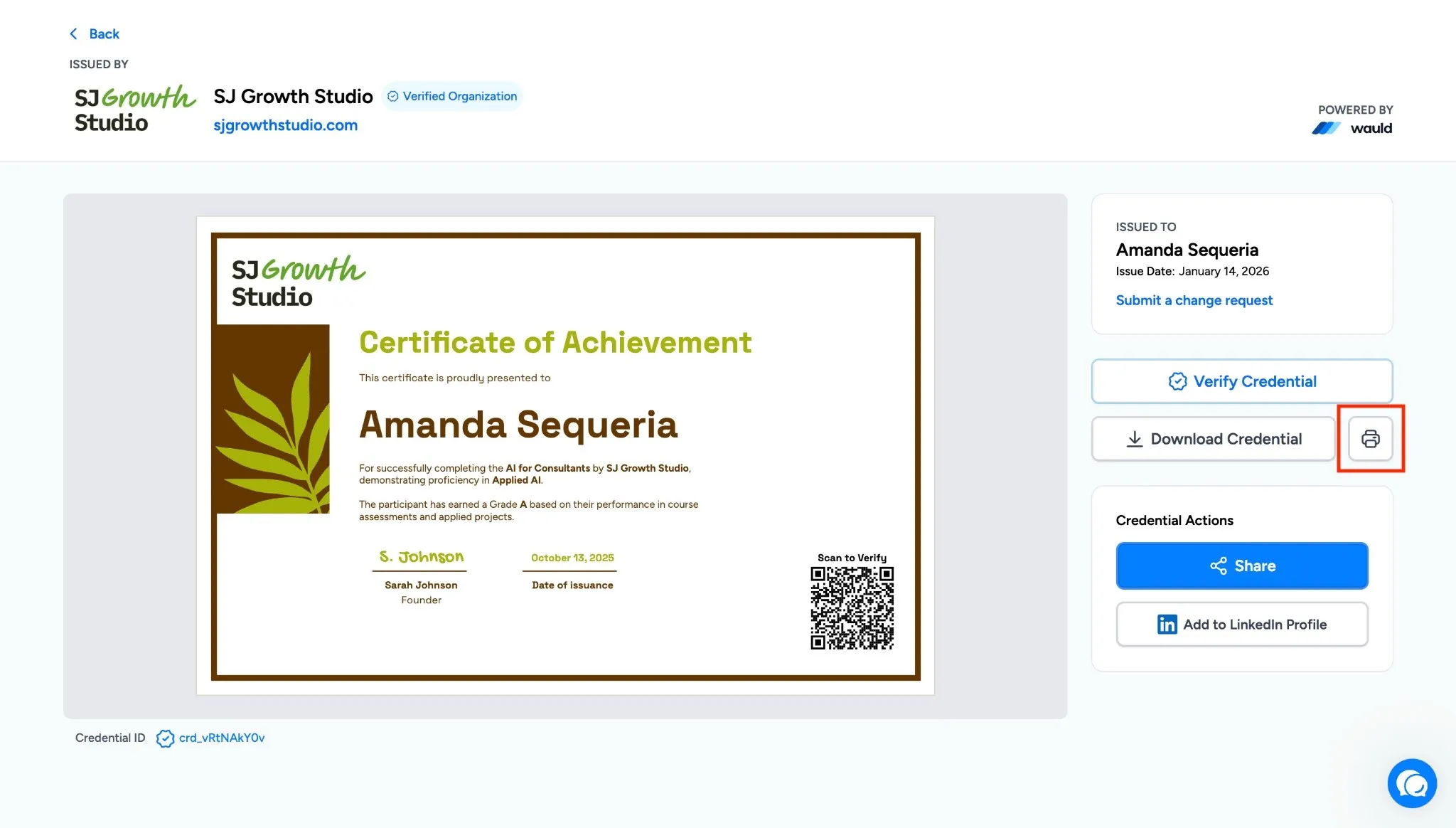
Print Certificate directly from the recipient side