LearnWorlds Certificate of Completion: How to Issue Them For Free

LearnWorlds Certificate of Completion
Your learner just finished the course. Now what? A student completes every lesson, passes the final exam, and claims their LearnWorlds certificate of completion. They download a PDF, and that is the end of the journey:
- No QR code to scan
- No public page confirming the credential is real
- No way for an employer to check it months later without emailing you directly
For internal training, that might not matter. But once you are charging for a course or building a brand learners want to show off, a PDF nobody can verify feels thin. This guide covers what LearnWorlds offers natively, where the gaps are, and four ways to connect LearnWorlds to Wauld so every completion becomes a verifiable digital credential.
What LearnWorlds Offers Natively for Certificates
LearnWorlds is a premium all-in-one elearning platform used to build and sell online courses. Anywhere in your LearnWorlds platform where learners finish a course or pass an exam, you can attach one of two certificate types, each with its own set of certificate fields.
| Certificate type | Awarded when | Notes |
|---|---|---|
| Certificate of Completion | A user finishes a course and meets the activity's requirements | Not tied to grading; confirms participation |
| Certificate of Knowledge | A user passes a graded exam | Functions like a formal test result, often built from a quiz of multiple-choice questions, with a score attached |
Setting Up a Certificate of Completion
The process of creating one is straightforward inside the course builder. Open the desired course and follow these steps:
- Go to Courses, Course manager, the course, then Contents and Course outline.
- Add a Certificate of Completion activity to the course.
- Set the award condition: only exams, or all learning activities.
- Decide on a template or upload a custom design when you edit the certificate.
- Configure the Certificate Candidate Details screen so learners submit their first and last name, using a short text field, before claiming it.
The user's name is not pulled automatically from their sign-up details; they type it in manually before claiming, so the field must be filled in correctly. Once issued, learners can download the certificate from the school's course player an unlimited number of times. One quirk worth knowing before testing: admin accounts cannot receive a real certificate, even when enrolled. Any certificate generated from an admin submission is a dummy, useful only for previewing the design.
The Default Template and Its Limits
Every LearnWorlds plan includes one built-in template that auto-fills the learner's name, course title, and completion date, with no way to customize the layout beyond that default. It is functional and free, but every school using it produces the same generic-looking certificate.
Building a custom certificate template means downloading a starter PDF, opening it in an external fillable editor such as Sejda or Adobe Acrobat Pro, and switching to editing mode to add text fields tagged with a certificate PDF key for each piece of data to populate. Some fields, like the course name, populate automatically once the matching key is added. The LearnWorlds Help Center covers this functionality in detail, but custom PDF uploads are only available in the Pro Trainer plan or higher; Starter plan users cannot access this at all.
| What it takes | Detail |
|---|---|
| Plan required | Pro Trainer ($99/month) or higher for custom templates |
| Editing tool | External PDF editor (Sejda, Adobe Acrobat Pro) |
| File constraints | Under 1MB (LearnWorlds recommends under 500KB), exact case-sensitive PDF keys |
| Output | Static PDF, no verification layer |
No Verification, Regardless of Template
Whether a school uses the default or a custom template, the certificate of completion is a static PDF, with no QR code, no unique credential ID, and no public verification page. If an employer wants to confirm a certificate is genuine, there is no built-in way to check.
LearnWorlds does offer a partial fix: native integrations with Accredible and Credly, activated under Settings, Integrations, Digital Credentials. These hand off issuance to one of those platforms instead of LearnWorlds' own template, but with friction:
- Credly requires a separate paid organization account, since the integration needs an Organization ID and API token from Credly's own settings.
- Accredible requires its own account and an API key before activation works.
- Both are built for university and enterprise-grade credentialing, with cost and setup complexity a smaller course business does not necessarily need.
Where Wauld Fits In
Wauld is a digital credential platform built to design, issue, deliver, verify, and track certificates and badges. Connected to LearnWorlds, it replaces the static-PDF workflow with one that is automated, branded, and verifiable from the first credential issued, without a separate paid Credly or Accredible account. Browse the full certificate templates gallery to see the design options on the free plan.
| Feature | LearnWorlds native certificate | Wauld digital credential |
|---|---|---|
| Templates | 1 default; custom requires Pro Trainer | 1,000+ customizable templates, free plan included |
| Custom design tool | External PDF editor required | Built-in drag-and-drop design studio |
| Verification | None | Unique credential ID, QR code, public verification page |
| Delivery | Manual download from dashboard | Automated branded email on issuance |
| Sharing | LinkedIn, Twitter/X, Facebook share buttons, no verification link attached | One-click LinkedIn sharing with a live verification link attached |
| Analytics | None | Opens, downloads, shares, verification counts |
| Setup cost | Free template, or a separate paid Credly/Accredible account | Free plan covers up to 300 credentials/year |
For creators running paid certification, coaching credentials, or compliance training on LearnWorlds, the gap is less about how a certificate looks and more about whether it stands on its own once downloaded. The same gap shows up across most LMS platforms; see how Wauld closes it for LearnDash certificates if you also run courses there.
Methods to Connect LearnWorlds and Wauld
LearnWorlds runs an unusually capable native Zapier integration, with more triggers and actions than most LMS platforms offer, which makes Zapier the fastest route, though not the only one. Treat this as a quick tutorial and pick the method matching your technical comfort; LearnWorlds experts running multiple schools often mix Zapier for new completions with CSV for cleanup.
Method 1: Zapier (Fastest, No Code)
LearnWorlds' Zapier app includes the trigger Course Completed ("Triggers when a user completes a course"), which fires the moment a learner finishes, independent of whether a certificate activity exists for it. For milestone recognition along the way, Learning Activity Completed is also available.
Setup steps:
- Create a Zap with LearnWorlds as the trigger app and Course Completed as the event.
- Connect your account using your School ID, found under Settings, School settings, School info.
- Test the trigger to confirm the payload includes the learner's name, email, and course title.
- Set Wauld as the action app, choose Issue Credential, and connect using the token from Wauld's Integrations, Zapier, Generate Token.
- Map the fields to your certificate's dynamic attributes, test, then publish.
| Pros | Cons |
|---|---|
| No code, works within the hour | Free Zapier plan caps at 100 tasks/month |
| Many triggers available natively | Multi-step Zaps need a paid Zapier plan |
Best for: Creators who want automated issuance running today with no developer involved. Zapier's free plan covers light volume; the Professional plan, needed for multi-step Zaps, starts around $19.99/month billed annually.
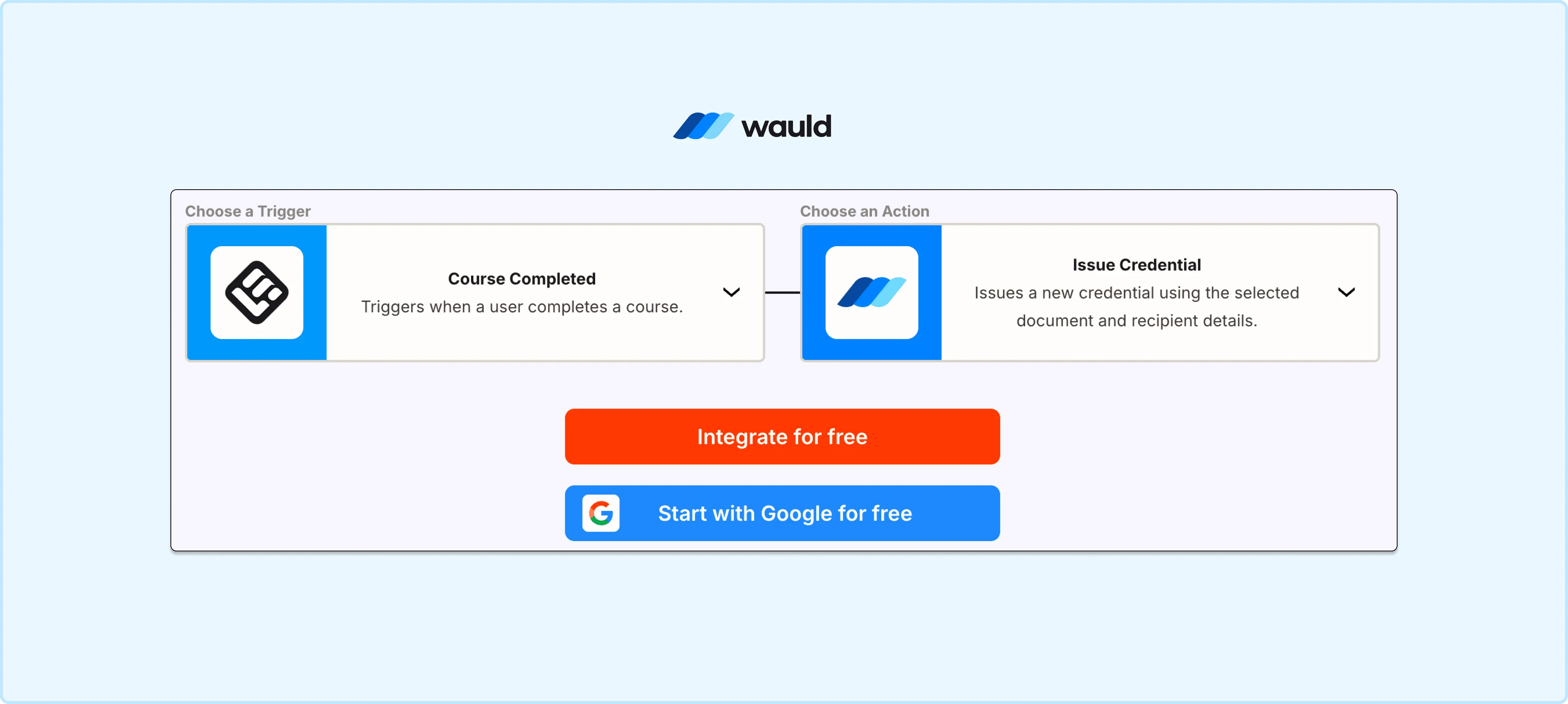
LearnWorlds course completions automatically trigger Wauld to issue secure, verifiable digital credentials through a seamless no-code integration.
Method 2: Webhooks (Real Time, No Subscription)
Wauld generates a unique custom trigger URL for each credential document. Any system that can send a POST request to that URL can issue a credential, so LearnWorlds can route data straight to Wauld without a Zapier subscription in the middle.
Setup steps:
- In LearnWorlds, go to Settings, Developers, Webhooks, and activate the relevant completion trigger.
- Copy Wauld's custom trigger URL from the credential document you want to automate.
- Paste the URL into the LearnWorlds webhook configuration and save.
- Run a test completion to confirm the payload arrives and the credential issues correctly.
| Pros | Cons |
|---|---|
| Real time, no per-task billing | Requires comfort mapping payload fields |
| No Zapier subscription required | Less plug-and-play than the native app |
Best for: Schools that want instant issuance without paying for Zapier task volume.
Method 3: Custom Trigger or API (Developer Grade)
For teams running custom enrollment logic or white-labeled, multi-school setups, Wauld's REST API and custom trigger URLs offer the most direct control. The API supports JSON requests, RESTful design, and OAuth 2.0, and any backend system can POST to a credential's trigger URL directly.
Setup steps:
- Generate an API key or copy the credential document's unique trigger URL from Wauld's dashboard.
- Build a backend job that listens for completion events from LearnWorlds, either by polling the API or capturing a webhook payload.
- Map the learner's name, email, and course data to Wauld's expected request format.
- Send a POST request to the credential's trigger URL (or call the API directly) to issue the credential.
- Log responses and add retry logic for failed requests before relying on the pipeline in production.
| Pros | Cons |
|---|---|
| Full control over data, timing, logic | Requires development resources |
| Scales cleanly to thousands of credentials per day | Not practical for non-technical admins |
Best for: Developer teams building a custom certification pipeline, or syncing multiple LearnWorlds schools into one system.
Method 4: CSV Bulk Upload (Zero Tech, Retroactive Fix)
This solves a problem automation cannot touch: learners who completed a course before any automation, or before a certificate activity even existed. LearnWorlds lets you export Certifications data in CSV or XLS format from Courses, Certificates.
Setup steps:
- Export completed learner records from LearnWorlds (name, email, course, completion date).
- Format the CSV columns to match your Wauld certificate template's fields.
- Upload the file in Wauld, map the columns, and issue the batch in one operation.
| Pros | Cons |
|---|---|
| No technical setup required | Manual export and upload each time |
| Solves retroactive and backlog issuance | Not automated for future completions |
Best for: Backfilling certificates for past cohorts, or one-off batch issuance.
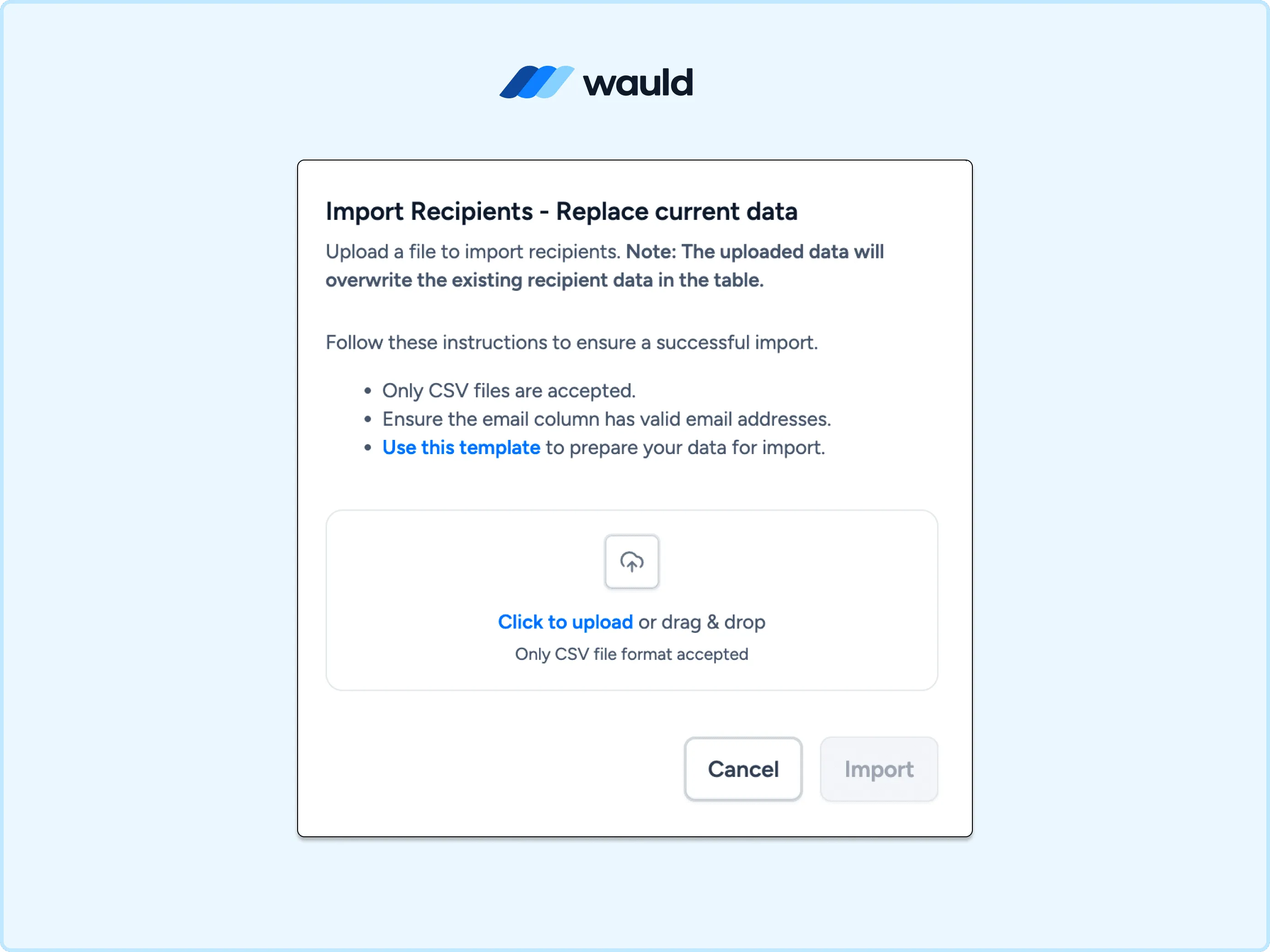
Import recipient data into Wauld using a CSV file to bulk issue verifiable digital certificates and credentials.
Comparing the Methods
| Method | Automated | Technical level | Cost |
|---|---|---|---|
| Zapier | Yes | Low | Free Zapier tier or from $19.99/month |
| Webhooks | Yes, real time | Medium | No subscription cost |
| Custom Trigger or API | Yes | High | Developer time only |
| CSV Bulk Upload | No | Low | Free |
Extended Use Cases: Badges for Milestones
A full course certificate is not the only moment worth recognizing. Wauld treats digital badges with the same automation logic, so Learning Activity Completed opens up milestone recognition without a separate workflow:
- A welcome badge at enrollment, to boost early engagement
- A per-module badge for each section of a longer course
- A track badge as learners move through a Program Path, ahead of the final certificate
These badges use the identical Zapier, webhook, or API setup described above, just pointed at a badge template instead.
Getting Started
Wauld's free plan covers up to 300 credentials per year, enough to pilot an integration before committing to a paid plan. It includes QR code and credential ID verification with a public page for every certificate, a template library of 1,000+ designs, CSV bulk issuance, and one-click LinkedIn sharing.
The Growth plan starts from $39/month for higher volume; check current tiers on the Wauld pricing page.