How to Issue CPD Certificates and Badges: A Trainer's Guide

Why CPD Certificates Really Matter
CPD certificates and badges are not decorations. They are the proof a learner shows when someone asks what training they actually completed.
Picture Dana. She runs safeguarding workshops, and last month a delegate got selected for an audit. That delegate went hunting for the certificate Dana sent in March. It had a name and a date, but no CPD hours and no way to check it was real.
Dana spent two days rebuilding records from memory. Nobody enjoyed that week.
This guide is for trainers and course issuers. We will cover what belongs on a CPD certificate, when to add a badge, and how to send a cohort in minutes.
What Every CPD Certificate Needs
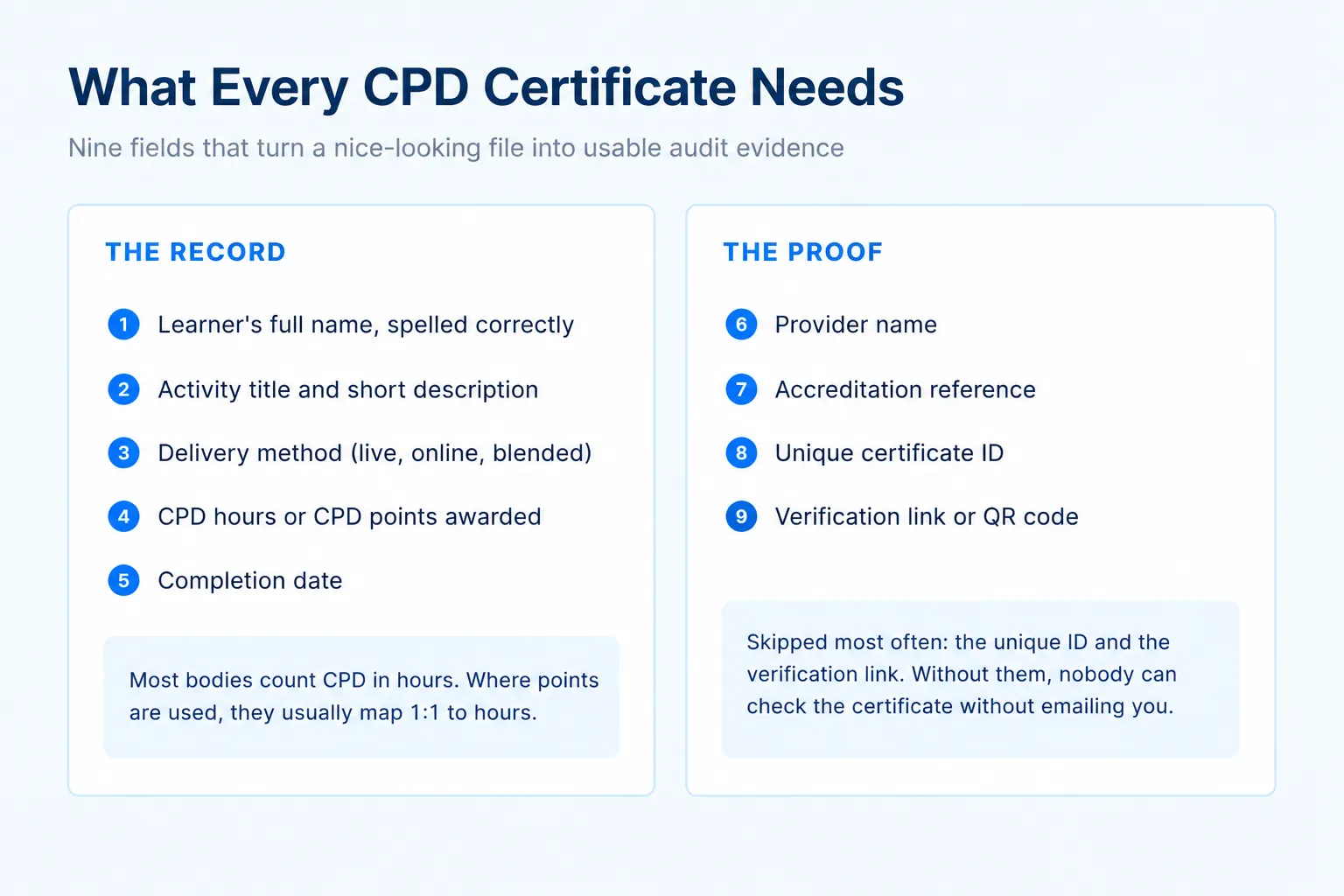
Think of your certificate in two halves. One half records what happened. The other half proves it.
The record:
- Learner's full name, spelled the way they spell it
- Activity title plus a short description of what was covered
- Delivery method, such as live, online, or blended CPD programs
- CPD hours or CPD points awarded
- Completion date
The proof:
- Provider name, so the source is obvious
- Accreditation reference, if you hold one
- Unique certificate ID
- Verification link or QR code
Those last two get skipped constantly. However, without them nobody can check a certificate without emailing you first. Fine for ten delegates. Painful for a thousand.
CPD Hours Versus CPD Points
This trips up new providers, so here is the short answer. Most professional bodies measure CPD in hours. Where points or credits are used, they are "typically a 1:1 ratio with CPD hours" (The CPD Certification Service).
Therefore, print the hours and say whether the learning was structured or self-directed. Many bodies split their requirement that way.
For example, RICS members need at least 20 hours a year, with 10 hours structured. ACCA members log 40 units a year, at least 21 of them verifiable (The CPD Standards Office).
Meanwhile, some bodies set no hour minimum at all. The GMC, HCPC, SRA, GPhC, and CIPD use outcome-based standards instead. For those learners, a clear activity description matters as much as the number. Education is its own case again, as we covered in our guide to CPD training for teachers and academic staff.
When To Issue CPD Badges
A certificate is the formal record. A badge is the version that travels. If badges are new to you, our complete guide to digital badges covers the basics in more depth.
Open Badges 3.0 packages an achievement so it is digitally signed by the issuing organization, compatible with the W3C Verifiable Credentials Data Model 2.0. Badges can then be "posted to a website, shared on social media, or imported into a digital wallet" (1EdTech). In plain English, a badge carries its own proof wherever it goes.
| CPD certificate | CPD badge |
|---|---|
| The formal record for audits | The shareable version |
| Lists hours, date, and provider | Carries verifiable metadata |
| Usually filed away | Lives on LinkedIn and profiles |
| Expected by accrediting bodies | Optional, but great for visibility |
Issue both when you can. One honest caveat though. A badge does not replace the certificate when a regulator asks for evidence.
Why Manual Issuing Stops Working
Dana used to build certificates in a design tool, then attach them one at a time. One cohort of 90 took a full Sunday, and she still misspelled two names.
Manual issuing costs you in four ways:
- Time, measured in evenings you will not get back
- Accuracy, because typing 90 names invites mistakes
- Credibility, since an editable file proves very little
- Visibility, as you never learn who opened anything
There is a faster way, and it does not require a bigger budget.
How To Issue Them In Bulk
Here is the full workflow using Wauld, which handles certificates and badges in one place. It takes you from a blank template to a tracked, verifiable cohort in seven steps.
Step 1: Design Your Certificate
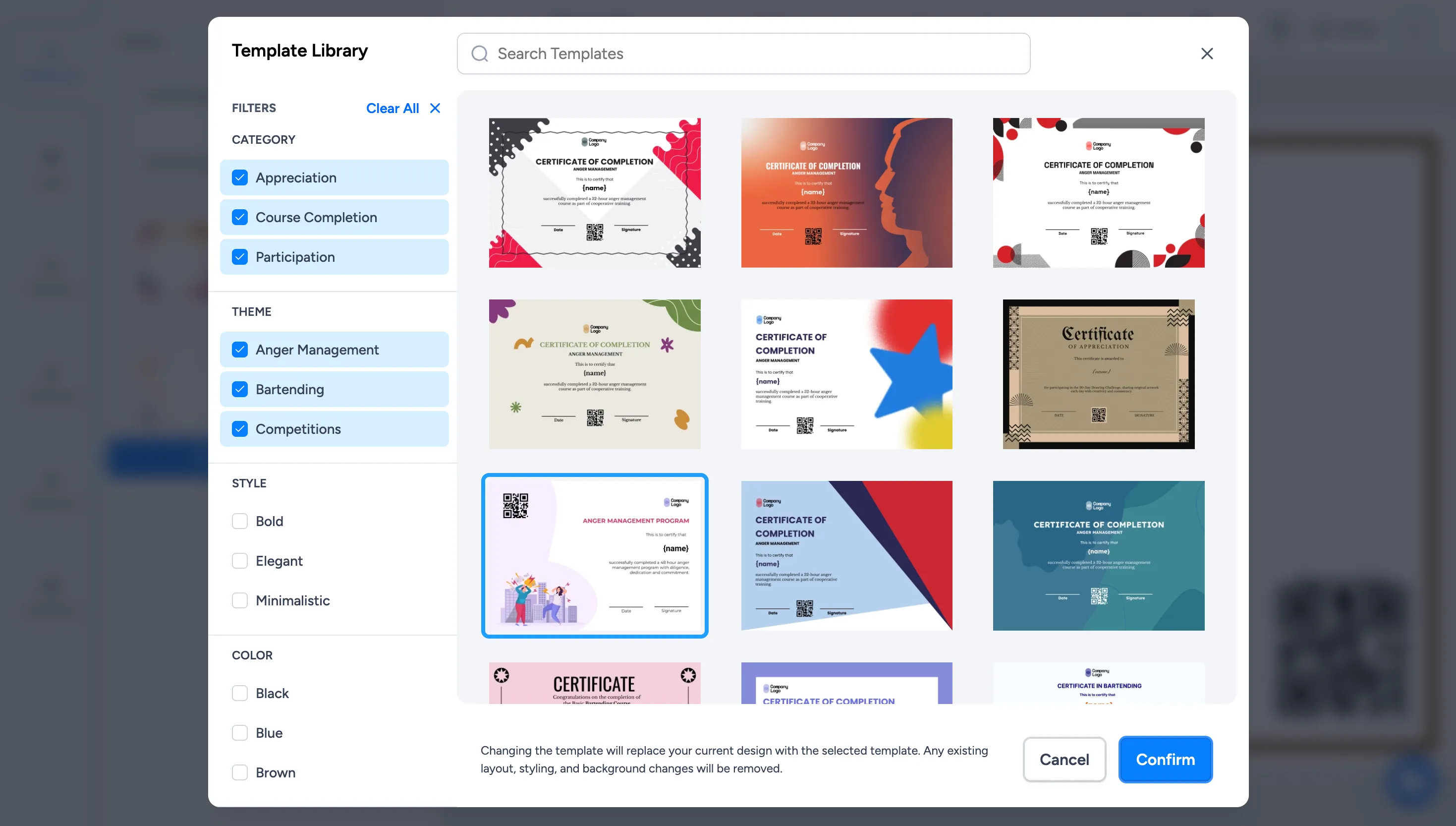
Start from the template library. You can pick from 1200+ designs, including ready-made CPD certificate templates, then filter by category, theme, style, and color to narrow the list.
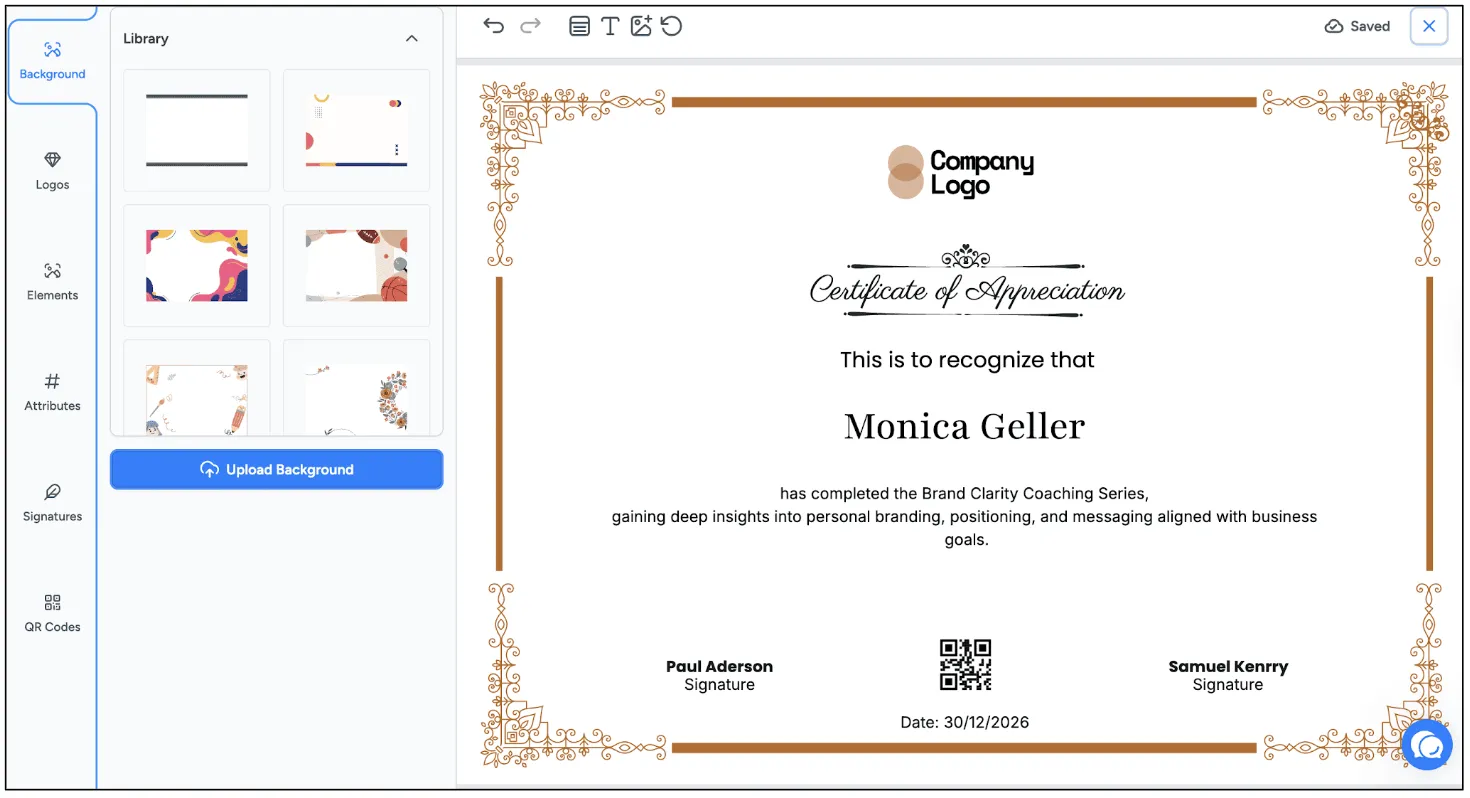
Once you confirm a template, the design studio opens. Add your logo, brand colors, a signature, and a QR code, and adjust the background until the certificate matches your program.
Step 2: Add Your Attributes
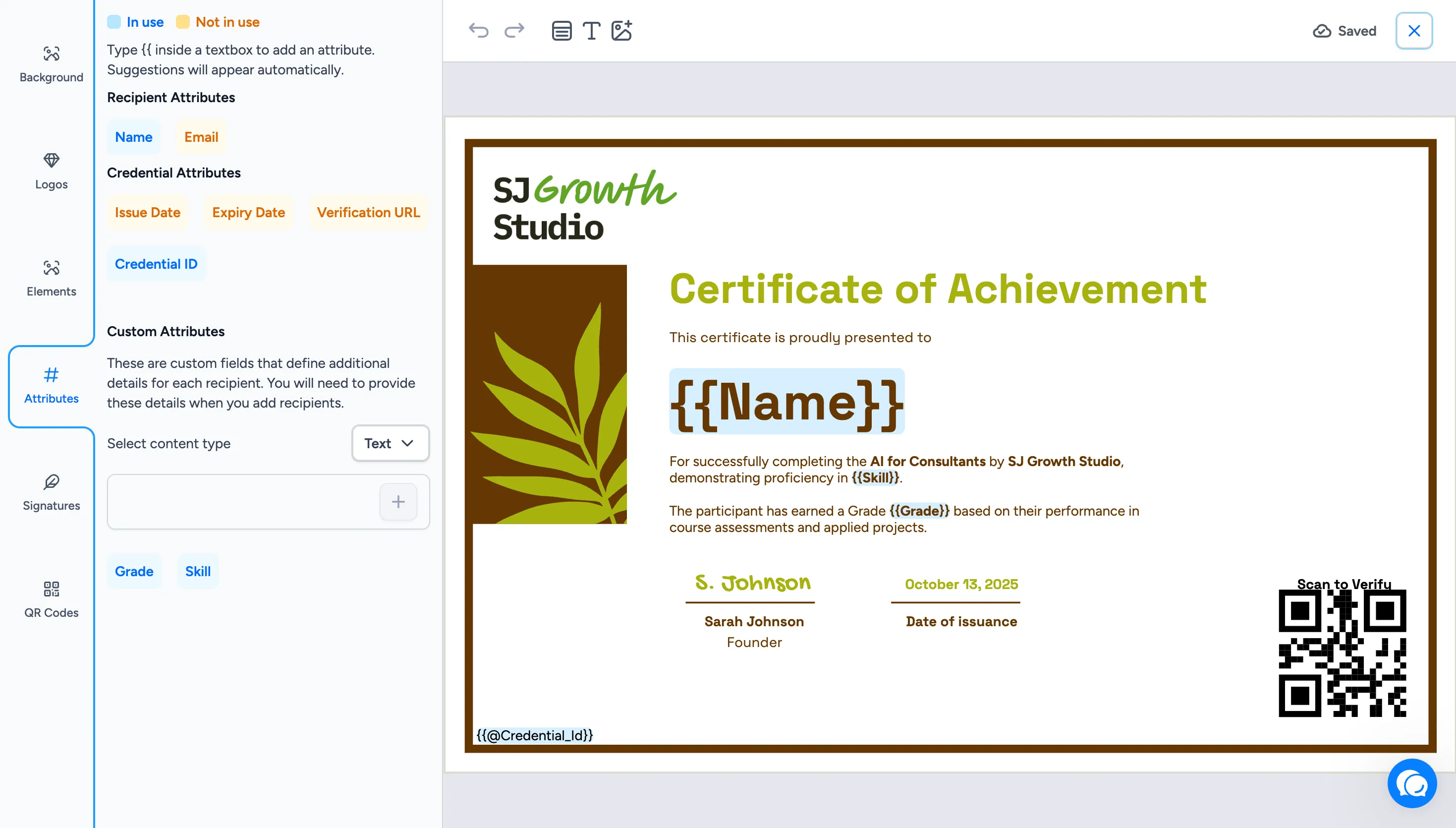
Attributes are the fields that fill themselves for each learner. Type {{ inside any text box to insert one. Recipient attributes cover name and email, while credential attributes handle the issue date, expiry date, verification URL, and unique credential ID. Add custom attributes, such as CPD hours or the activity grade, for anything specific to your program.
Step 3: Review And Start Issuing
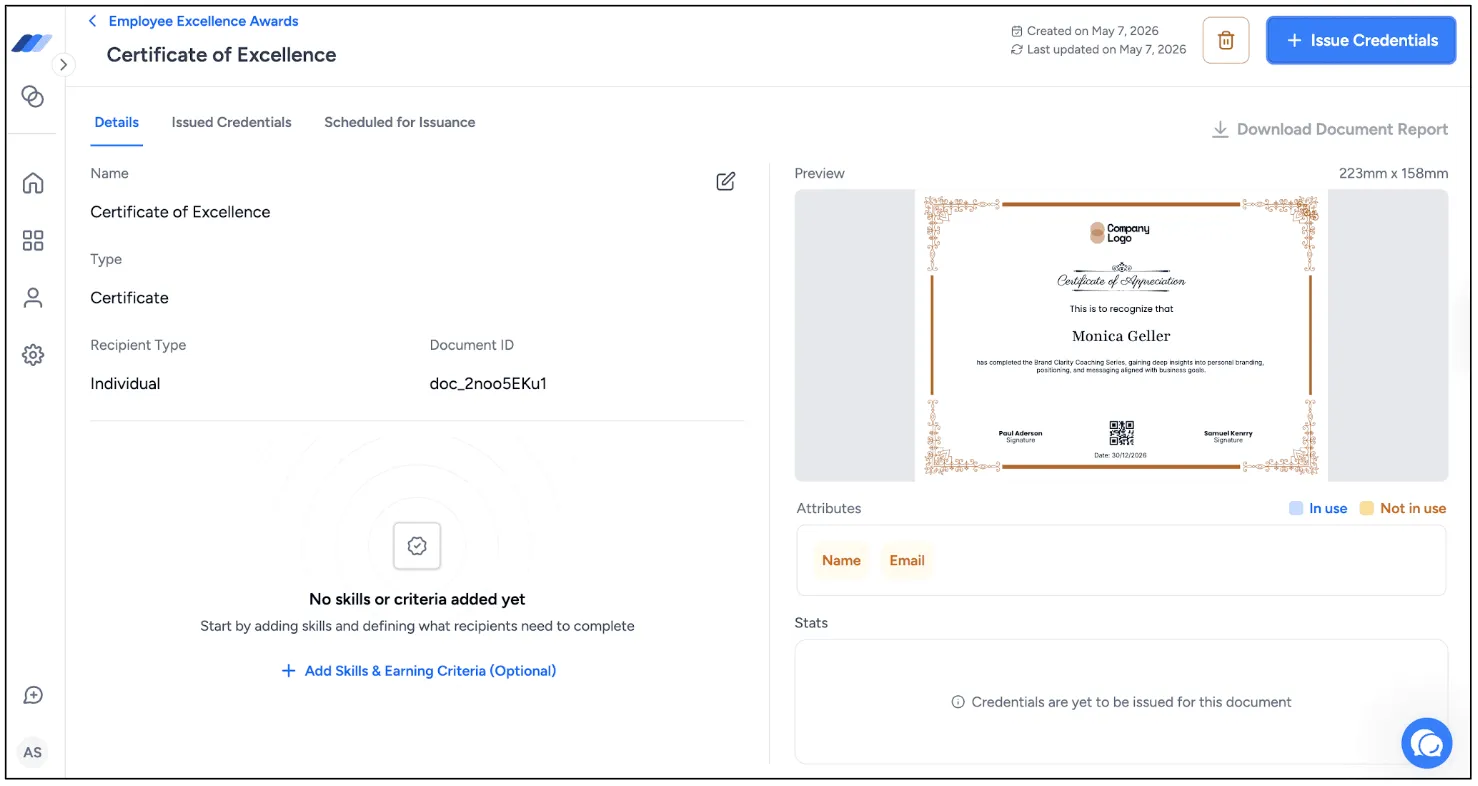
When the design is ready, open the document to review it. Check the live preview, confirm the attributes in use, and note the document ID. When everything looks right, click Issue Credentials to begin.
Step 4: Add Your Learners
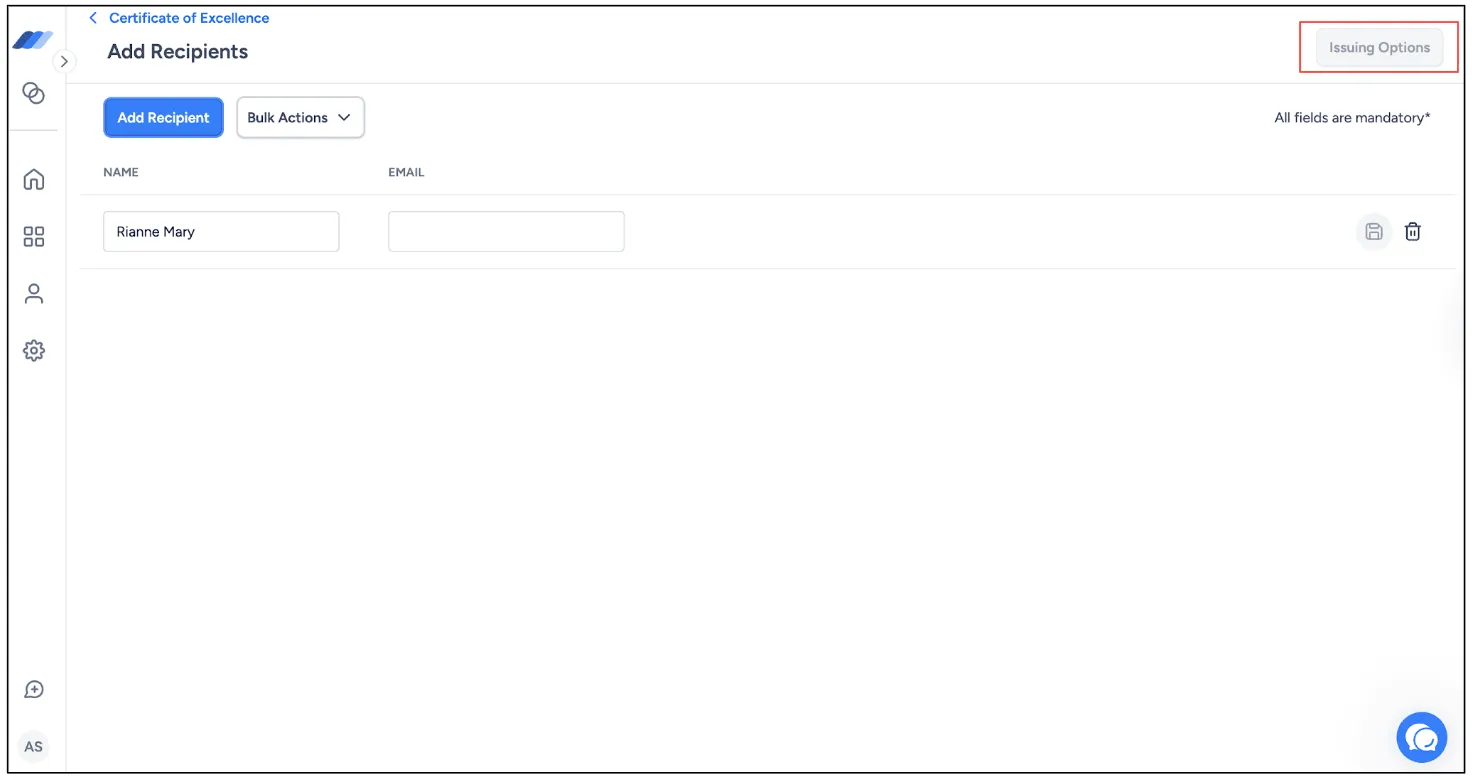
Now add the people who earned the certificate. Enter recipients one at a time, or use Bulk Actions to upload a CSV from your register or form responses and map the columns. Each learner's details populate their certificate automatically. When your list is ready, open Issuing Options.
Step 5: Set Delivery Options
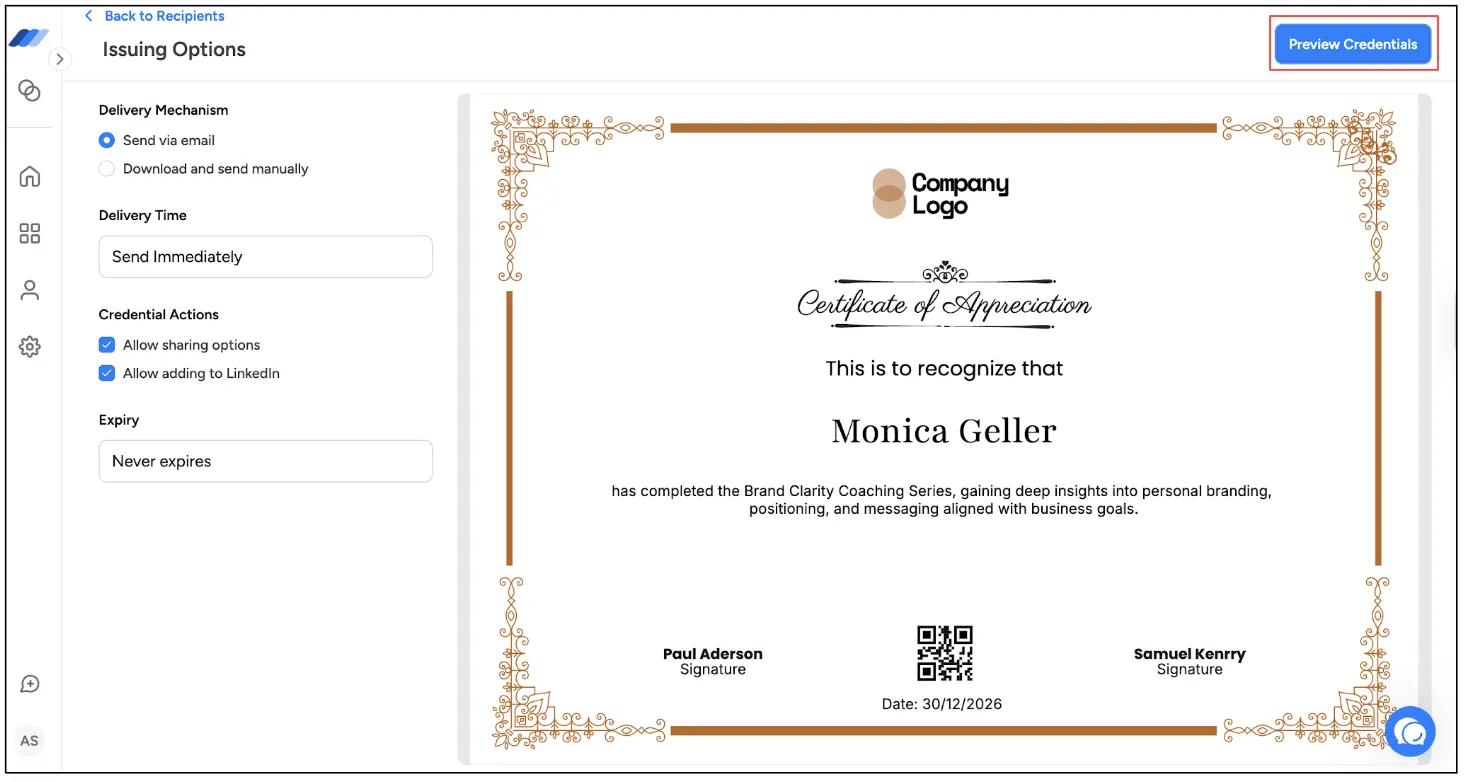
Choose how the certificates go out. Send them via email or download and send manually, deliver immediately or schedule for later, and decide whether learners can share the credential or add it to LinkedIn. Set an expiry if your credentials renew, then click Preview Credentials to check one record before sending.
Step 6: Issue And Confirm
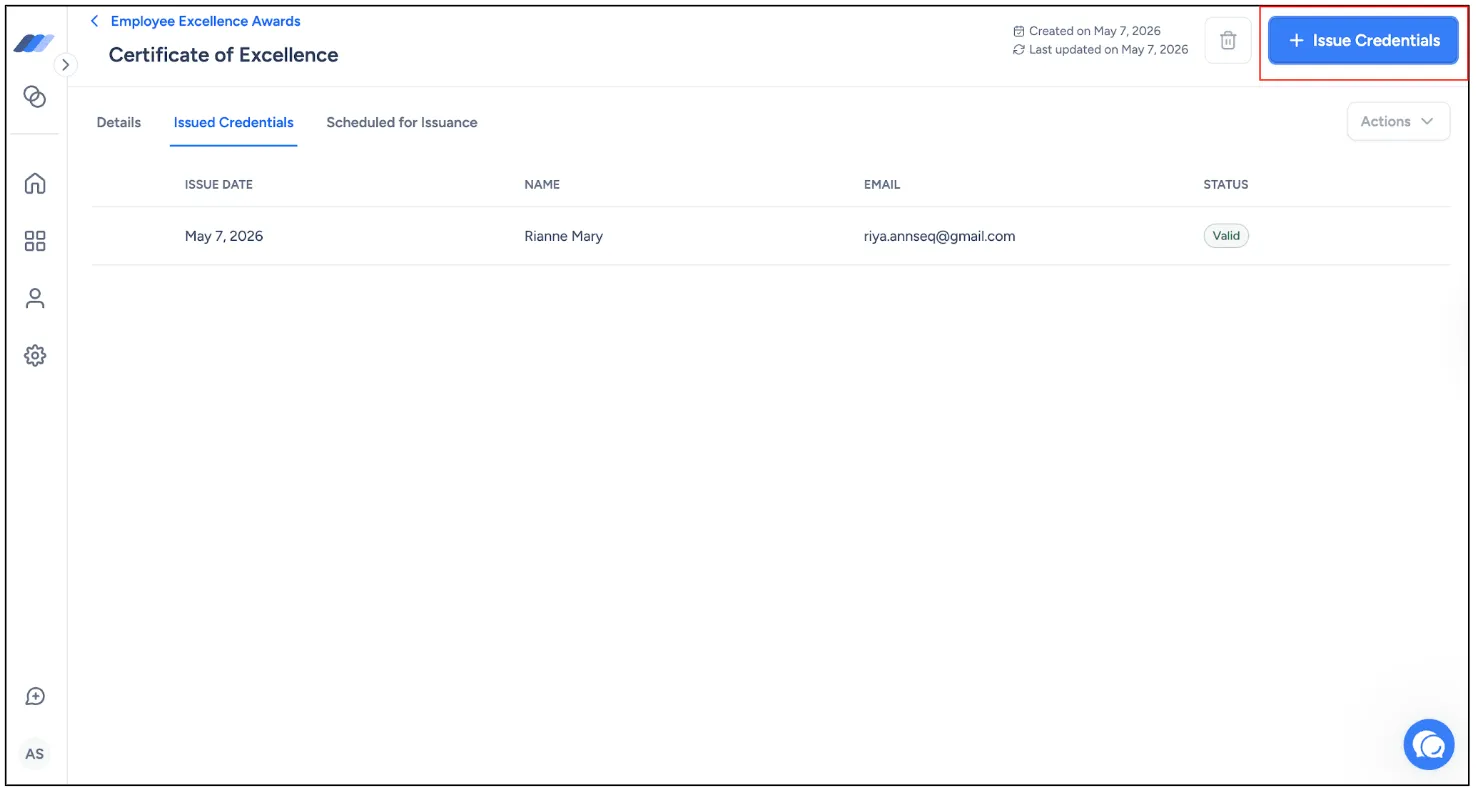
Confirm the batch to issue the whole cohort at once. Each new credential appears under Issued Credentials with a status of Valid, so you can see exactly who received what and when.
Step 7: Track And Reissue
Your dashboard tracks opens, downloads, verifications, clicks, and shares across the cohort. Void or reissue a credential whenever a detail changes, and the audit trail stays intact.
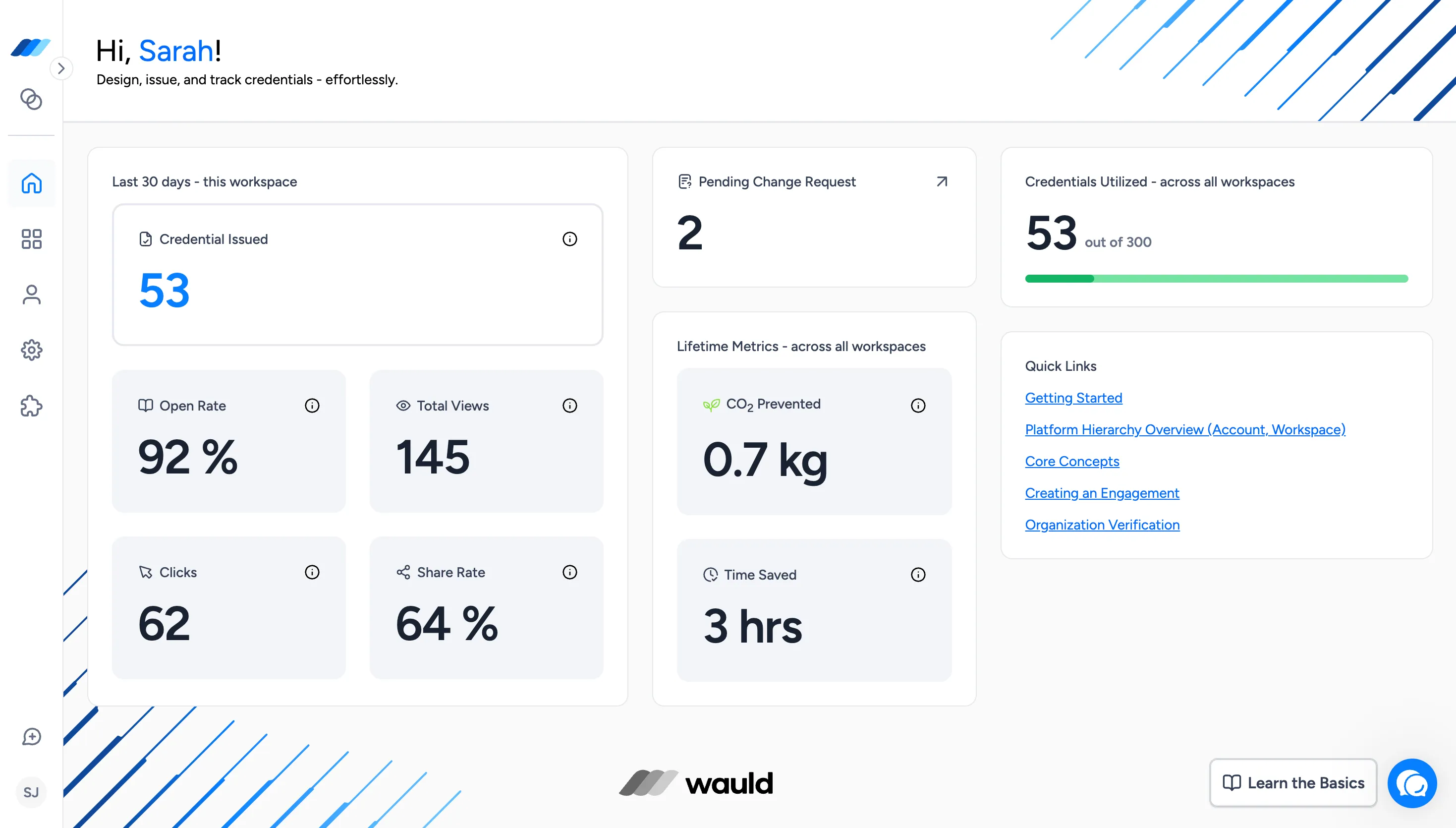
The same workflow works for digital badges, so a delegate can leave with a certificate for their file and a badge for their profile.
Keep Records Your Learners Need
Your job does not end when the email sends, because your learners are the ones who get audited.
A few real examples. ACCA members must retain CPD evidence for three years. GDC registrants keep an activity log with provider certificates across a five-year cycle. The HCPC randomly audits around 2.5% of each profession's records.
Dana gets one of those emails most weeks now, usually asking for a copy of something from two years ago. A searchable issuing log answers that in seconds. A folder of PDFs named "certificate_final_v2" does not.
Bringing It All Together
Dana issues differently now. One branded template, hours printed clearly, a verification link on every certificate, and a badge for delegates who want one on their LinkedIn profile. Her last cohort of 90 took eleven minutes.
Good CPD certificates and badges do two jobs at once. They protect your learner when someone checks, and they quietly show everyone else who trained them.
Get the nine fields right, add a badge where it helps, and keep a record you can search.
Send your next cohort their certificates in minutes
Create a free Wauld account and issue your first verifiable CPD certificate today.
FAQs on CPD Certificates and Badges
What does CPD accredited mean? CPD accredited means an independent body reviewed your training and confirmed it meets recognized standards. Accreditation lets you display a certification mark and give delegates certificates their professional body accepts. It is not a legal qualification, but it signals quality.
Do CPD certificates expire? CPD certificates do not usually expire, because they record something that happened on a date. However, professional bodies often count CPD only within a current cycle. Always print the completion date clearly.
Is CPD certification recognized in the USA? CPD is recognized in the USA, although it often appears as continuing education units (CEUs) or continuing professional education (CPE). Individual state boards and associations set the requirements, not one national body.
Can I get a job with a CPD certificate? A CPD certificate strengthens an application, although it is not a formal qualification on its own. Employers treat it as evidence of current, relevant training. It works best alongside a degree, license, or membership from recognized training providers.
Why is CPD important? CPD keeps professional skills current and is a condition of membership for many bodies. For trainers, it is also a steady market, because learners log CPD every year.
What is the difference between a CPD certificate and a CPD badge? A CPD certificate is the formal record listing hours, activity, and provider details for audits. A CPD badge is a shareable digital credential that carries verifiable data and sits on a profile. Most trainers issue both.