How to Generate Certificates with Typeform for your events, webinars or courses

Creating engaging forms with Typeform is easy, but what happens after you collect responses? Too often, valuable learner data stays locked in spreadsheets. With Wauld, you can give that data a new purpose. From feedback surveys to quizzes, your Typeform results can instantly generate certificates or badges that learners are proud to share.
In this blog, we’ll walk you through how to turn your Typeform responses into shareable certificates or badges using Wauld, a simple yet powerful digital credential platform.
Step-by-Step: Issuing Credentials from Typeform
Step 1: Download the List of Participants from Typeform
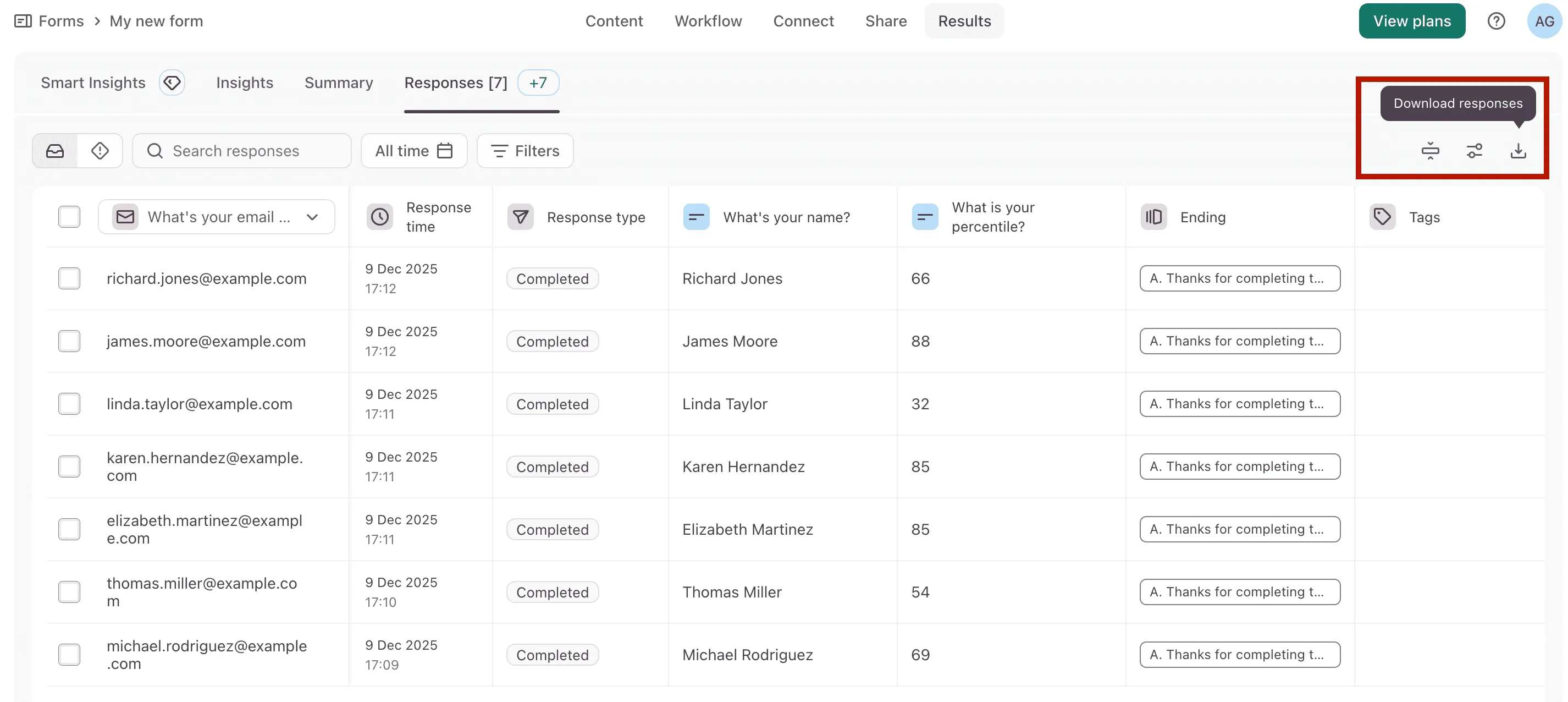
To download responses as a CSV file from Typeform, start by opening your form and going to the 'Results' tab. From there, click on the 'Responses' section to view all the submitted entries. In the top-right corner of the page, click the 'Download' responses icon to open the download options.
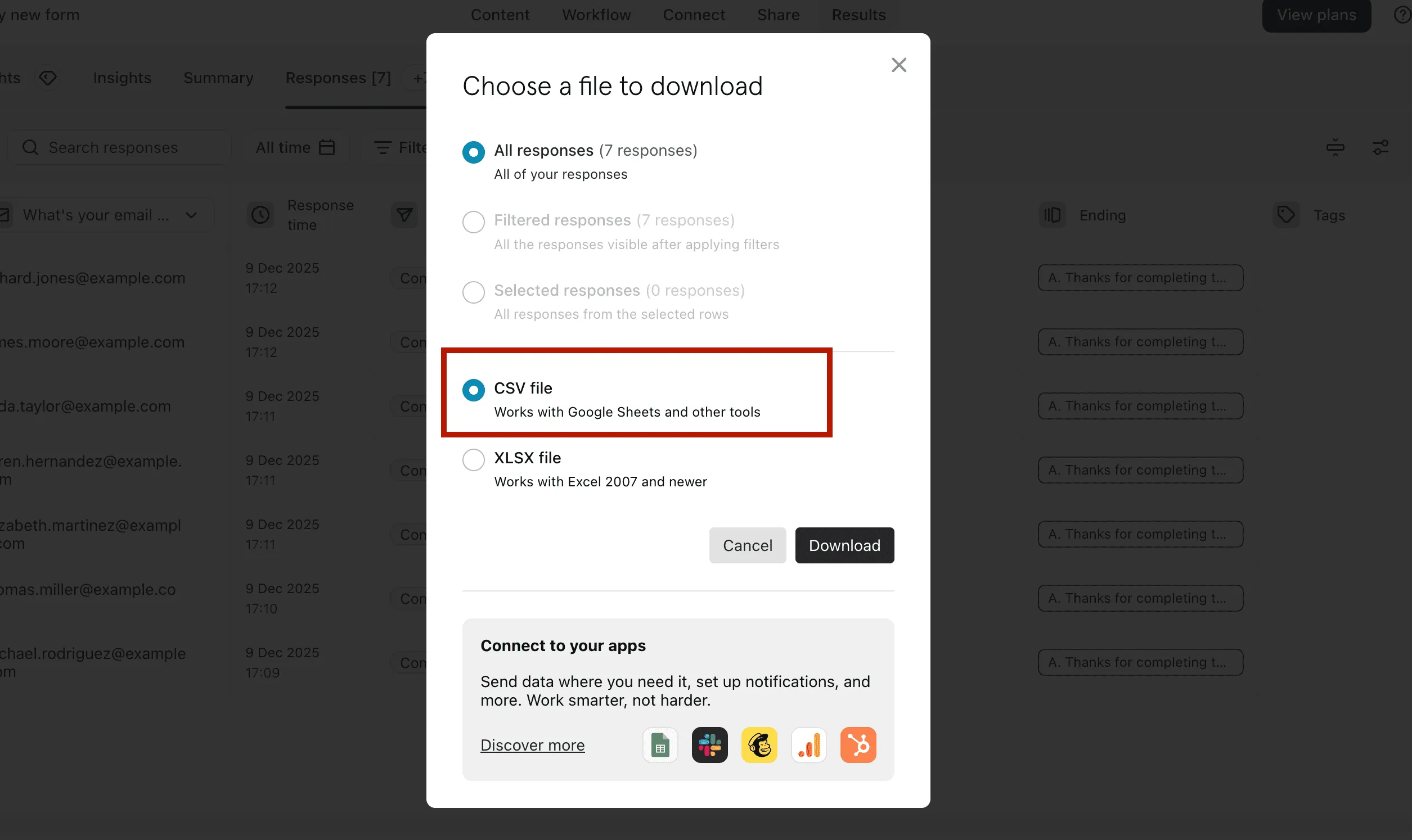
In the pop-up window that appears, choose whether you want to download all responses, filtered responses, or only selected ones. Select the CSV file option, which works well with Google Sheets and other tools. Finally, click Download to save the CSV file containing your form responses to your computer.
Ensure it includes name, email, and any extra fields you want on the certificate (such as course name or completion date). Delete any other column information you don't need in the credential.
Now, sign in to your Wauld admin portal with your account credentials.
If you don't have an account, you can signup with Wauld (just a 4 step process, and hardly takes 2 mins) and issue upto 300 certificates and/or badges for free! No credit card required in the signup process.
Step 2: Create a New Engagement in Wauld
Click 'Create Engagement', then define it with basic details (eg: Foundations - Prompt Engineering). Or choose an already created engagement.

Step 3: Design or Upload Certificate Template
Create a document.
- Choose a certificate or badge template from Wauld’s library with 600+ templates.
- Upload your own design if you already have a branded certificate/badge template.
- Start from scratch with our visual editor to design a customized certificate or badge.
In Wauld, you can design credentials with QR codes for instant verification, official signatures, logos, custom color schemes, design elements, and dynamic attributes. This makes every certificate both professional and personalized at scale.
Step 4: Upload Recipient Data (collected via Typeform)
Upload the CSV file from Typeform. Wauld maps the data into your template via dynamic attributes. You can preview some or all credentials before issuing.
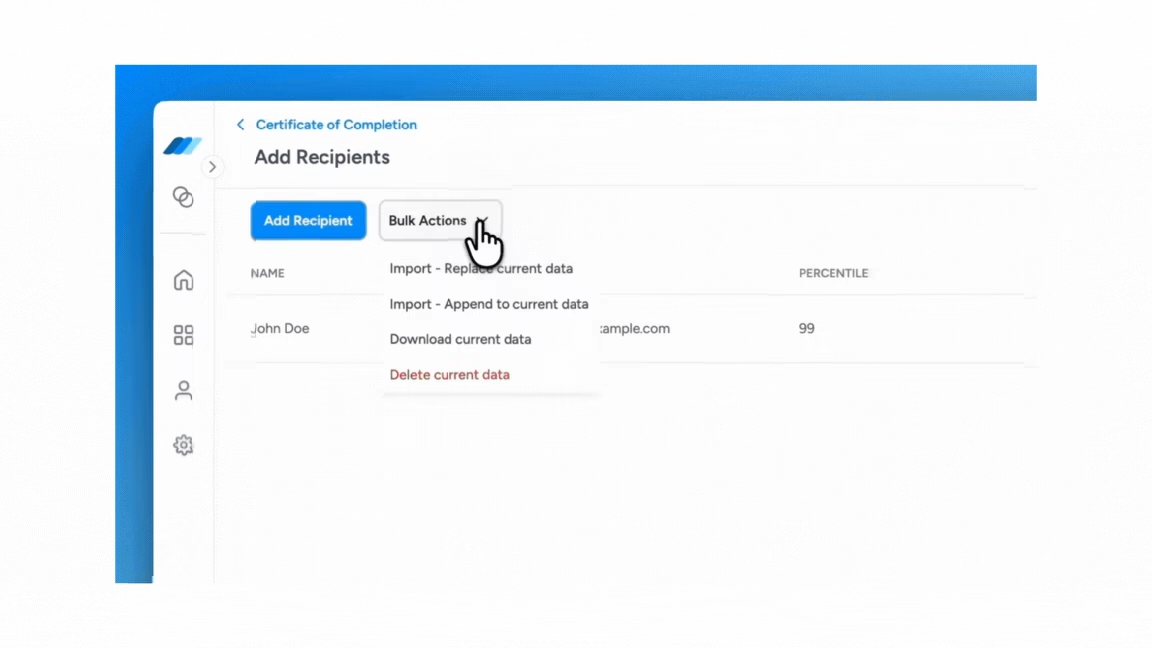
Step 5: Issue Certificates or Badges
Certificates or badges will be generated instantly and emailed to all participants.
The life of a certificate, in reality, starts after issuance
Think about the last paper certificate you received. You felt a spark of pride for a few seconds… and then, chances are, it found its way into a folder, or worse, the back of a drawer. Out of sight, out of mind.
Digital credentials are different. They don’t end when they’re issued — they begin a new journey. And with Wauld, that journey is designed to create lasting value for both learners and organizations.
1. Manage Credentials
Life happens. Names get misspelled, courses get updated, or someone needs a reissue. With Wauld, you don’t need to panic. From one simple dashboard, you can edit, revoke, or reissue certificates anytime. No paper, no hassle.
2. Track Engagement
A certificate should be more than a keepsake — it should be a signal of achievement that carries weight. Wauld helps you see the ripple effect your credentials create. You can track:
- How many people opened their certificate
- How many times it was viewed
- How often it was shared on LinkedIn or beyond
These numbers aren’t just stats; they’re proof that your learners are celebrating their success and amplifying your brand at the same time.
3. Enable Instant Verification
No more guessing games or chasing paperwork. Every Wauld certificate comes with a QR code and a secure link. Employers, peers, or partners can verify authenticity in seconds. Simple, transparent, and trustworthy.
Typeform makes it easy to collect responses with beautiful, engaging forms. With Wauld, you can take those responses a step further — instantly turning them into digital certificates or badges that learners value and share. This not only saves you time but also gives your participants recognition that lives far beyond the form itself.
Ready to try it out? Connect your Typeform data with Wauld today and start issuing certificates that are visible, verifiable, and truly valuable.