How to create and send certificates with Jotform for your events, webinars or courses

Forms are no longer just for collecting responses. They’ve quietly become a way to deliver outcomes, including digital certificates.
If you're running webinars, courses, or events, tools like Jotform PDF Editor (certificate maker) make it possible to generate and send certificates automatically. But how far can you really go with it?
Let’s break it down.
How to Create & Send Certificates via Jotform
Jotform PDF Editor is a no-code tool that lets you create, customize, and auto-fill PDFs using form responses.
It works well for quickly generating documents like certificates, but is primarily designed around simple PDF workflows rather than full credential management.
Create your certificate template
Note: Map form fields → certificate placeholders so data auto-fills.
Design & style the certificate
- Connect the certificate to your formLink the PDF template to your form responses.Ensure each field, like Name, is correctly mapped to avoid blank certificates.
- Set up autoresponder emailGo to Form Settings → Emails → AutoresponderConfigure:Recipient = user email fieldSubject + message bodyAttach the generated PDF certificate.
Once the form is submitted, Jotform automatically generates the certificate PDF and delivers it to the user via email.
Why Use Jotform to Issue Certificates?
- Quick to get started
You can set up certificate issuance fast using the Jotform PDF Editor, without needing engineering effort. - All-in-one workflow
Form submission, certificate generation, and email delivery are handled in one flow, which keeps operations simple. - Template-driven setup
Ready-made certificate templates help you avoid designing everything from scratch, especially for common use cases. - Easy customization
Adding logos, editing text, and mapping fields is straightforward, so non-technical teams can manage it easily. - Works well for lightweight use cases
Suitable for workshops, webinars, and internal certifications where speed matters more than complexity. - Low maintenance
Once configured, it runs automatically with minimal ongoing effort.
Who is this for? Event organizers, online course creators, corporate trainers, webinar hosts, professional associations. Anyone already using JotForm to track participation or completion.
Limitations of Jotform Certificate Maker
- Design flexibility is moderateDrag-and-drop exists, but not pixel-perfect (alignment and spacing can feel rigid)Complex layouts (multi-column, layered elements) are harder to achieveThe templates and styling feel outdated, lacking the visual polish and modern design standards expected today
- Styling control is shallowLimited typography control (no advanced font pairing, spacing control, etc.)Background-heavy designs can be tricky to fine-tune
- Scalability gapsNo strong native system for:Certificate verificationUnique credential IDs / blockchain-style validationPrimarily a “generate & send PDF” workflow, not a full credential lifecycle system
- Template reuse & versioningManaging multiple certificate versions or updates isn’t very structured
If you need a quick, no-code way to generate and send basic certificates, Jotform gets the job done.
But when certificates need to go beyond static PDFs into verifiable, shareable credentials, a credentialing platform like Wauld starts to make more sense.
Step-by-Step: Generate Jotform Certificates from Wauld
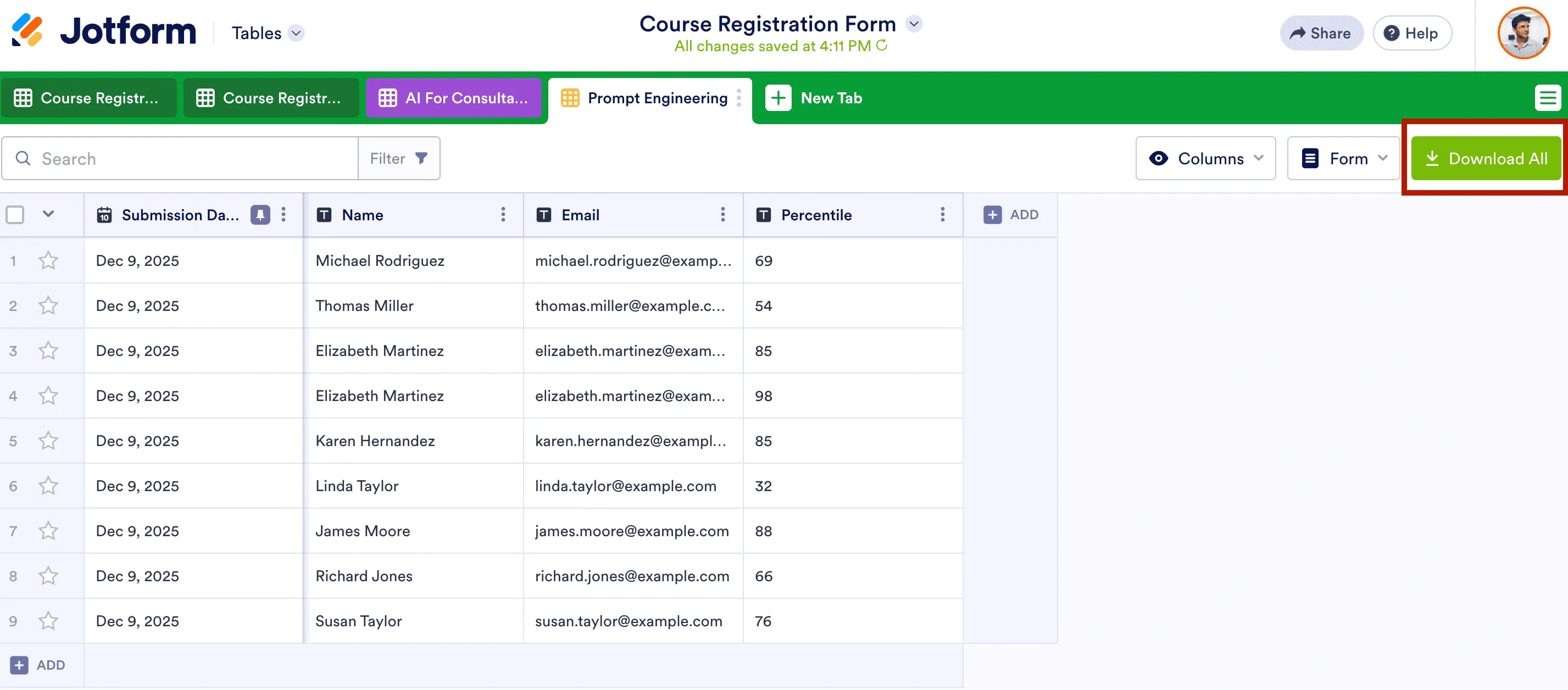
Step 1: Export your JotForm submissions as a CSV
Go to Jotform Tables, click Download All in the upper-right corner, and choose Download as CSV. Make sure the file includes at minimum: full name, email address, and any dynamic fields you want printed on the certificate (such as course name, score, or cohort).
Delete any columns you do not need. A clean CSV speeds up the mapping step in Wauld.
Sign in to your Wauld dashboard with your account credentials.
If you don't have an account, you can signup with Wauld (just a 4 step process, and hardly takes 2 mins) and issue upto 300 certificates and/or badges for free! No credit card required in the signup process.
Step 2: Create a New Engagement in Wauld
Sign in to your Wauld dashboard. Click Create Engagement and give it a name that matches your event or course (e.g. "Foundations - Prompt Engineering"). If you have already created one, simply select it.

Step 3: Design or Upload Certificate Template
Choose a certificate or badge template from Wauld’s library with 1,000+ templates.
- Upload your own design if you already have a branded certificate/badge template.
- Start from scratch with our visual editor to design a customized certificate or badge.
In Wauld, you can design credentials with QR codes for instant verification, official signatures, logos, custom color schemes, design elements, and dynamic attributes. This makes every certificate both professional and personalized at scale.
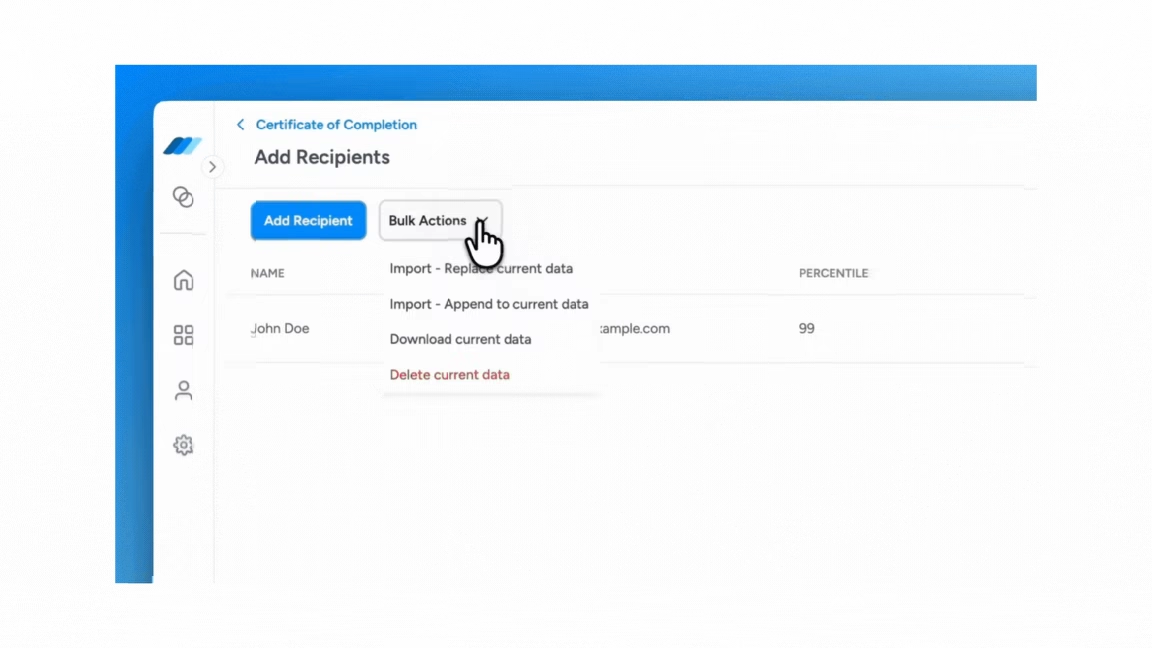
Step 4: Upload your JotForm CSV
Upload the exported CSV into Wauld. The platform maps each column to the corresponding dynamic attribute in your template. You can preview individual credentials before issuing: a useful step for catching any data errors before sending to hundreds of participants.
Step 5: Issue Certificates or Badges
Click Issue. Every participant receives a personalized, verifiable certificate by email within seconds. No batch processing delays, no manual follow-up.
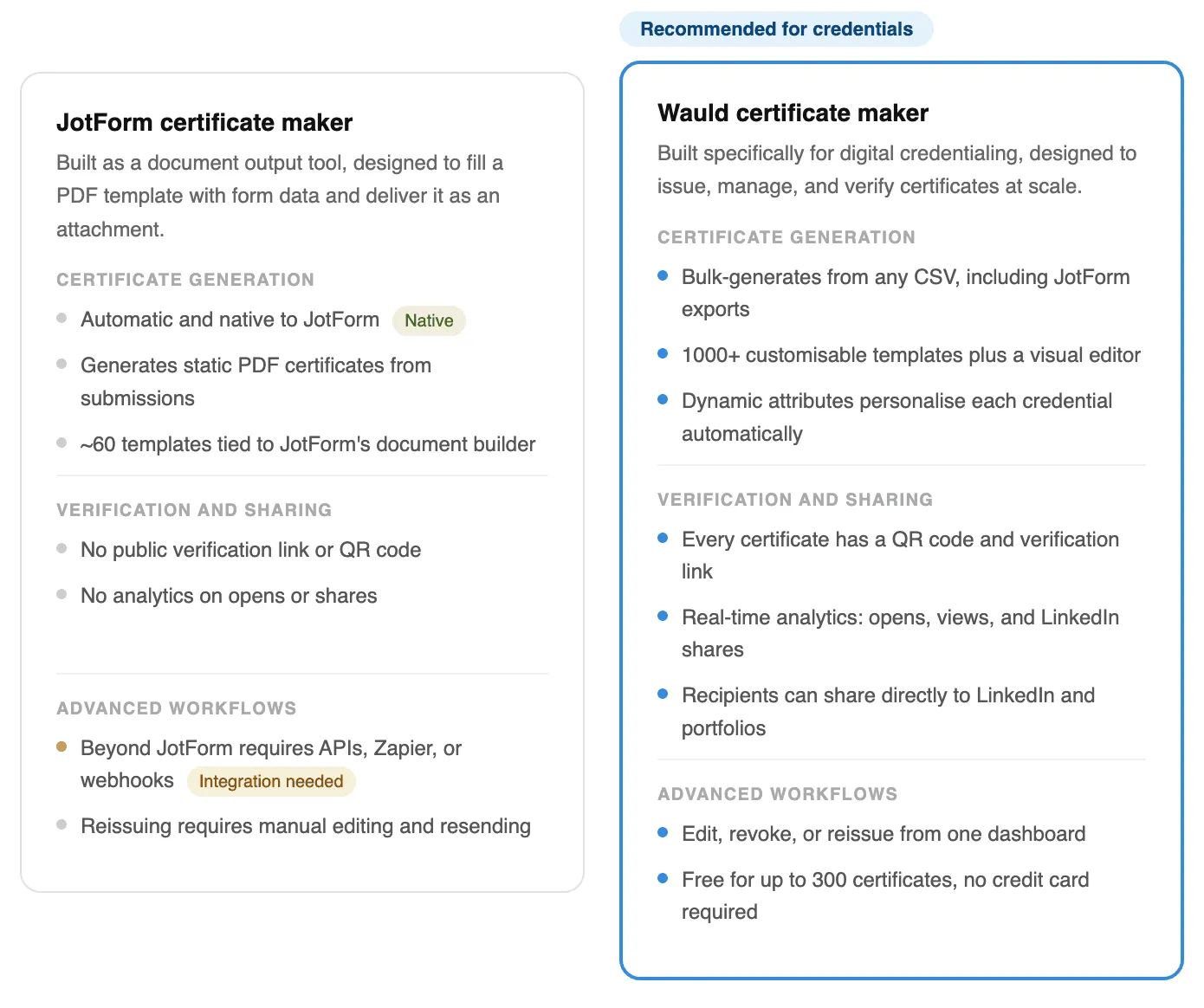
Comparison: Jotform Certificates and Wauld certificates
JotForm does offer a basic certificate feature through its Jotform certificate maker, letting you auto-fill a PDF template from form data. For simple use cases, this works fine. But if you need credentials that can be shared, tracked, and independently verified, there are meaningful differences worth knowing before you choose.
Final Takeaway
Define your goal first.
If a certificate is more of a formality, a quick confirmation that someone attended or completed something, JotForm's built-in certificate maker is perfectly convenient, and free. No extra tools, no setup.
But if you want your credentials to carry real weight, Wauld is worth the integration effort. Here is what you get:
- Verifiable by anyone, instantly. Every certificate has a QR code and a live link. Employers, clients, and institutions can check authenticity in seconds without contacting you.
- Built to be shared. Recipients can post their credential directly to LinkedIn, portfolios, and beyond, turning every certificate into organic promotion for your program.
- You stay in control. Made an error? Need to revoke a credential? You can edit, reissue, or revoke any certificate from one dashboard, without starting over.
- You can see the impact. Wauld shows you who opened their certificate, how many times it was viewed, and where it was shared. Data a PDF attachment will never give you.
- It scales without extra work. Whether you are issuing 10 certificates or 10,000, the process is the same: upload a CSV, hit issue, done.
JotForm gives you a document. Wauld gives your credentials a life of their own.