Owwlish Course Completion Certificates: Free Setup Guide

How To Issue Owwlish Certificates
Your learner just completed their online course. Every lesson watched. Every module done. And Owwlish goes completely silent.
No Owwlish certificate. No credential. No proof of what they earned. Nothing to share on LinkedIn or send to a client.
That gap is fixable, fast and free. This guide covers three practical methods to issue Owwlish course completion certificates automatically. You will find a Zapier method, a bulk CSV method, and the cleanest option: connecting Owwlish directly to Wauld for verifiable digital credentials.
Can Owwlish Issue Certificates Natively?
Not on its own. Owwlish is a streamlined course platform built to add an online course directly from your website, but it ships with no built-in certificate generator.
Reviewers consistently name the missing certificate generator as the platform's biggest drawback. It is the most-requested addition among Owwlish users. So the fix is connecting Owwlish to a dedicated credential platform that handles design, delivery, and certificate management automatically.
The good news: Owwlish has a live Zapier integration that exposes a Lesson Completed trigger firing instantly when a learner finishes a lesson. That single trigger is all you need to automate the whole certificate automation workflow. If you have set up Skilljar certificate automation or Skool certificates before, the approach here is nearly identical.
What You Need Before You Start
- An Owwlish account with at least one published course. Zapier is included on both the Basic ($16/month annual) and Pro ($30/month annual) plans.
- A Wauld account to design and issue learner certificates. It is free to start.
- A Zapier account. The multi-step Zap required for Method 1 needs a paid Zapier plan, starting at $19.99/month.
Build your certificate design in Wauld before connecting anything. Then pick the method below that fits your setup.
Connect Wauld to Zapier: Generate Your Access Token
Before building any Zap, you need to connect your Wauld account to Zapier. The connection runs through an access token you generate inside Wauld.
Log in to Wauld and open Integrations from the left navigation bar. Select Zapier from the integration gallery. On the Zapier details page, click Generate Token and copy the token that appears.
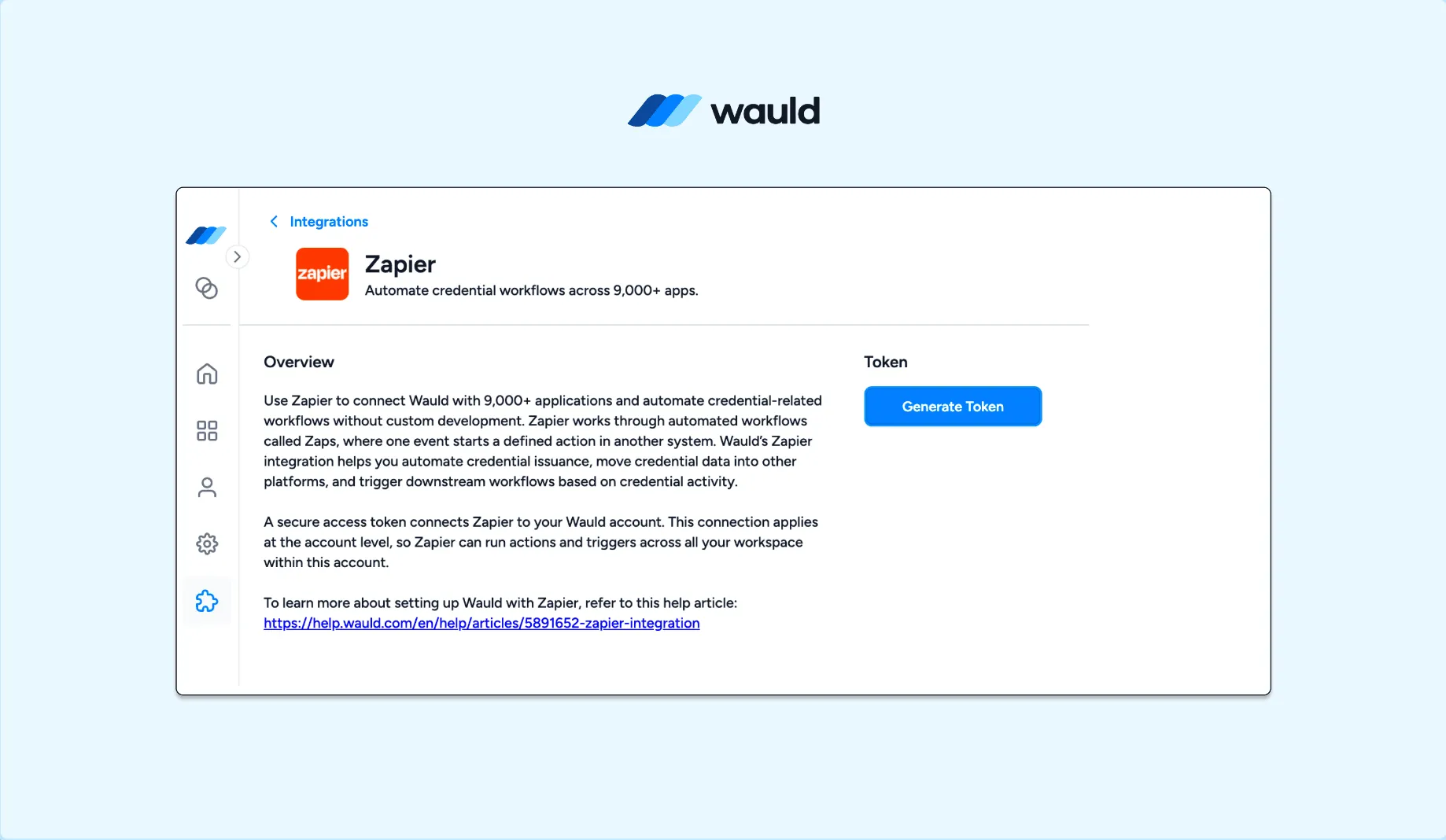
Generating a Zapier access token inside Wauld's Integrations panel
Keep this token ready. When Zapier prompts you to connect your Wauld account during setup, paste the token into the connection field and click Yes, Continue to Wauld. Zapier confirms the connection and your Wauld account is linked.
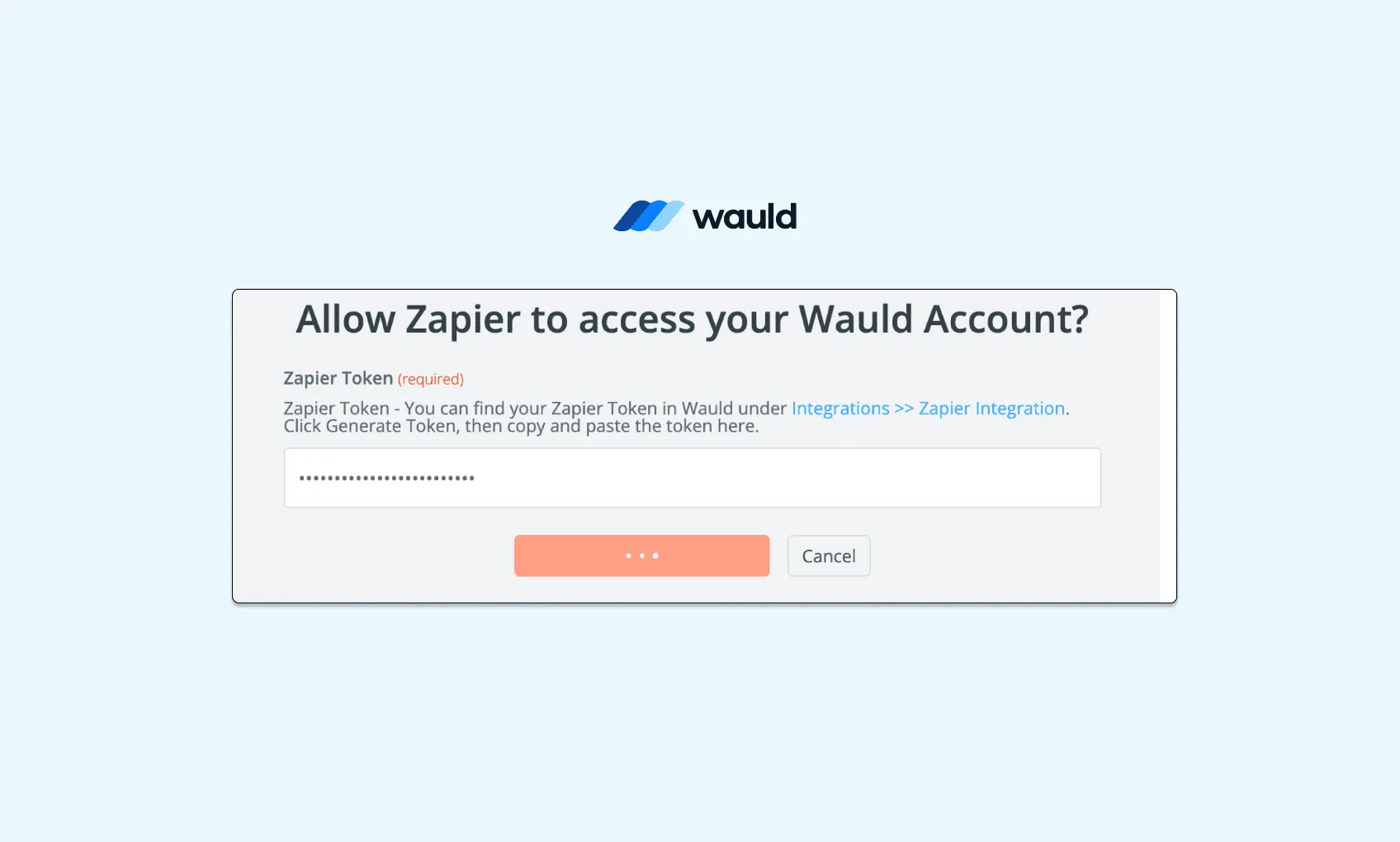
Pasting the Wauld access token into Zapier to link your account
Treat the token like a password. If you need to revoke Zapier access at any point, go back to Wauld under Integrations and click Regenerate Token. The old token stops working immediately. Any active Zaps using it will need to be reconnected in Zapier with the new one.
Method 1: Owwlish + Zapier + Wauld (Recommended)
This is the cleanest path to automatic Owwlish certificates. When a learner finishes the final lesson, Zapier fires instantly. Wauld generates a branded, verifiable certificate and delivers it to the learner's inbox. No manual work is needed at any point.
Step-by-Step Setup
Step 1: Design your certificate in Wauld. Open Wauld's template gallery and choose a design. Add your logo, brand colors, and dynamic fields for learner name, course name, and completion date. This is the template every learner will receive.
Step 2: Connect your Owwlish account in Zapier. Create a new Zap. Set Owwlish as the trigger app and choose Lesson Completed. Connect your Owwlish account and select the course you want to track.
Step 3: Add a Filter step for course completion. Owwlish fires the Lesson Completed trigger on every single lesson, not just the last one. Add a Filter by Zapier step and set it to continue only when the completed lesson matches your final lesson name or ID.
This step is critical. Without it, learners receive a course completion credential after every lesson instead of upon full course completion.
Step 4: Set Wauld as the action. Add a new action step, select Wauld, and choose Issue Credential. When Zapier asks you to connect your Wauld account, use the token you generated in the section above. Once connected, select the certificate design from Step 1.
Step 5: Map the learner data. Map the learner's first name, last name, and email from the Owwlish trigger into Wauld's recipient fields. Add the course name as the credential title.
Use Wauld's dynamic attributes to automatically populate learner names, course titles, completion dates, scores, instructor names, and custom training data. This allows a single certificate template to work across multiple Owwlish courses without requiring separate designs for each program.
Step 6: Test and publish. Send a test and verify the certificate arrives in the inbox correctly. Confirm the QR code works and the learner name appears as expected. Turn the Zap on.
Every learner who completes the final lesson now receives a professional, verifiable certificate automatically. No manual sending or follow-up is needed.
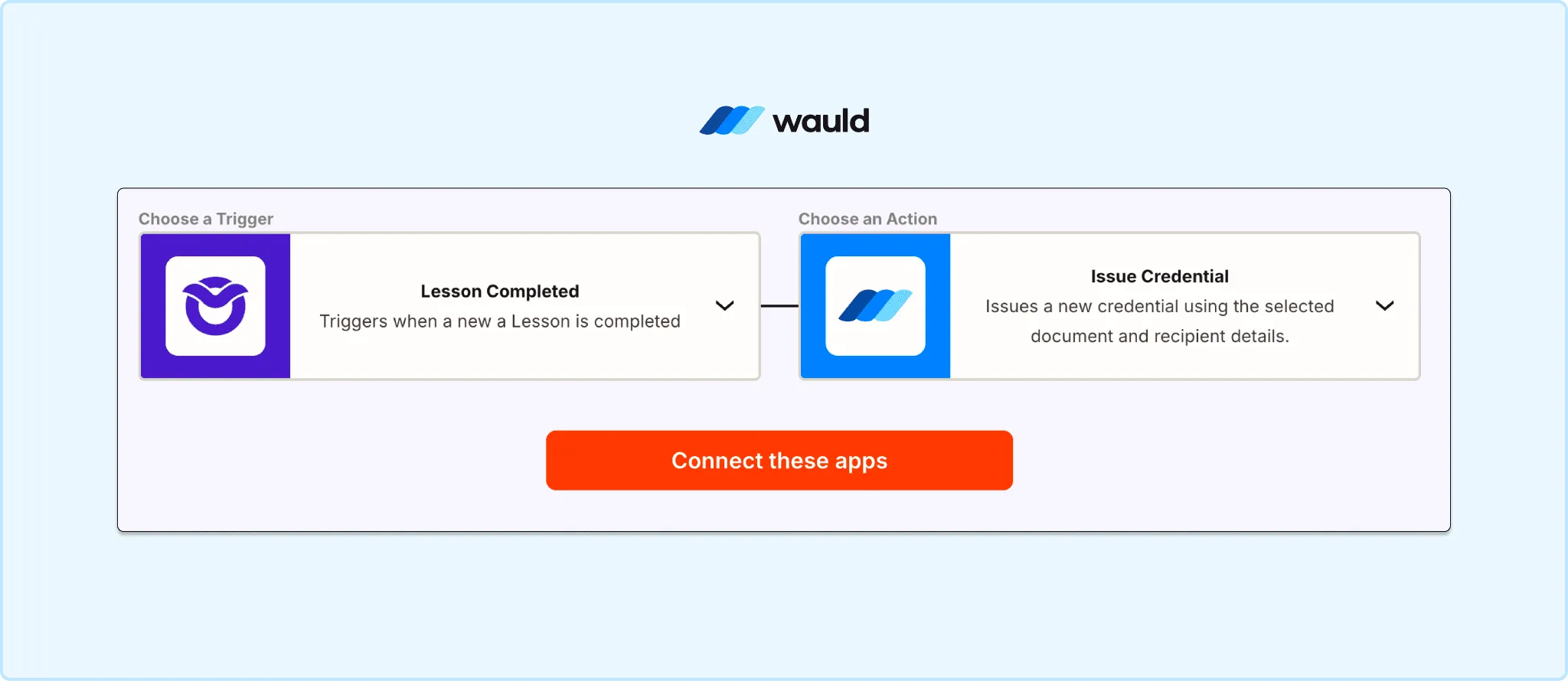
The complete Zapier workflow: Owwlish triggers on lesson completion, a Filter checks for the final lesson, and Wauld issues the certificate
Method 2: Owwlish + Zapier + Google Slides (DIY Option)
This method works if you want a free setup without adding another tool. It uses Google Slides as the certificate generator and chains multiple Zapier steps together.
Set Owwlish Lesson Completed as your trigger. Add the Filter for the final lesson. Then connect these Zapier actions in sequence:
- Google Slides: Copy a Presentation (clone your certificate template)
- Google Slides: Update Presentation (replace
{{name}}and{{date}}placeholders with real learner data) - Google Drive: Export as PDF
- Gmail: Send Email with the PDF certificate attached
For a visual walkthrough of how this Zapier workflow is built, this tutorial walks through the full setup step by step.
Cons of the Google Slides Method
- No verification. The certificate is a static PDF. There is no unique credential ID, no public verification page, and no QR code. An employer or institution cannot confirm the document is genuine. Anyone can edit a PDF and a recipient has no way to prove it is authentic.
- No LinkedIn sharing. Learners cannot add the certificate to their LinkedIn profile in one click. They would need to manually upload the PDF as a media attachment, which most learners do not do.
- No engagement tracking. Once the email is sent, you have zero visibility. You cannot see whether the learner opened the certificate, downloaded it, or shared it. There is no analytics layer at all.
- No revocation or updates. If you issued a certificate with an error, a wrong date, or a misspelled name, you cannot update or recall it. The PDF is out of your control the moment it lands in the inbox.
- Complex Zap to maintain. This route chains four to five Zapier actions together. Each step is a potential failure point. If Google Drive permissions change, if a template file is moved, or if a placeholder name mismatches, the entire Zap breaks silently and learners stop receiving certificates with no error notification.
- Paid Zapier plan still required. Despite using free Google tools, the multi-step Zap still requires a paid Zapier plan. The cost savings compared to Wauld are minimal, while the setup complexity and limitations are significantly higher.
For simple online course certificate needs with a very small learner base, this method works. For anything professional, scalable, or verifiable, it falls short.
Method 3: Bulk CSV Upload in Wauld
No automation needed here. This is the best route for cohort-based courses, past completions, or any situation where you want to review learners before issuing.
Step 1: Export your list of learners who completed the online course from Owwlish. Include name, email, and completion date.
Step 2: Format the list as a CSV with column names matching Wauld's certificate fields.
Step 3: In Wauld, open Bulk Issuance and upload the file. Map each column to the corresponding field on your certificate design.
Step 4: Preview one certificate to confirm data mapped correctly. Then send. Wauld emails a personalized, verifiable credential to every recipient at once.
Run this at the end of each cohort or once a week. The process handles any volume, from ten learners to ten thousand, in exactly the same number of steps.
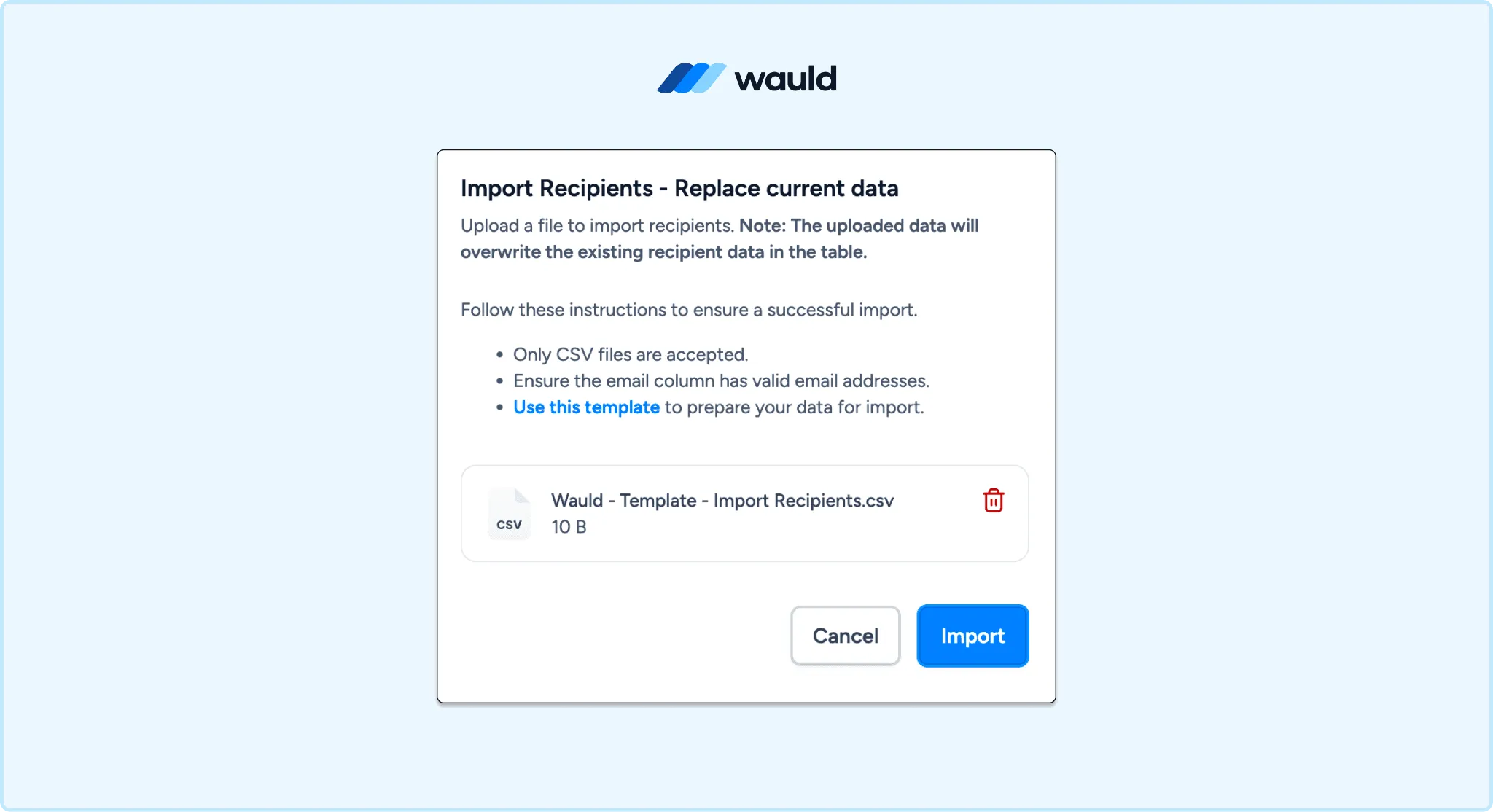
Uploading a CSV of course completions for bulk certificate issuance in Wauld
If you run cohort-based courses, include custom fields such as Cohort Name, Instructor, Completion Score, or Training Department in your CSV upload. Wauld can automatically map these dynamic attributes into each credential, making every certificate personalized without additional manual work.
Why a Static PDF Is Not a Real Credential
The Google Slides route produces a file. Wauld produces a digital credential. That difference matters more than most course creators realize.
A static PDF cannot be verified. An employer, institution, or client has no way to confirm the document is genuine. It cannot be shared on LinkedIn in one click. It cannot be revoked. It cannot be updated if a detail changes. And you have no visibility into whether the learner opened it at all.
With Wauld, every Owwlish LMS certificate includes:
- A unique credential ID
- A public verification page anyone can open and check
- A QR code linking to that verification page
- A downloadable PDF version
- One-click LinkedIn sharing for learners
- Engagement analytics showing opens, downloads, and shares
Learners who earn online course certificates worked hard. A credential that proves it should be worth sharing, not just saving to a downloads folder.
You can explore how verifiable certificates compare to basic LMS certificates in Wauld's guide to digital credentials vs certificates.
Comparing the Methods
| Method | Verifiable | Automatic | Cost |
|---|---|---|---|
| Owwlish + Zapier + Wauld | Yes | Yes | Free plan |
| Owwlish + Zapier + Google Slides | No | Yes | Free |
| Owwlish + Wauld Bulk CSV | Yes | No (Manual) | Free plan |
Which Method Is Right for You?
- Running a self-paced course with rolling completions? Use Method 1: Owwlish, Zapier, and Wauld. It fires the moment a learner finishes and requires zero ongoing effort from you.
- Teaching a cohort where you want to review completions before issuing? Use Method 3, the bulk CSV route in Wauld. You stay in control of exactly when certificates go out.
- Need the fastest possible free setup without adding any new tools? Method 2 works, but plan for its limitations. No verification, no tracking, and more Zap steps to maintain.
Most Owwlish course creators end up running both: an automated Zapier workflow for self-paced learners, and a periodic bulk send for structured cohorts.
Issue Your First Owwlish Certificate Today
Owwlish builds and delivers the course. Wauld makes the achievement visible, verifiable, and worth sharing.
Design your certificate template once in Wauld. Connect it through Zapier or upload a CSV. Every learner walks away with a credential they can verify, add to LinkedIn, and point to in their career.
If you are new to automated certificate workflows, Wauld's guide to Zapier certificate automation is the fastest place to start.