How to Issue Verifiable MemberPress Certificates & Badges

Verifiable MemberPress Certificates & Badges
Your student just finished your MemberPress course. They passed every lesson and every quiz. Then MemberPress hands them a styled PDF and a shareable link back to your WordPress site. That link can go offline. That PDF can be edited. Neither can be independently verified. If your online course certification program targets professionals in healthcare, fitness, tech, or nutrition, that is a real problem.
This guide covers where MemberPress course certificates fall short, how Wauld fixes every gap, and the three methods to connect the two platforms today.
Where MemberPress Course Certificates Fall Short
MemberPress is the leading WordPress membership plugin for course creators and coaches. The MemberPress Courses add-on includes a built-in certificate feature that rewards students on course completion. For casual learning programs it covers the basics. For professional certification programs, it has real blockers.
- Locked to Paid Plans and Only Three Styles: The certificate feature is not available on the Launch plan. Even on Growth and Scale plans, you get only three design templates with no template library, no badge format, and no flexibility beyond logo, text, and font color.
- No Score Gating: MemberPress has no way to gate a certificate behind a minimum quiz score. A student who fails every quiz gets the same certificate as one who scored 100%. MemberPress promotes awarding certificates only to students who meet certain standards but the tool has no mechanism to enforce this. Course creators asking for this feature in the MemberPress certification program guide have gone without an answer.
- No Multi-Course Pathway Certificates: Certificates are tied to individual course completions only. There is no way to issue one credential across a series of courses. The official MemberPress certificate documentation confirms no pathway or multi-course trigger is available.
- A Shareable Link Is Not a Verified Credential: The shareable link simply opens a page on your WordPress site. If your domain lapses or your URL changes, every certificate link breaks. There is no cryptographic verification, no unique credential ID, and no independent proof the document has not been altered.
- No LinkedIn Credential Integration: Students cannot add a MemberPress certificate as a verified entry on their LinkedIn profile. LinkedIn's Licenses and Certifications section requires an issuer name, issue date, and a live verification URL. MemberPress provides none of this.
- No Post-Issuance Analytics: Once a student downloads the PDF, MemberPress has zero visibility into what happens next. You cannot track whether the certificate was opened, shared, or verified by a third party.
- No Digital Badges: MemberPress has no badge feature at all. Digital badges are a separate credential format: compact, embeddable, and shareable directly to LinkedIn, a resume, or a portfolio. Without badges, MemberPress has no way to reward partial progress, skill attainment, quiz passes, or coaching milestones. Read the Wauld guide on LMS certificates vs digital credentialing for the full comparison.
How Wauld Fixes Every Gap
Wauld is a dedicated digital credential platform built to design, issue, verify, and track certificates and badges at scale. It handles the full credential lifecycle in one dashboard and connects directly to MemberPress through three integration methods.
- Verifiable Credentials from Any MemberPress Plan: Every Wauld certificate carries a unique ID, a QR code, and a permanent public verification page. Whether you are on Launch, Growth, or Scale, you can issue professional verifiable credentials to your students. An employer or licensing body can confirm authenticity by scanning the QR code, completely independent of your WordPress site.
- Score Gating and Multi-Course Credentials: Set a filter condition to only issue a credential when a student's quiz score meets your minimum threshold. MemberPress records the score. Wauld issues only to those who passed. For multi-course programs, Wauld triggers on a combination of MemberPress course completions so one credential represents an achievement that spans your entire program.
- Digital Badges: Wauld issues digital badges as a distinct credential type alongside certificates. Badges are verifiable, embeddable, and shareable directly to LinkedIn. They are ideal for quiz passes, module completions, CoachKit milestones, and membership tier achievements. Wauld can trigger badge issuance on any MemberPress event including course completions, membership tier changes, and coaching milestones.
- Real LinkedIn Integration and Post-Issuance Analytics: Recipients add both certificates and badges directly to the LinkedIn Licenses and Certifications section, with your organization name, issue date, expiry date, and a live verification link. Wauld also tracks every open, download, share, LinkedIn profile addition, and third-party verification for every credential you issue. Learn how this works in the Wauld guide to leveraging digital credentials on LinkedIn.
- Automated Expiry and Renewal: When a credential expires, it is automatically revoked and third-party verification reflects the updated status immediately. When the student completes the renewal course, Wauld issues a fresh, re-dated credential automatically, supporting the recurring revenue strategy MemberPress promotes.
- 900 Plus Certificate and Badge Templates: Wauld offers over 900 customizable certificate and badge templates. Badge templates cover skill icons, achievement badges, and membership tier recognitions. All are brandable and verifiable from the same dashboard.
3 Ways to Connect MemberPress to Wauld
Method 1: Zapier (No-Code, Best for Most Creators)
Zapier connects MemberPress and Wauld without any code. The Zapier add-on is available on the MemberPress Scale plan only. It fires on course completion, membership activation, subscription renewal, and more. Read the full walkthrough in the Wauld guide to automating certificates with Zapier.
Setup steps:
- Activate the Zapier add-on from your MemberPress Scale dashboard.
- In Zapier, create a new Zap and set MemberPress as the trigger app.
- Choose Course Completed as the trigger event.
- Add a Filter step for score gating if needed, for example, only continue if quiz score is 75 or above.
- Set Wauld as the action app and choose Issue Credential.
- Map the student name and email to Wauld's recipient fields.
- Select your certificate or badge template, test with a sample record, and turn the Zap on.
From that point, every qualifying student automatically receives a branded, verifiable certificate or badge by email.
Also automate:
- Membership tier upgrade: issue a tier-specific credential
- CoachKit milestone reached: issue a coaching achievement badge
- Subscription renewal: re-issue an updated annual certificate
- Corporate account team added: credential the full group automatically
Pros:
- No code required
- Fast to set up
- Supports conditional logic via filters
- Issues both certificates and badges
Cons: Requires MemberPress Scale plan. A paid Zapier plan is also needed for multi-step Zaps.
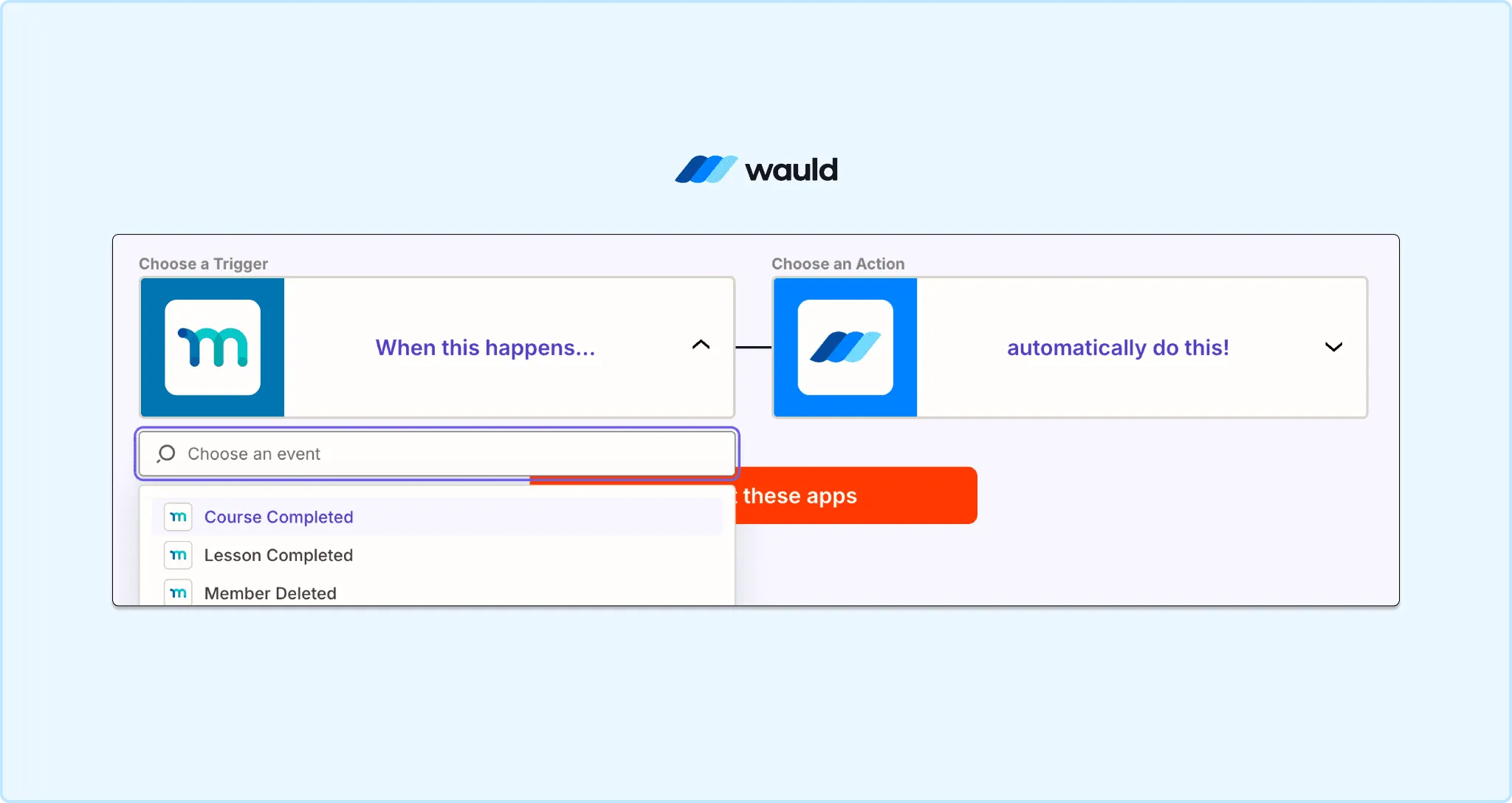
Connecting MemberPress to Wauld in Zapier
Method 2: Wauld and MemberPress Webhooks (Best for Developers)
MemberPress fires webhooks on every platform event, but the Developer Tools and REST API add-on that enables this is available on the Scale plan only. Wauld has its own webhook system that acts as the receiving end, so you do not need to build or maintain a custom server endpoint. MemberPress sends the event payload out, and Wauld catches it and issues the credential automatically.
Setup steps:
- In your Wauld dashboard, go to Automations and create a new webhook.
- Copy the Wauld webhook URL generated for your credential template.
- In MemberPress, go to Developer Tools and add a new webhook.
- Paste the Wauld webhook URL as the destination and set the event to mpcs_course_completed or your chosen trigger.
- Map the student name and email fields from the MemberPress payload to the Wauld recipient fields.
- Select the credential type, certificate or badge, and your chosen template.
- Save and test with a sample course completion. Wauld issues and emails the credential automatically.
Pros:
- No Zapier subscription required.
- No custom server endpoint to build or maintain.
- Fastest and most reliable connection for high-volume programs.
- Full custom logic including multi-course gates, score thresholds, and badge vs certificate routing.
Cons:
- Requires MemberPress Scale plan for Developer Tools access.
- Requires basic technical familiarity with webhook configuration.
- Not suitable for non-technical creators.
Method 3: Bulk CSV Upload (Best for Cohorts and Past Students)
No Zapier, no developer, no Scale plan required, and no ongoing setup needed. Export your MemberPress completion data, upload to Wauld, and credentials go out to everyone at once. This method works for both certificates and badges. Just select the credential type during the upload.
Setup steps:
- Export course completion data from MemberPress, including student names, emails, and completion dates.
- Format it into a CSV with the columns Wauld expects.
- In Wauld, select Bulk Issuance, choose certificate or badge, upload your file, and map each column to the matching credential field.
- Preview a sample, then click send. Wauld emails a personalized, verifiable credential to every recipient.
Pros:
- Zero setup time.
- Works on Launch, Growth, and Scale plans.
- Issues certificates and badges.
- Ideal for past cohorts and one-time certification drives.
Cons:
- Manual process.
- Not automated in real time.
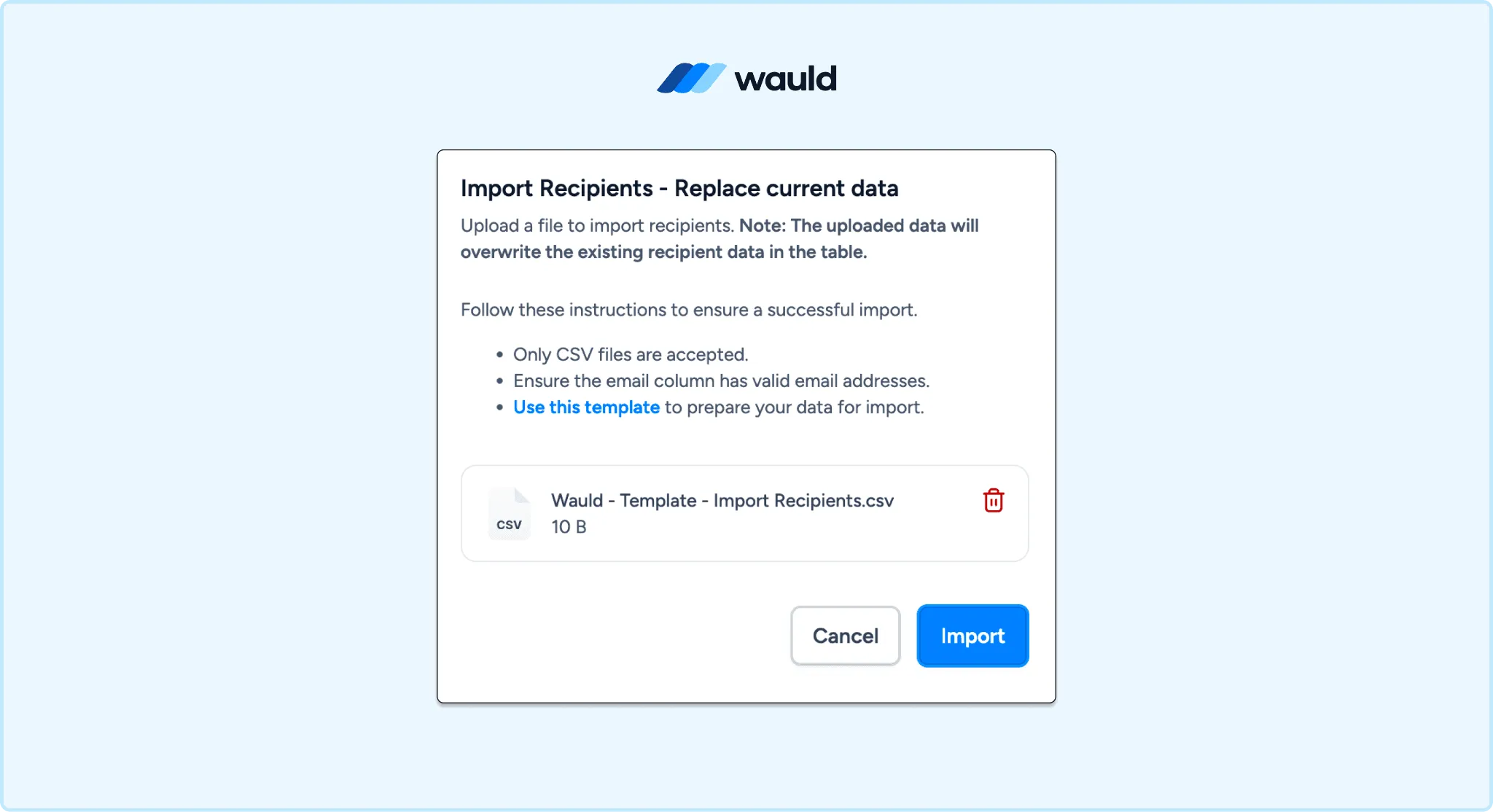
Bulk issuance in Wauld: upload a CSV of your MemberPress course completions, map the fields, and send personalized verifiable certificates or badges to every recipient.
Want a visual walkthrough of how MemberPress certificate settings work before you connect Wauld?
MemberPress has an official video tutorial covering how to add completion and expiration dates to your course certificates. Watch it here: How to Add Completion and Expiration Dates on a MemberPress Course Certificate
Which Method Should You Use?
| Zapier | API and Webhooks | Bulk CSV | |
|---|---|---|---|
| Requires coding | No | Yes | No |
| Fully automated | Yes | Yes | No |
| Score gating | Via filter step | Full custom logic | Manual |
| Multi-course pathways | Via multi-step Zap | Full custom logic | Manual |
| Badge issuance | Yes, per event | Yes, full logic | Yes, bulk |
Most MemberPress course creators start with Zapier and move to the API method as their certification program scales. The bulk CSV method is the fastest way to get verifiable credentials out to students today with no setup at all.
Start Issuing Verifiable MemberPress Certificates Today
MemberPress builds the course and the learner journey. Wauld makes the credential at the end of that journey mean something in the real world.
Students walk away with proof that holds up to professional scrutiny. A certificate when they finish a course. A badge when they pass a quiz, hit a milestone, or earn a skill recognition. Both shareable to LinkedIn as verified credential entries. Both checkable independently by any employer, without contacting you.
Wauld is built specifically for coaches and creators running professional learning programs on platforms like MemberPress. Whether you run a healthcare training program, a fitness certification course, a tech bootcamp, or a coaching membership, Wauld gives your credentials the weight they deserve.