Generate Certificates with Google Forms for your events, webinars, or courses

Generate Certificates with Google Forms for your events, webinars, or courses
Turning Google Form into Certificates (Step-by-Step Guide)
If you're looking to create certificates with Google, the most common starting point is using google forms to collect responses. Whether it’s a webinar, training, or assessment, this method helps you generate certificates with Google Forms and scale recognition without manual effort.
Here’s a complete breakdown of how to generate certificates from Google forms efficiently.
1. Create a Google Form to Collect Responses
Start by setting up a new form. This is where participants will submit their details such as name, email, and any required inputs like score or feedback. If you're running a webinar or course assessment, you can also define a passing percent to filter eligible respondents.
When you create a google form, ensure it captures all necessary participant details since these will directly power your personalized certificates later.
2. Link Responses to Google Sheets
Once your form is live, responses will flow into a linked google sheet (a google spreadsheet). Every new response creates a new row, which becomes the trigger point for your certificate workflow.
These google form responses act as the foundation for certificate creation. This step is critical because all automation depends on clean and structured data.
3. Choose a Certificate Template in Google Slides
To create certificates, you can design a certificate template in google slides. Many users rely on a google slides template with placeholders for participant names, dates, and course details.
You can build your own certificate template in google or use included templates available via tools in the google workspace marketplace. These templates allow basic certificate design, including font selection, layout, and branding elements.
Alternatively, you can also explore 900+ certificate templates from Wauld's certificate template gallery.
4. Use Tools to Automate Certificate Generation
To generate and send certificates, tools like Wauld (offers a free plan upto 300 certificates) are commonly used. These tools integrate with your google forms and enable personalized email automation by using google forms as the trigger.
Every time a respondent submits the form, the system can trigger certificate creation. This allows you to generate and send certificates directly without manual intervention.
However, while you can automate certificate workflows within Google, the flexibility is limited when scaling to hundreds of certificates or managing individual certificates.
5. Generate and Send PDF Certificates
Once configured, the system will generate certificates from google and send a digital certificate to each respondent. This includes mapping dynamic fields like participant names and participant details into the template.
You can also customize the email that accompanies the certificate, making it suitable for email marketing or post-event engagement. The goal is to ensure smooth email delivery without needing to send another email manually.
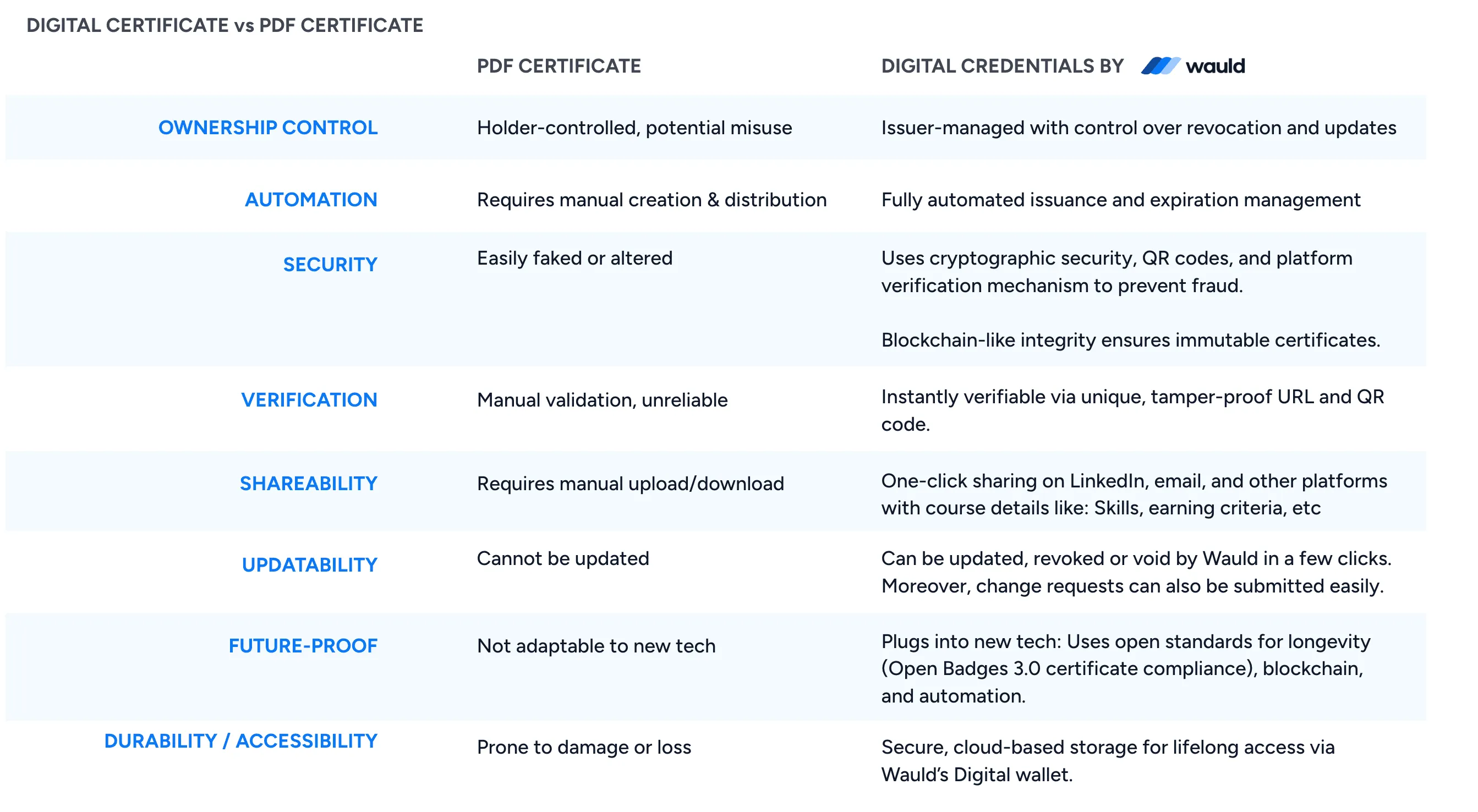
It is important to note that digital certificates (issued by platforms like Wauld) are not the same as pdf certificates. You can read the difference between them below.
6. Enable Certificate Issuance and Tracking
With basic tools, you can send certificates and maintain simple logs in your google spreadsheet. However, tracking is limited. You may store detailed records, but visibility into engagement is minimal.
If you need to generate and issue certificates online with more control, advanced platforms help manage full certificate issuance, assign a unique certificate id, and maintain a centralized dashboard.
7. Simplify the Certificate Creation Process
The traditional certificate creation process using Google tools often involves copy-paste steps, manual fixes, and dependency on add-ons. While it works for small-scale needs, it becomes inefficient as you scale.
To truly streamline and simplify, modern platforms allow you to:
- Connect google forms seamlessly
- Automate certificate workflows end-to-end
- Generate certificates in minutes
- Issue digital certificates with verification
- Maintain a centralized dashboard for management
8. Scaling Beyond Google Tools with Wauld
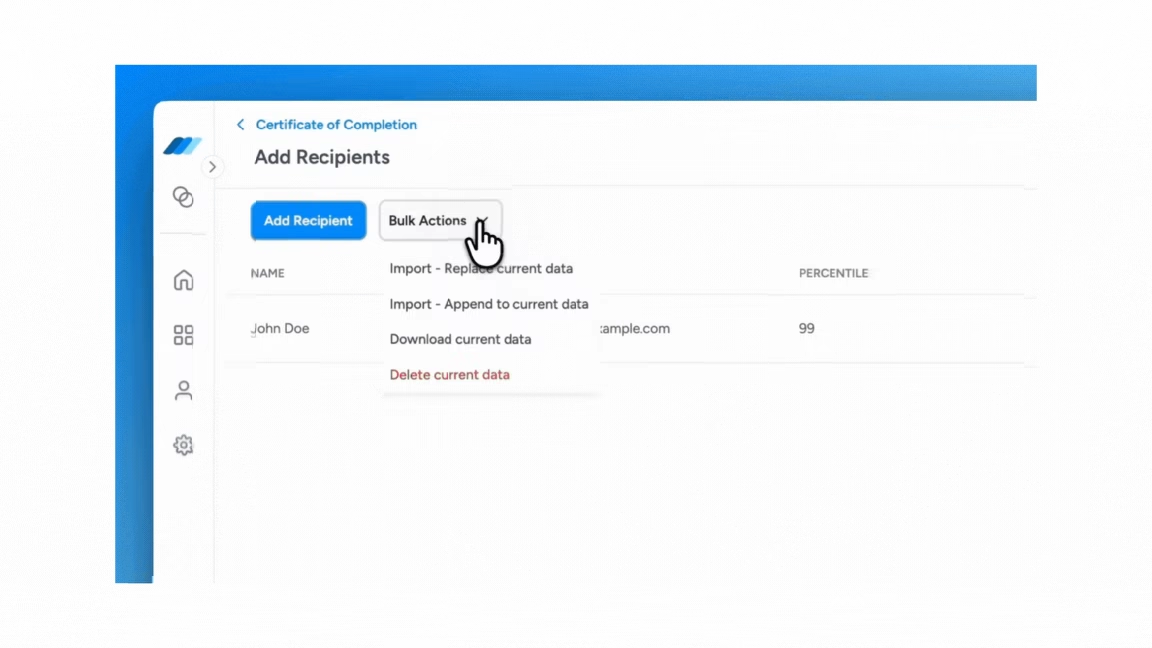
While you can create certificates in google slides and manage certificates in google, scaling requires more robust automation. If you need to generate and issue at scale, platforms like Wauld help you:
- Choose from hundreds of professionally designed certificate templates
- Access customizable templates and included templates
- Add QR-based verification and unique certificate id
- Automate certificate issuance upon form submission
- Handle 100 million certificates-level scalability
This allows you to go beyond basic Google setups and integrate your workflow into a more reliable system.
Final Takeaway
Using google forms is a powerful way to collect responses, but the real value comes when you generate and issue certificates online seamlessly. Whether you're using tools from the google workspace marketplace or moving to advanced platforms, the goal is the same: create a smooth, automated certificate experience.
If you’re just starting, Google tools are sufficient to create a certificate and send certificates directly. But if you need to generate certificates at scale with better tracking, automation, and branding, it’s worth upgrading your workflow.
Today, organizations don’t just create certificates, they deliver digital certificates that drive engagement, credibility, and growth.