Free AI Certificate Generators & Tools

From dusty templates to dazzling designs - AI is transforming how we create certificates of achievement, completion, and appreciation.
Introduction
Certificates are more than pieces of paper. They represent milestones - a course completed, a skill mastered, a contribution recognized. Yet for years, certificate design has been trapped in a loop of generic borders, Times New Roman headings, and stock gold seals that all look suspiciously alike.
That era is ending.
Today, AI-generated certificates are helping individuals, educators, HR teams, and startups produce stunning, personalized results in minutes - without hiring a graphic designer. Whether you need to create certificates for a school event or issue thousands of completion certificates for an online course, generative AI now gives you the power to design certificates at scale with style.
With the right AI certificate maker, you can go from blank canvas to print-ready PDF in minutes - and even send certificates directly to recipients, all from one platform.
Why AI Changes the Game for Certificate Design
Traditional certificate design had a few major pain points:
Time. Even with a certificate template, customizing typography, layouts, colors, and branding across dozens of files was tedious. Now you can make certificates in minutes rather than hours.
Skill barrier. Professional-looking results once required complex design tools with steep learning curves. AI lets anyone easily create beautiful, polished certificates without prior design experience.
Scalability. Producing hundreds of personalized certificates meant manual data entry for every recipient name. Modern tools handle this automatically.
Creativity gap. Free templates looked free. Premium templates looked like every other premium template. AI-generated designs break that cycle entirely.
AI dissolves all four barriers. You can now generate certificates from a text prompt, apply your brand kit and brand colors, choose a certificate template, and export your certificate as a print-ready PDF - all within a single workflow. Some platforms even let you design custom certificates and issue credentials on the same platform.
The Tools: A Detailed Comparison
1. Adobe Firefly
Best for: Professionals who live inside the Adobe ecosystem
Adobe Firefly is Adobe's generative AI engine, deeply integrated into Photoshop, Illustrator, and Adobe Express. For certificate creation, it shines inside Adobe Express - start from a certificate template and use Firefly to generate custom backgrounds or decorative borders via text prompts. Crucially, Firefly is trained on licensed content, making its output safe for free for commercial use projects.
Strengths: Vector-perfect, print-ready PDF output; brand kit and brand colors management; design assets library; commercially licensed AI imagery.
Limitations: Full power needs a Creative Cloud subscription; steep learning curve for new users.
Pricing: Free tier in Express; paid plans from ~$9.99/month.
Verdict: The gold standard for professional designers. If you need to design custom certificates at the highest quality, Firefly delivers.
2. Canva (Magic Studio AI)
Best for: Anyone who wants to create certificates quickly and beautifully
Canva is the world's most popular platform for designing certificates, and its Magic Studio AI suite makes it even more powerful. The standout feature for scale is Bulk Create - upload a spreadsheet with every recipient name and Canva auto-generates a personalized certificate for each person. Magic Design generates layouts from prompts, while drag and drop editing makes customizing effortless.
Strengths: Largest certificate template library; Bulk Create for mass issuance; brand kit with brand colors and fonts; one-click resize; send certificates directly via link.
Limitations: AI imagery can feel generic; fine typographic control is limited.
Pricing: Free plan available; Canva Pro ~$15/month.
Verdict: The best all-around choice. The ability to make certificates in bulk, apply a brand kit, and send certificates to recipients makes it indispensable.
3. Nano Banana
Best for: Automated certificate creation at scale
Nano Banana is purpose-built to create a certificate, issue it, and deliver it - all without switching platforms. This focus makes it exceptionally efficient for e-learning platforms and training organizations that need to generate certificates automatically. With its ai features, you can design a certificate, personalize it with the recipient name, and issue credentials - all in one place.
Strengths: Purpose-built for certificates online; data merge for bulk personalized certificates; LMS integrations; QR-code verification; certificates in minutes.
Limitations: Smaller certificate template library; less creative flexibility.
Pricing: Tiered by volume; free plan for low usage.
Verdict: When you need to generate certificates automatically and issue credentials on the same platform, Nano Banana is purpose-built for exactly that.
4. Visme
Best for: Organizations managing branded certificates alongside broader visual content
Visme's AI Design Generator lets you design a certificate from a text description, applying your brand kit and design elements automatically. Its publishing options let you release certificates online as interactive digital documents - not just static files. You can also personalize the design for different departments or client groups using multiple brand kits.
Strengths: AI layout generation; interactive digital publishing; design custom certificates per brand; strong team collaboration; training certificates workflow support.
Limitations: Busier UI than Canva; some ai features still maturing.
Pricing: Free plan; paid from ~$12.25/month.
Verdict: Excellent for organizations that need professional certificates with consistent branding across teams and departments.
5. Fotor (AI Design Suite)
Best for: Individuals wanting truly unique AI-generated certificate artwork
Fotor's AI Image Generator lets you generate original backgrounds and artwork from text prompts, which you then compose into beautiful certificates using its template editor. The result is genuinely distinctive - far from generic stock imagery. You can customize every design element and export a printable certificate when done.
Strengths: Strong AI image generation; smart design elements suggestions; certificate for free tier available; affordable ai certificate maker pricing.
Limitations: Limited bulk generation; smaller certificate template variety.
Pricing: Free plan; Fotor Pro ~$8.99/month.
Verdict: A hidden gem for individuals who want a beautiful certificate backed by original ai-generated artwork without the Adobe price tag.
6. Picsart (AI Design Tools)
Best for: Modern, digital-first certificates with AI for social sharing
Picsart's design sensibility skews expressive - bold gradients, dynamic layouts, modern font choices. Its AI tools let you make a certificate that feels fresh and contemporary, perfect for course completion badges and community awards. The mobile app means you can create your certificate and share it directly from your phone - no desktop required.
Strengths: Vivid ai-generated artwork; huge font and graphic library; excellent for course completion certificates; easy to make certificates on mobile.
Limitations: Less suited for formal award certificates; print-ready PDF control is weaker; limited bulk tools.
Pricing: Free plan; Picsart Gold ~$5/month.
Verdict: Perfect when your certificates with AI are headed to LinkedIn or email rather than a picture frame.
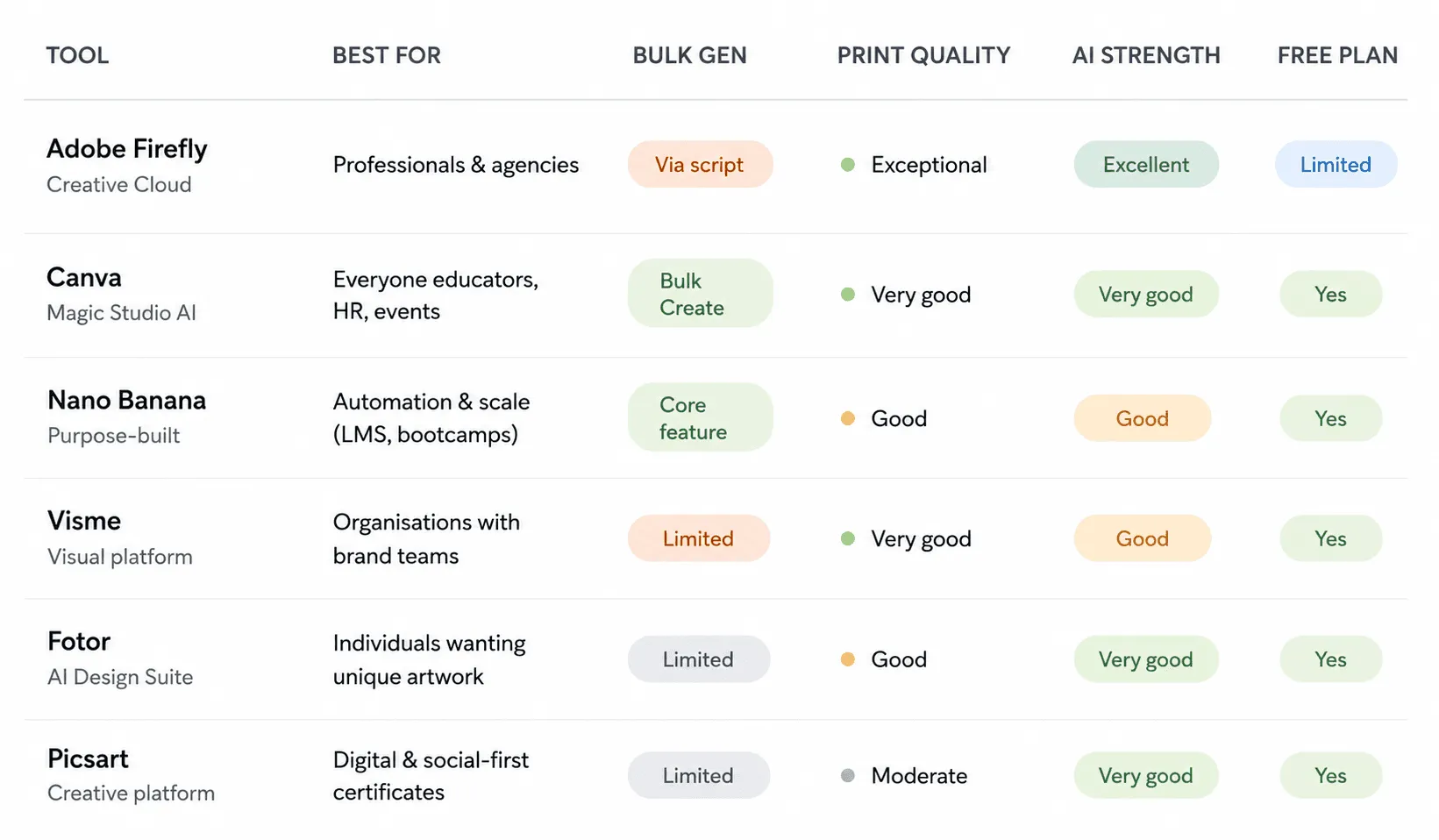
Side-by-Side Comparison
Key Design Principles AI Still Can't Replace
No matter which AI certificate maker you choose, these fundamentals still require human judgement:
- Hierarchy. The recipient name must dominate the layout visually. Always check this after AI generates the design.
- Whitespace. Resist filling every corner with design elements just because you can. Restraint signals quality.
- Font pairing. A serif headline with a sans-serif body remains timeless - use AI font suggestions as a starting point.
- Brand consistency. Always apply your brand kit and brand colors before finalizing any certificate design.
- Authenticity. A personalized certificate with a real signature carries more weight than a purely automated output. Add a signature field before you send certificates.
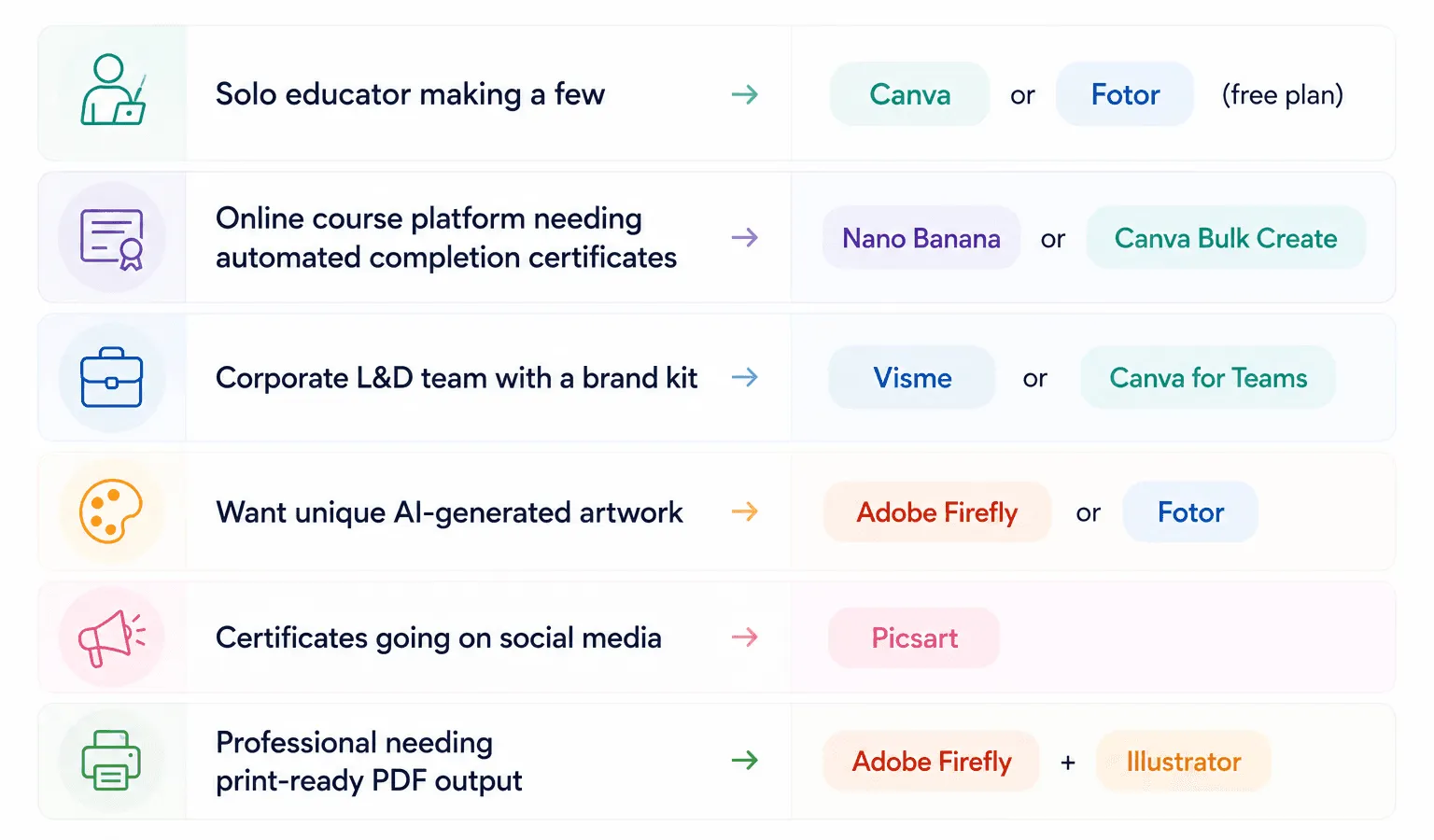
Quick Decision Guide
Final Thoughts
AI hasn't just made certificate design faster - it's made it genuinely better. The combination of generative AI, smart certificate templates, automated personalization per recipient name, and brand kit consistency means there's no excuse for a forgettable certificate anymore.
Start with a free certificate generator, test a few ai features, and pick the platform that fits your workflow. The award certificates your recipients receive reflect how much you value their achievement - and with AI, making them look extraordinary has never been easier.
And if you're looking for a platform that brings the best of both worlds together - Wauld offers certificate design as stunning as any of the tools above, while also letting you issue and manage credentials directly on the same platform - so your entire recognition workflow, from design to delivery, lives in one place_._