Docebo Certificate Integration: How to Issue Verifiable Credentials with Wauld

Docebo issues a certificate natively, but it lands as a static PDF with no public verification link, no QR code, and no analytics. A Docebo certificate integration with Wauld closes that gap. It turns each course completion into a verifiable, branded credential your learners can share and anyone can verify. This guide shows you four proven ways to connect the two.
Picture a learner who finishes a compliance course in Docebo. A certificate pops up. They download a PDF, and that is where the story ends. The file sits in a downloads folder. An employer cannot verify it without a phone call. Meanwhile, you have no idea whether it was ever opened or shared. For a modern program built on certificate automation, that is a real problem.
Key takeaways
Does Docebo issue certificates, and why add Wauld?
Yes, Docebo issues certificates natively. However, they arrive as static PDFs with no verification, no QR code, and no analytics. Wauld fixes that gap. It turns each Docebo course completion into a verifiable, branded credential. Therefore your certificates finally work outside the platform, not just inside it. You can connect the two in four proven ways, and this guide shows you how.
What Docebo offers natively for certificates
Docebo is a well established enterprise LMS, and it ships credentialing out of the box. However, Docebo draws a clear line between a certificate and a certification. Knowing the difference helps you decide what to issue.
Certificates confirm that a learner gained knowledge or skills by finishing a training program. They rarely require an exam. A Docebo certificate usually does not expire, so learners add it to a resume or use it as foundational proof for career growth. It is lightweight. Therefore it often carries less industry weight than a formal certification.
Certifications are professional credentials granted by a recognized authority to verify expertise in a specific field. They often require passing an exam and meeting professional standards, which can include work experience. Unlike a certificate, a certification usually needs renewal through continuing education or retraining. Docebo issues these through its Certifications and Retraining app, each with a validity period and an expiry date. For example, a learner can recertify by retaking a course or logging external training.
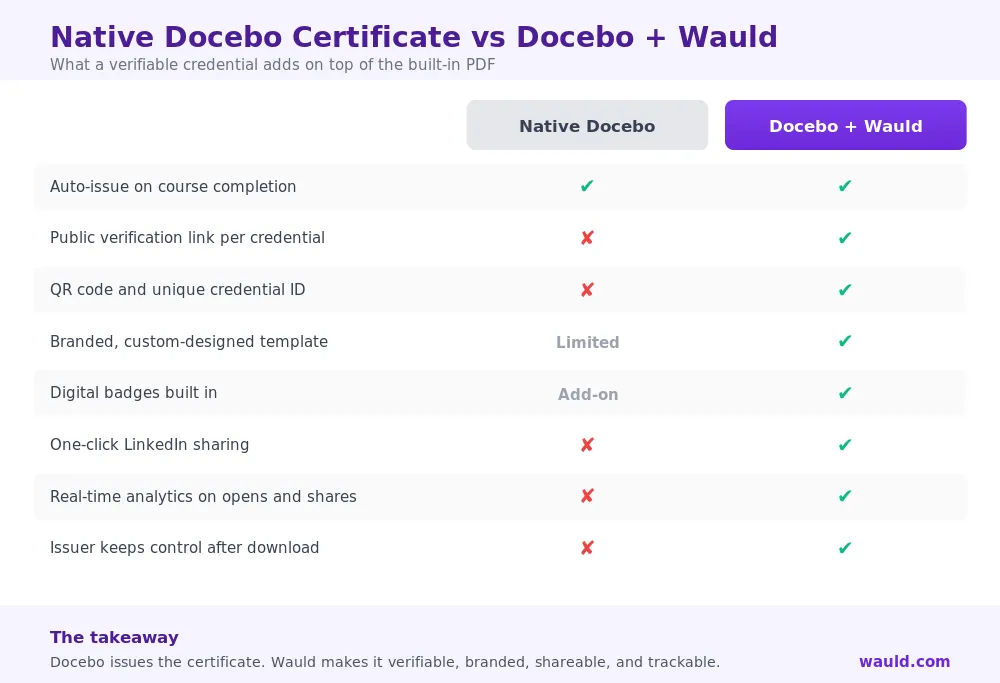
Both help with internal record keeping. However, the limits show up the moment a credential needs to leave Docebo. Here is what the native Docebo certificate cannot do once a learner downloads it:
- It is a downloadable PDF. Once downloaded, the issuer loses control of it.
- It has no public verification page for a third party to check.
- It carries no QR code or unique credential ID for tamper checking.
- It offers no digital wallet, no one-click LinkedIn sharing, and no analytics.
This is the same gap Docebo's own credentialing partners point to. A dedicated credentialing layer is built to solve it.
Where Wauld helps
Wauld is a digital credential platform. It manages the full lifecycle of a credential: design, issue, deliver, verify, and track. Plugged into Docebo, it takes the completion event Docebo already produces. Then it turns that event into a credential that works in the real world.
Here is what Wauld adds:
- Verification built in with a unique ID and QR code
- Live, public verification page for every credential
- Open Badge 3.0 compliant and fully portable
- Branded, white-label design with your logo and fonts
- Dynamic attributes auto-fill name, email, course, and date
- Digital badges from the same automation
- Real-time analytics on opens, shares, and verifications
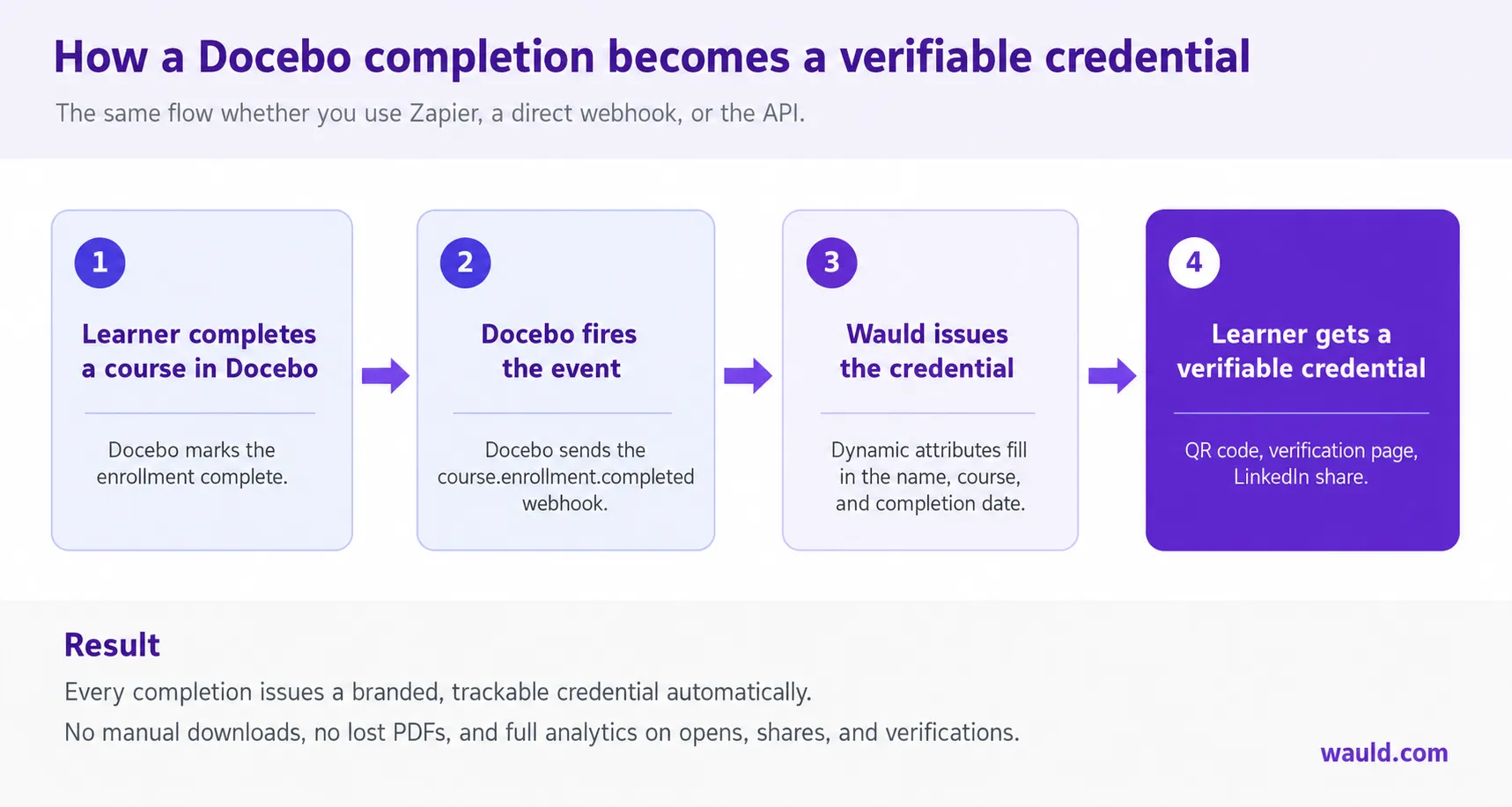
For example, every credential carries a unique ID and a QR code. The code links to a live, public verification page, so anyone can scan it to confirm authenticity with no account needed. Meanwhile, you build the certificate or digital badge once with your logo, colors, fonts, and signatures. Placeholders then fill in each recipient's details the moment the credential issues, and the credential emails out the instant Docebo fires the completion event.
How to integrate Docebo with Wauld
Docebo does not publish a dedicated Zapier app. Therefore the accurate connection points are its native webhooks, its API, Docebo Connect, and a plain CSV export. All four methods below are verified against Docebo's own documentation.
Wauld exposes two building blocks that matter here. The Issue Credential action issues a credential in Wauld when triggered. The Credential Issued trigger fires in another app after Wauld issues one. Every method follows the same simple flow.
Method 1: Docebo webhook through Webhooks by Zapier
Docebo fires a webhook on the course.enrollment.completed event. Because there is no native Docebo Zapier app, you catch that webhook with Webhooks by Zapier. Then you pass the data to Wauld.
- 1
Subscribe the Docebo webhook
In Docebo, create a webhook and subscribe it to the
course.enrollment.completedevent. - 2
Catch the hook in Zapier
Start a Zap with the Webhooks by Zapier "Catch Hook" trigger. Paste its URL into the Docebo payload URL.
- 3
Add the Wauld action
Add Wauld's Issue Credential action as the next step.
- 4
Map the fields and turn it on
Map the Docebo fields (learner name, email, course title, date) to Wauld's dynamic attributes. Turn it on, and each completion now issues a verifiable credential automatically.
Best for: no-code teams who also want to send the same event to a CRM or Slack. Note that Webhooks by Zapier sits on Zapier's paid tiers.
Method 2: Direct webhook to Wauld's trigger URL
Would you rather skip Zapier? Then point the Docebo webhook straight at Wauld.
- In Wauld, open the credential you want to automate. Generate its custom trigger URL.
- In Docebo, create a webhook on
course.enrollment.completed. Set the payload URL to that Wauld trigger URL. - Map the fields so the incoming payload fills your dynamic attributes.
- Test with one completion. Confirm the credential issues, then go live.
Best for: real-time issuance with no middleware cost. It is direct and fast. However, it needs someone comfortable configuring a webhook.
Method 3: Docebo API or Docebo Connect
For high volume or custom logic, use the Docebo API or the low-code Docebo Connect platform.
- Use the Docebo API to read completion and certification data, or build a flow in Docebo Connect.
- When your condition is met, POST to Wauld's issuing endpoint or trigger URL.
- Pass recipient and course data into Wauld's dynamic attributes.
- Add branching rules. For example, issue a badge for one module and a full certificate for the whole path.
Best for: developer teams building custom or conditional pipelines. It also suits issuance tied to the Certifications and Retraining app.
Method 4: CSV bulk upload
This needs no code, no webhooks, and no subscription. Therefore it is perfect for one-off cohorts or backfilling past learners.
- In Docebo, run a report of the learners who completed the course.
- Export it. Format the columns Wauld needs, such as name and email.
- Upload the file to Wauld and bulk-issue in one operation.
Best for: batch issuance, historical cohorts, or teams that want zero technical setup.
Methods at a glance
| Method | Setup effort | Real-time | Cost beyond Docebo/Wauld | Best for |
|---|---|---|---|---|
| Webhooks by Zapier | Low | Yes | Zapier paid tier | No-code, multi-app workflows |
| Direct webhook | Medium | Yes | None | Fast real-time issuance |
| API / Docebo Connect | High | Yes | Dev time | Custom, conditional pipelines |
| CSV bulk upload | Very low | No | None | Batch and one-off issuance |
Beyond course certificates: real use cases
The same automation issues digital badges as well as certificates. Therefore one connection can power a full program:
- Milestone badges. Issue a badge per module so learners get recognition before the full certificate.
- Compliance and retraining. Pair Wauld with the Certifications and Retraining app. Every renewal then produces a fresh, dated, verifiable credential.
- Partner and customer education. For extended enterprise programs, give external learners credentials they can show and verify.
- Learning paths. Award a stacked, verifiable credential when a learner finishes a full learning plan.
Get started
Docebo is a strong LMS, and your Docebo certificate does its job inside the platform. Wauld makes it count outside it. You can build the whole thing on Wauld's free plan. It includes 300 credentials a year with AI design, analytics, and automation. Later, you can move to the Growth plan as you scale.
The fastest path is Method 2, a direct webhook. Alternatively, choose Method 1 if you prefer a no-code builder. Connect it to the course.enrollment.completed event. Then every Docebo completion becomes a credential your learners can verify, share, and be proud of.
Turn every Docebo completion into a verifiable credential
Create a free Wauld account and connect it to your Docebo course completion event today.
FAQs on Docebo Certificate Integration
Does Docebo already issue certificates? Yes. Docebo awards a PDF certificate on course or learning plan completion. Through the Certifications and Retraining app, it also issues certifications with expiry and renewal. However, the native certificate is a downloadable PDF with no public verification or analytics.
Why use Wauld if Docebo has certificates? Wauld adds what the native Docebo certificate lacks. That includes a public verification page, a QR code, branded design, digital badges, LinkedIn sharing, and real-time analytics. Best of all, it issues them automatically from the same completion event.
Does Docebo have a Zapier app? No, not a dedicated one. Instead, you connect through Docebo's native webhooks. You can use Webhooks by Zapier, point the webhook straight at Wauld, or use the Docebo API and Docebo Connect.
Which Docebo event triggers certificate issuance? The course.enrollment.completed event, labeled "Learner completed course," is the standard trigger. Meanwhile, API and Docebo Connect flows can also key off certification and learning plan completion.
Can I issue digital badges from Docebo, not just certificates? Yes. Wauld issues badges with the same automation as certificates. Therefore you can award Docebo badges for single modules, milestones, or partner tiers, each fully verifiable.
Do I need a paid plan to start? No. Wauld's free plan covers 300 credentials a year with automation, analytics, and design included. A direct webhook to Wauld also avoids any Zapier subscription.
Further reading: see how Wauld automates the same flow for another LMS in Skilljar certificate automation. Compare options in top digital certificate platforms and digital badge platforms. For source docs, see Docebo on certificates and certifications and creating and managing webhooks.