Animated Digital Badges: What They Are & How to Create Them

In a world where credentials are becoming increasingly digital, animated digital badges are transforming how organizations recognize and celebrate achievements. These dynamic credentials aren't just static images anymore. They move, they shine, and they capture the essence of what makes an accomplishment truly worth celebrating.
Whether you're an educator recognizing course completion, an employer acknowledging professional development, or an organization celebrating milestones, animated digital badges offer a modern way to make recognition meaningful. Learn more about course completion certificates and higher education solutions at Wauld. In this guide, we'll explore what animated digital badges are, why they matter, and how you can get them for your organization.
What are Animated Digital Badges?
An animated digital badge is a digital credential that features motion and dynamic visual effects. Unlike traditional static badge images that remain unchanged, animated badges use animations such as pulsing effects, rotating elements, color transitions, or floating particles to create a more engaging and memorable credential.
These badges are typically issued as digital files (PNG, GIF, WebP, or SVG formats with animation capabilities) or as interactive web-based badges that organizations can share with recipients. When someone earns a badge, they receive a visually engaging credential they can display on their website, LinkedIn profile, portfolio, or email signature. To understand how badges differ from certificates, check out our guide on digital badges vs certificates.
Key characteristics of animated digital badges:
- Motion and visual effects that draw the eye
- Customizable animations matching your brand identity
- Metadata that verifies authenticity and achievement details
- Digital format that's easy to share and display online
- Higher engagement and perceived value compared to static badges
The Advantages of Using Animated Digital Badges
Beyond the visual differences, animated digital badges offer concrete benefits:
- Increased engagement and reach: Recipients display and share animated badges more frequently, extending brand visibility
- Higher completion and motivation: The appeal of animated badges motivates program completion and inspires pride in achievement
- Professional credibility: Animated badges look more official and valuable on professional platforms, attracting recruiter attention
- Better learning outcomes: Programs offering animated badges correlate with higher retention, satisfaction, and program value perception
- Scalable and cost-effective: Digital badges scale to unlimited recipients without additional cost, from dozens to thousands
Limitations of Animated Digital Badges
While animated digital badges offer significant advantages, keep these limitations in mind:
- Platform Compatibility: Animations may not display on all platforms (LinkedIn, email clients often convert to static images)
- File Size: Animated formats (GIF, A-PNG, WebP) have larger file sizes and may impact page load times
- Design Complexity: Poorly designed animations can look unprofessional or distract from credibility
- Accessibility: Animations may not be compatible with screen readers or accessible to people with photosensitive conditions
How to Create Animated Digital Badges
Creating animated digital badges involves several approaches, depending on your technical capabilities and resources:
Option 1: Use Design Software
If you have design skills or access to a designer, you can create animated badges using:
- Adobe Animate or Animate CC: Professional tool for creating frame-by-frame animations and exporting as GIF or WebP
- Adobe After Effects: More advanced tool for sophisticated animations with effects like glows, particles, and transitions
- Canva Pro: User-friendly design tool that offers animation features and badge templates
- Figma: Modern design platform with prototyping capabilities for creating animated badges
The process typically involves:
- Designing the static badge artwork
- Creating animation keyframes or effects
- Exporting in a format that supports animation (GIF, WebP, or as interactive HTML/CSS)
- Testing the badge across devices and platforms
- Embedding metadata for verification
Pricing: Adobe tools ($20-55/month), Canva Pro ($12-15/month), or Figma (free to $45/month) depending on features needed. However, you'll also need a professional designer who can create quality animations, which typically costs $2,000-$4,000 per month for a full-time position.
Option 2: Use Badge Creator Platforms
Many platforms now offer built-in animated badge creation:
- Choose your template or design from scratch
- Add animations and effects through visual controls
- Customize colors, text, and imagery
- Export and distribute to recipients
- Track who has earned and displayed the badge
This approach requires no design skills and produces professional results quickly.
Pricing: While many badge platforms offer free tiers, animated badges are usually reserved for paid plans. At Wauld, we believe you should try before you commit. That's why we've made animated badges available in our free account, allowing you to issue up to 300 animated badges at no cost. This lets you experience the power of animated badges and decide if a paid plan makes sense for your organization.
Option 3: Hire a Specialized Service
Organizations wanting premium, custom animated badges can hire designers or badge services to create unique animations tailored to their brand. This ensures completely original designs and sophisticated animations that reflect your organization's identity.
Pricing: Custom design services typically range from $500-$5,000+ depending on complexity, revision rounds, and scope of work. Ongoing support and updates may incur additional costs.
How Wauld Makes Animated Digital Badges Easy
Wauld offers a comprehensive solution for organizations looking to implement animated digital badges without complexity.
- 1
Pre-built Animated Badge Templates
Wauld provides professionally designed, animated badge templates for course completion, industry-specific needs (healthcare, education, technology, compliance), and subtle animations (pulsing, glowing, rotating). Our native animation elements work like "lego sets" for badge creation—mix and match components or build custom badges from scratch. Select a template, customize in minutes, and start issuing. No design experience needed.
- 2
Custom Animated Badge Creation
For organizations with specific branding or unique requirements, Wauld's design team can create completely custom animated digital badges that reflect your brand identity perfectly. The process includes a discovery call to understand your vision and requirements, custom design and animation creation, multiple revision rounds to ensure satisfaction, final delivery in all necessary formats, and integration with your badge issuance system.
- 3
Bulk Badge Issuance
Whether using pre-built or custom badges, Wauld makes issuing animated digital badges in bulk simple. Upload recipient lists and achievement data, automatically generate personalized badges for each recipient, distribute badges via email, direct download, or badge wallet integration, track issuance and display across your organization, and enable recipients to easily share on LinkedIn, portfolios, and professional platforms.
- 4
Badge Wallet and Verification
Wauld's platform provides recipients with a secure badge wallet where they can store all earned animated badges in one place, share badges to LinkedIn, social media, and professional profiles, view badge details, issue dates, and verification information, and manage their digital credentials portfolio.
- 5
No Technical Complexity
Unlike some badge platforms that require technical setup, Wauld handles the complexity. No coding or development required, simple intuitive dashboard for badge management, built-in verification and authenticity features, and GDPR and data privacy compliance.
Services Wauld Offers for Custom Animated Badges
Beyond pre-built templates, Wauld offers full-service custom animated badge creation tailored to your organization:
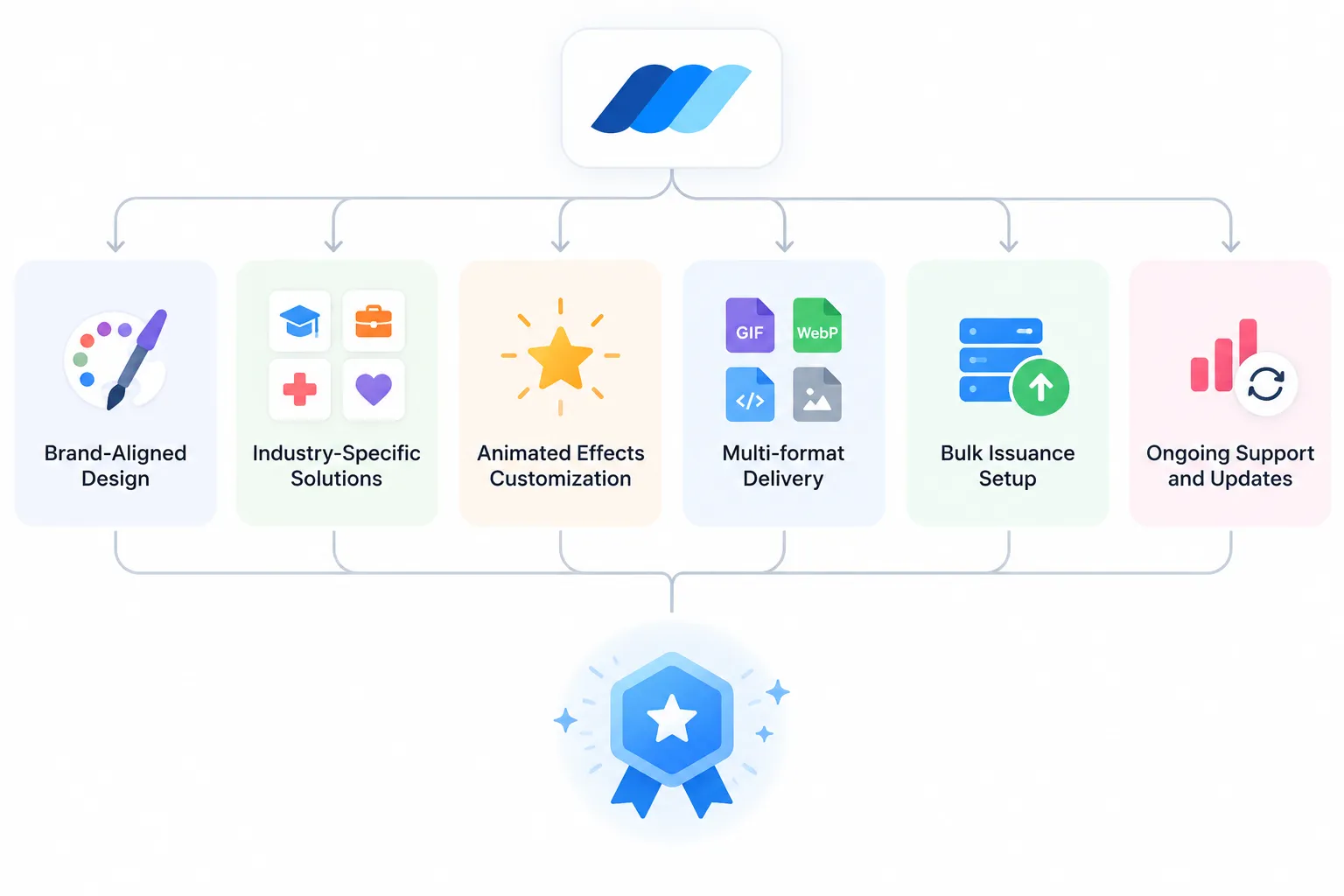
#1. Brand-Aligned Design
- Badges designed to match your brand guidelines and visual identity
- Subtle animations or eye-catching effects available
#2. Industry-Specific Solutions
- Education: course completion, degrees, skill development
- Professional Development: certifications, training, competency badges
- Healthcare: continuing education, specialty certifications, compliance
- Corporate: employee achievement, milestones, training
- Nonprofits: volunteer recognition, fundraising, program completion
#3. Animated Effects Customization
- Subtle pulsing, rotating elements, color transitions
- Particle effects (shimmer, sparkle, float)
- Custom animations tailored to your needs
#4. Bulk Issuance Setup
- Integration with existing systems (LMS, HR platforms, etc.)
- Automated batch processing for hundreds or thousands of badges
- Recipient communication and distribution
- Engagement analytics and reporting
#5. Ongoing Support and Updates
- Technical support for recipients and administrators
- Badge updates as branding changes
- Analytics on badge display and sharing
- Optimization recommendations
FAQs on Animated Digital Badges
1. How long does it take to create custom animated badges?
For pre-built templates, you can customize and start issuing badges within minutes. For fully custom animated badges, the timeline typically ranges from 1 to 4 days depending on complexity, revision rounds, and animation requirements. Wauld will provide a clear timeline during your initial consultation.
2. Are animated badges more expensive than static badges?
Pre-built animated badges cost the same or sometimes less than fully custom design work. Creating fully custom animated badges involves more design and animation work than static designs, so custom options cost more. However, the investment typically pays for itself through increased engagement and completion rates. Wauld offers flexible pricing options to fit different budgets and organizational sizes.
3. What formats do animated badges come in, and will they work on all devices?
Wauld delivers animated badges as SVG files. SVG format works on all devices and platforms, except some platforms like LinkedIn don't support SVG animation—the badge will display as a static image instead. We also provide static PNG versions when you download the badge, ensuring compatibility everywhere.
Take Your Badge Program to the Next Level
Animated digital badges are more engaging, memorable, and shareable than static badges. Wauld handles design, animation, bulk issuance, and recipient support so you can focus on celebrating achievements. Choose pre-built templates or custom badges designed for your brand.
Ready to start? Explore Wauld's pre-built templates or book a demo to discuss custom solutions. Learn more about maximizing badges on LinkedIn and our complete digital badges guide.
Ready to create animated digital badges?
See how Wauld makes it easy to design, issue, and manage animated badges for your organization.